The Gnomon Workshop – Introduction to Houdini: Grains Free Download
AD
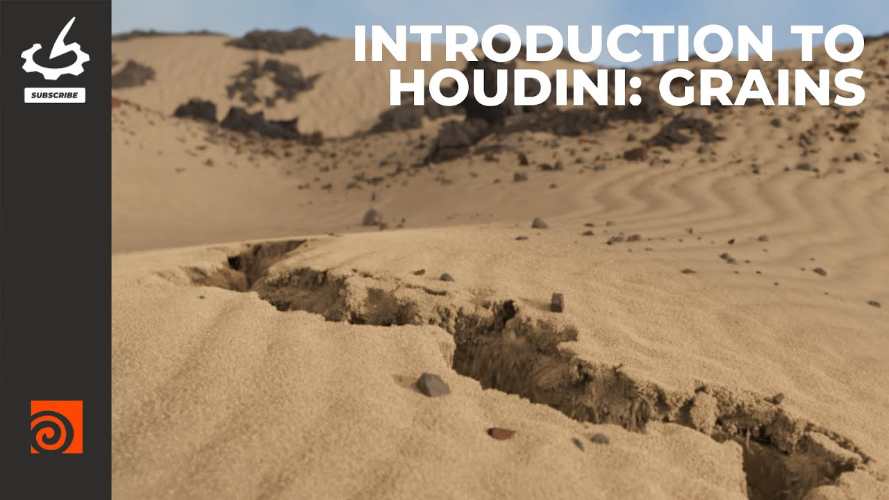
“Introduction to Houdini: Grains” from The Gnomon Workshop is a beginner-friendly training course focused on granular simulations in SideFX Houdini, such as sand, soil, and collapsing terrain. The workshop is taught by VFX artist David Silberbauer, who specializes in procedural FX workflows.
🔗 Official course page:
https://www.thegnomonworkshop.com/workshops/introduction-to-houdini-grains
The course walks through the creation of a desert sinkhole effect using Houdini’s grain simulation tools, demonstrating the procedural workflows commonly used in VFX and simulation pipelines.
Course Overview
This workshop provides over 6 hours of training across 9 lessons, guiding artists step-by-step through Houdini’s granular simulation workflow.
Key details:
Instructor: David Silberbauer
Runtime: ~6 hours 18 minutes
Lessons: 9
Skill level: Beginner to intermediate
Software used: Houdini
Includes: Project files and example assets.
The main project is a sand sinkhole simulation, which demonstrates how grains behave like sand collapsing into a hole in a desert landscape.
What You’ll Learn
1. Understanding Houdini’s Procedural Workflow
The course begins by explaining what makes Houdini different from other 3D software. Instead of traditional modeling workflows, Houdini uses procedural node networks that allow artists to build systems rather than static scenes.
Students learn how to:
navigate the Houdini interface
structure scenes procedurally
work using “The Houdini Way.”
2. Creating a Base Terrain with HeightFields
Before simulating sand, the workshop builds the environment.
Using HeightField nodes, students create the terrain where the sinkhole will appear. HeightFields are procedural terrain tools used to generate landscapes quickly.
Topics include:
terrain creation
procedural erosion and shaping
building a base desert mesh.
3. Grain Simulation Fundamentals
The core of the course focuses on Houdini’s grain solver, which is used to simulate granular materials like sand, gravel, and snow.
Students learn how to:
create grain particles
configure simulation parameters
control particle behavior.
Grain simulations are widely used in visual effects to simulate collapsing sand or debris.
4. Working with DOP Networks
The workshop introduces DOPs (Dynamics Operators), which control physics simulations in Houdini.
Topics include:
understanding different DOP solvers
building a simulation network from scratch
controlling dynamic simulations procedurally.
5. Attribute Manipulation
Houdini relies heavily on attributes to control behavior in simulations.
The course shows how to manipulate attributes using:
Wrangle nodes
Noise functions
Ramp controls.
These tools allow artists to control how sand moves and collapses in the simulation.
6. Using VDB and Fluid Tools
The tutorial also touches on related simulation techniques including:
VDB processes for creating simulation sources
basic FLIP fluid simulation concepts
meshing simulated particles into geometry.
This gives artists a broader understanding of Houdini’s simulation ecosystem.
7. Scene Assembly in Solaris
After the simulation is complete, the project moves to Solaris, Houdini’s environment for scene assembly, lighting, and rendering.
Students learn how to:
assemble assets
manage scene layout
prepare the simulation for rendering.
8. Rendering the Final Scene
The final stage covers how to create the finished shot.
Topics include:
lighting the desert scene
applying materials
final render settings and compositing adjustments.
Lesson Breakdown
The workshop includes the following chapters:
Preview
VFX Shot Breakdown
Houdini Scene Setup & Interface
HeightField Overview & Terrain Setup
Inspecting POPs, DOPs & Grain Solvers
Wrangles, Curves & Attribute Controls
Running the Grain Simulation
Scene Assembly in Solaris
Final Rendering & Post-processing.
Who This Course Is For
This workshop is ideal for:
beginners learning Houdini simulations
VFX artists interested in sand or particle effects
technical artists exploring procedural workflows
environment artists working with terrain simulations.
Because it focuses on the core building blocks of Houdini simulations, it’s also useful for intermediate users who want to understand grain systems more deeply.
Instructor Background
David Silberbauer is a VFX artist at Sunrise Animation Studio who specializes in procedural effects created with Houdini. His work focuses on building flexible systems that can generate complex natural effects.
Final Thoughts
“Introduction to Houdini: Grains” is a solid entry point for artists who want to learn how Houdini handles granular simulations such as sand and debris. By building a complete sinkhole simulation from terrain creation to final render, the course demonstrates Houdini’s procedural workflow and provides practical experience with grain solvers, attributes, and dynamic simulations.
The Gnomon Workshop – Introduction to Houdini: Grains Free Download
https://zeroupload.com/a926d699b7e582a37b3bc6c654655b04
https://filekeeper.net/yksx82o90wpu/TGW_IntroHoudiniGrains_DownloadPirate.com.rar
https://buzzheavier.com/yxigsmp6bph4
https://ranoz.gg/file/Vgj4XoHR
https://pixeldrain.com/u/4Biye6g5
Those who sell pirated content are losers.
If you're paying for pirated content, you're the biggest loser.
Please read the FAQ if you need basic help.
Use VPN &
FDM if you have download problems.
AD