AEScripts StreakMachine v1.0 Plugin for After Effects Full Version Free Download
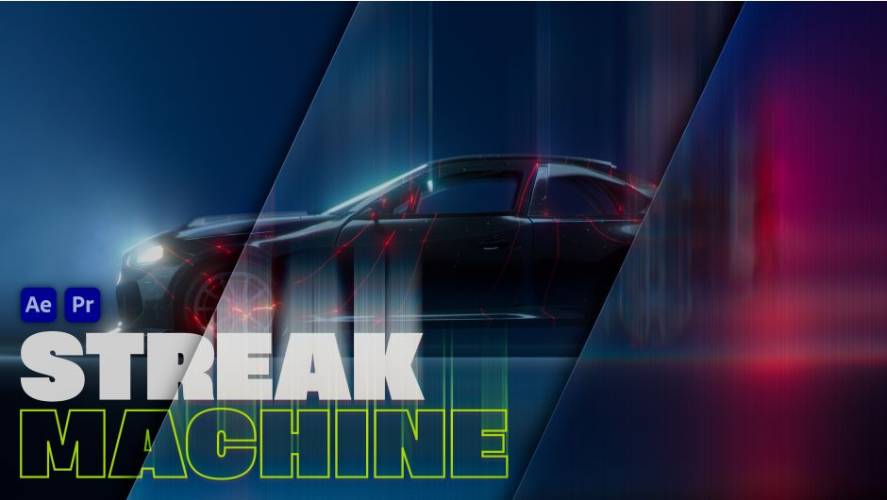
AEScripts StreakMachine v1.0 is a GPU-accelerated visual effects plugin developed by Awaken Productions for Adobe After Effects and Premiere Pro. It transforms bright areas and highlights in footage into expressive light streaks, creating distinctive optical effects inspired by long-exposure photography and experimental cinematography.
The plugin provides controls for streak length, width, direction, colour separation, movement and diffraction. Artists can use these settings to create subtle light accents, dramatic glowing trails or stylised effects for music videos, commercials, title sequences and motion graphics.
StreakMachine also includes different output modes that allow users to isolate generated light streaks for further compositing, providing additional flexibility when building complex visual effects.
Official Product Page: https://aescripts.com/streakmachine/
What Is AEScripts StreakMachine?
StreakMachine is a light streak generation plugin that analyses image highlights and transforms them into elongated visual trails. Instead of manually creating light streaks using multiple layers, masks and blur effects, users can generate them directly from existing footage.
The plugin offers control over the geometry and appearance of the streaks, allowing artists to customise how light spreads across the image.
It can be used directly on footage or configured to output isolated streak elements for additional compositing. This makes it useful for both quick visual enhancements and more elaborate post-production workflows.
Key Features of AEScripts StreakMachine v1.0
1. Automatic Highlight Detection
StreakMachine identifies bright regions within an image using its input analysis controls.
The Histogram and Threshold settings help determine which parts of the footage generate light streaks. Threshold Smooth provides additional control over the transition between selected highlights and surrounding image areas.
The Invert option allows users to reverse the selection behaviour, providing another way to control which image regions contribute to the effect.
These controls are particularly useful when working with footage containing practical lights, reflections, illuminated objects and other bright visual elements.
2. Customisable Streak Length, Width and Direction
The Streak controls determine the shape and orientation of the generated light trails.
Users can adjust:
- Length: Controls how far the light streaks extend.
- Width: Determines the thickness of the streaks.
- Direction: Changes the orientation of the light trails.
- Symmetric Blur: Provides additional control over the streak appearance.
- Intensity: Adjusts the strength of the generated effect.
These settings make it possible to create anything from narrow optical trails to broad washes of light.
3. Chromatic Aberration
The Chromatic Aberration controls introduce colour separation into the generated streaks.
By separating colour channels, artists can create optical imperfections commonly associated with lenses and experimental visual effects.
The Channels and Amount settings provide control over how the colour separation appears.
This can produce subtle cinematic colour fringing or more pronounced RGB-style effects for stylised motion graphics.
4. Diffraction and Fine Light Details
The Details and Diffraction controls introduce additional texture into the generated light trails.
Diffraction breaks up smoother streak patterns and creates more intricate visual structures. This helps prevent the effect from looking like a simple directional blur.
The controls are particularly useful for footage containing bright light sources, where detailed optical patterns can contribute to a more distinctive appearance.
5. Animated Jitter Effects
StreakMachine includes Jitter controls for introducing movement and variation into the generated light trails.
The available settings include:
- Length: Controls variation in streak length.
- Width: Adjusts variation in streak thickness.
- Speed: Determines the rate of jitter movement.
- Amount: Controls the overall strength of the variation.
These controls can make otherwise static light streaks feel more dynamic.
They are particularly useful for music videos, energetic transitions, experimental visuals and animated backgrounds.
6. Custom Colour Tinting
The Tint section allows users to apply custom colours to the generated streaks.
Artists can select a colour and adjust the Mix parameter to control how strongly the tint influences the final result.
This makes it possible to create coloured light trails that complement a project’s visual identity, brand palette or cinematic colour scheme.
7. Multiple Output Modes
StreakMachine provides four output modes:
- Normal: Displays the complete effect over the original footage.
- Matte: Shows the selection as a matte for inspecting which image regions contribute to the effect.
- Black: Isolates the generated streaks against a black background.
- Alpha: Outputs the streaks with transparency for further compositing.
The Black and Alpha modes are particularly useful when artists want to combine generated light elements with other visual effects or composite them over separate footage.
8. Blend Modes and Edge Controls
The plugin includes Blend Mode and Edge Mode settings for adjusting how streaks interact with the original image and composition boundaries.
The available edge modes include:
- Clamp
- Wrap
- Mirror
These options provide additional control over how the effect behaves near image edges.
Combined with different blending options, they allow artists to integrate the generated light trails into a variety of compositing styles.
9. GPU Acceleration and High-Precision Processing
StreakMachine uses GPU acceleration to process its visual effects.
The plugin also supports 32-bit-per-channel processing (32 BPC), providing greater colour precision for professional compositing workflows.
Multi-Frame Rendering (MFR) support allows After Effects to process multiple frames concurrently where supported by the system and project configuration.
These capabilities make the plugin suitable for demanding motion graphics and visual effects projects.
Supported Software and Compatibility
According to the official AEScripts product listing, StreakMachine supports:
| Application | Supported versions |
|---|---|
| Adobe After Effects | 2026, 2027 |
| Adobe Premiere Pro | 2026, 2027 |
The plugin is available for:
- Windows
- macOS
Separate downloads are provided for both operating systems.
The initial version, StreakMachine 1.0.0, was released on October 28, 2026.
Who Should Use StreakMachine?
StreakMachine is designed for creative professionals who work with light effects and cinematic visual treatments.
Typical users include:
- Motion designers: Create animated light trails and abstract graphics.
- Video editors: Add optical effects to existing footage.
- Filmmakers: Enhance practical lights and bright highlights.
- Music video creators: Produce expressive light effects and experimental visuals.
- VFX artists: Generate isolated streak elements for compositing.
- Commercial studios: Create distinctive lighting treatments for advertisements.
It is particularly useful for artists who want to transform existing highlights into controlled light streaks without constructing the effect manually.
Conclusion
AEScripts StreakMachine v1.0 provides a dedicated workflow for generating and customising light streak effects in Adobe After Effects and Premiere Pro. Its highlight detection, adjustable streak geometry, chromatic aberration, diffraction, animated jitter and colour tinting controls offer considerable flexibility for creating optical effects.
With GPU acceleration, 32-bit colour processing, Multi-Frame Rendering support and multiple output modes, the plugin is suitable for both direct footage enhancement and more advanced compositing workflows.
For motion designers and visual effects artists looking to turn ordinary highlights into expressive light trails, StreakMachine offers a specialised and configurable solution.
StreakMachine After Effects, AEScripts StreakMachine plugin, light streak effects, GPU accelerated After Effects plugin, cinematic light trails, chromatic aberration effects, Premiere Pro visual effects, optical effects plugin
AEScripts StreakMachine v1.0 Plugin for After Effects Full Version Free Download
https://zeroupload.com/0caba224788410a465fde3c4b7da9fb3
https://buzzheavier.com/7soh3otsmy3o
https://pixeldrain.com/u/mNbpEwV9
https://filekeeper.net/4gma6x8h43v4/StreakMachine1.0_DownloadPirate.com.zip