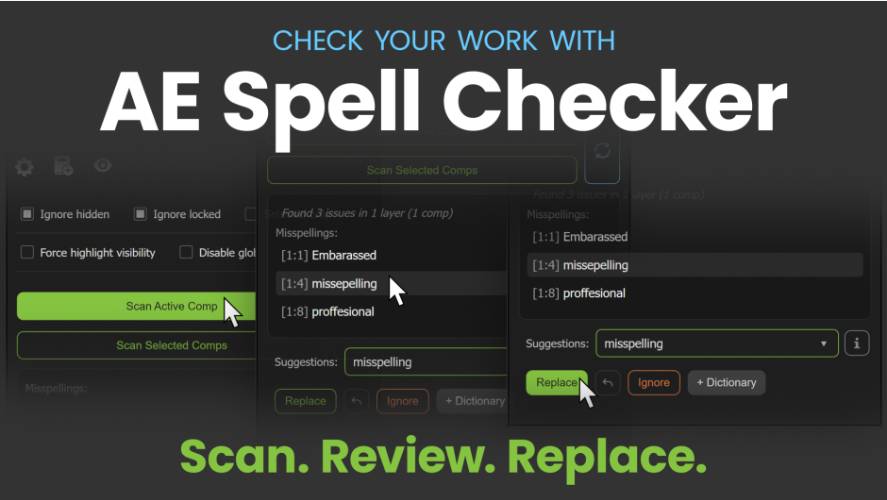
AEScripts AE Spell Checker v2 v2.3 Script for After Effects Windows Macintosh Full Version Free Download
AEScripts AE Spell Checker v2 v2.3.0 is a proofreading script for Adobe After Effects that helps motion designers, video editors and content creators identify and correct spelling mistakes in text layers. Developed by Midnight Snacks, the script scans compositions, highlights potential errors and provides spelling suggestions, allowing users to review and correct text without manually searching through every layer.
The v2 series introduces an upgraded spell-checking engine, expanded language support, a dedicated Brand Dictionary and improved text replacement that preserves surrounding formatting. Version 2.3.0 further expands multilingual support to 17 languages and 22 language variants, making the tool useful for projects involving different markets, languages and brand requirements.
The official product page is available at AEScripts AE Spell Checker v2.
What Is AE Spell Checker v2?
AE Spell Checker v2 is a text quality-control utility designed specifically for Adobe After Effects. Text errors can be easy to overlook in motion graphics projects, especially when compositions contain numerous titles, subtitles, lower thirds, product names and text elements spread across nested compositions.
The script helps streamline proofreading by scanning the active composition or selected compositions, identifying potential spelling errors and navigating directly to the relevant text. Users can review suggested corrections and replace misspelled words from the script’s interface.
Instead of checking each text layer individually, editors can perform a broader proofreading pass across their projects before rendering or delivering the final video.
Key Features of AE Spell Checker v2.3.0
Automated Spelling Checks Across Compositions
AE Spell Checker can scan the active composition or selected compositions in the Project panel. It also supports scanning nested precompositions, helping users find errors in projects where text is distributed across multiple levels of a composition hierarchy.
After scanning, the script presents detected errors in a list. Users can navigate directly to flagged text and inspect each issue in context before deciding whether a correction is necessary.
This workflow is particularly useful for large motion graphics projects, promotional videos, animated presentations and subtitle-heavy compositions.
Spelling Suggestions and Quick Replacement
When the script identifies a potential spelling mistake, it provides suggested corrections that users can review before replacing the original word.
The Replace function helps reduce repetitive editing by allowing corrections directly through the panel. An Undo Last Replace feature is also available, providing a way to reverse the most recent replacement when necessary.
The optional Auto Advance setting can automatically select and navigate to the next nearby error after a replacement. When disabled, the panel pauses so users can review each correction before continuing.
Style-Preserving Text Replacement
One of the major improvements in the v2 series is the ability to replace individual misspelled words while preserving surrounding text formatting.
After Effects text layers can contain multiple fonts, sizes and styles within a single layer. In these situations, replacing an entire text string can disrupt carefully formatted words or characters.
AE Spell Checker v2 supports style-preserving replacement for mixed-style text, helping users correct individual words without unnecessarily changing the surrounding typography.
There are limitations: words containing mixed styles or detectable custom kerning may require manual correction. The panel displays warnings when a replacement cannot safely preserve the formatting.
Custom Dictionary for Specialised Vocabulary
The Custom Dictionary allows users to add words that should not repeatedly be flagged as spelling errors. This is useful for specialised terminology, personal names, abbreviations and industry-specific vocabulary.
Entries are case-insensitive and can include numbers, hyphens and apostrophes. Examples include product identifiers, technical terms and names that may not appear in standard dictionaries.
Maintaining a custom dictionary can reduce unnecessary warnings during repeated proofreading sessions.
Brand Dictionary for Consistent Branding
AE Spell Checker v2 includes a separate Brand Dictionary designed to protect approved brand and product names.
Unlike the Custom Dictionary, which prevents recognised terms from being flagged, the Brand Dictionary checks whether a term follows its approved spelling and presentation. It can detect incorrect capitalisation, missing accents, trademark symbol issues, hyphen variations and common misspellings.
This distinction is important for branded video content. A product name may be technically recognisable but still require a particular spelling or capitalisation to meet brand guidelines.
Keyframed and Expression-Controlled Text
AE Spell Checker v2 supports scanning text animated through keyframed Source Text properties. It can navigate to the time of an error and replace text within individual keyframes.
The script also supports scanning underlying Source Text in expression-controlled layers, with replacement available for supported expressions and linked text.
These features are particularly useful for animated titles, changing labels, data-driven graphics and text that changes throughout a composition rather than remaining static.
Expanded Language Support in Version 2.3.0
Version 2.3.0 expands language support to 17 languages and 22 variants. Supported options include:
- English: United States, United Kingdom, Canada and Australia
- Spanish
- French
- Dutch
- Russian
- Portuguese: Brazil and Portugal
- Polish
- Serbian: Cyrillic and Latin
- Croatian
- Swedish
- Romanian
- Danish
- Slovenian
- Slovak
- Lithuanian
- Hungarian
- Turkish
The update also improves multilingual spelling suggestions and handling of diacritics, which are important when proofreading names and words containing accented characters.
Visual Highlighting and Faster Navigation
The script visually highlights potential spelling errors and provides navigation controls to move between them. Users can customise highlight colours and adjust global highlight limits to suit their workflow.
These controls help make errors easier to identify in busy compositions and reduce the time spent locating the relevant text layer and word.
What’s New in AE Spell Checker v2.3.0?
Version 2.3.0 was released on 18 October 2026. The update introduces nine additional languages, adds European Portuguese and improves multilingual suggestions and diacritic handling.
It also improves editing in the Custom and Brand Dictionaries by adding unsaved-change protection. Language selection in Settings has been streamlined through a collapsible list, and the release fixes highlight visibility at Source Text keyframe boundaries.
These improvements build on earlier v2 updates, which introduced style-preserving replacement, keyframed Source Text scanning, expression-controlled text support and the Brand Dictionary.
How to Use AE Spell Checker in After Effects
The basic workflow consists of three stages:
- Scan: Open the script and scan the active composition or select compositions to check, including supported nested precompositions.
- Review: Navigate through the detected spelling errors and inspect each word in its original context.
- Replace: Choose an appropriate suggestion and apply the correction, reviewing the result before continuing when necessary.
For projects with specialised terminology or strict brand guidelines, configure the Custom Dictionary and Brand Dictionary before running a final proofreading pass.
Compatibility and Availability
- Software: Adobe After Effects
- Product: AE Spell Checker v2
- Version: 2.3.0
- Developer: Midnight Snacks
- Supported After Effects versions: 2025 and 2026
- Operating systems: Windows and macOS
- Official product page: AEScripts AE Spell Checker
The official listing provides a free trial. Check the product page for current pricing, licensing options, installation instructions and updates.
Who Can Benefit from AE Spell Checker?
AE Spell Checker v2 is useful for motion designers, video editors, animators, agencies and production teams that create text-heavy content in After Effects.
It can help with promotional videos, animated presentations, subtitles, title sequences, social media advertisements, product demonstrations and multilingual projects. The Custom and Brand Dictionaries are especially useful when projects contain specialised vocabulary or names that must follow exact brand guidelines.
By combining automated scanning, contextual navigation and formatting-aware replacement, the script provides a dedicated proofreading workflow for After Effects projects.
Conclusion
AEScripts AE Spell Checker v2 v2.3.0 helps users find and correct spelling errors across After Effects compositions while preserving the formatting of supported mixed-style text layers. Its expanded language support, Brand Dictionary, keyframed text scanning and improved replacement workflow make it a practical quality-control tool for professional motion graphics and video production.
AE Spell Checker v2.3.0, AEScripts spell checker, After Effects spell checking script, After Effects text proofreading, Brand Dictionary After Effects, multilingual spell checker, style-preserving text replacement, Midnight Snacks
AEScripts AE Spell Checker v2 v2.3 Script for After Effects Windows Macintosh Full Version Free Download
https://zeroupload.com/d5e36e18b7629d5969483aa46671edd7
https://buzzheavier.com/p4w5emyzwvtj
https://pixeldrain.com/u/bu5m7bYS
https://filekeeper.net/7unhpdaxrp0c/AESpellChecker2.3_DownloadPirate.com.zip