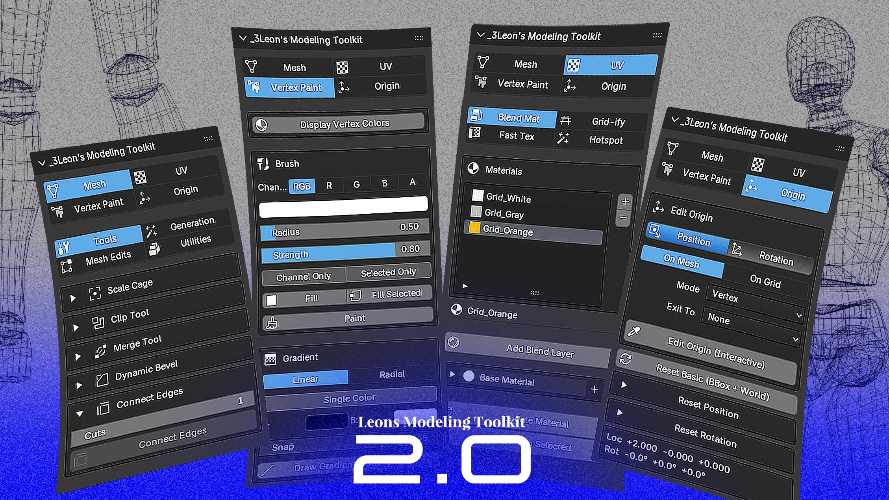
Leons Modeling Toolkit v2.0 for Blender Free Download
Hard-surface modeling, environment creation, architectural blockouts, and level design workflows often require artists to perform the same repetitive operations repeatedly. While Blender offers a powerful collection of modeling tools, many artists coming from applications such as Maya, 3ds Max, or Hammer Editor frequently miss workflow features that are either unavailable or require multiple manual steps to reproduce.
Leons Modeling Toolkit v2.0 for Blender was created to bridge that gap by introducing a collection of modeling, texturing, and utility tools inspired by professional workflows from multiple 3D applications. According to the developer, the toolkit focuses on architectural modeling, environment creation, level blockouts, and faster iteration workflows inside Blender.
Rather than functioning as a single tool, the addon provides a complete collection of modeling utilities designed to accelerate common production tasks.
What is Leons Modeling Toolkit v2.0?
Leons Modeling Toolkit is a Blender addon that combines modeling tools, texturing utilities, snapping improvements, shape-generation systems, and workflow enhancements into a single package. The toolkit draws inspiration from Maya, 3ds Max, Hammer Editor, and other modeling workflows that many Blender users have traditionally recreated through multiple addons or manual techniques.
According to the official feature list, the toolkit includes:
- Arch Tool
- Draw Shape System
- Clip Tool
- Panel Maker
- Mirror Tool
- World Aligned Texturing
- Better Origin Snapping
- Cable Generator
- Circle Scatter
- LOD Group Creation
- Transform Utilities
- Material Workflow Tools
These tools are designed to simplify environment modeling and speed up asset creation workflows.
Arch Tool for Architectural Modeling
One of the primary modeling features is the Arch Tool.
According to the developer, the tool converts selected edges into architectural arches by automatically subdividing geometry and pushing vertices into an arc formation. The direction of the arch is determined automatically using face normals, allowing arches to be generated consistently regardless of wall orientation.
Artists can adjust:
- Arch angle
- Curve height
- Segment count
- Upward or downward curvature
This feature is particularly useful for:
- Architectural visualization
- Interior design
- Historical structures
- Environment art
- Level design
Instead of manually shaping arches, users can generate them procedurally.
Draw Shape System
Leons Modeling Toolkit includes a collection of viewport-based shape creation tools.
According to the documentation, users can draw geometry directly within the viewport using configurable planes and snapping systems. Supported shape creation tools include:
- Draw Plane
- Draw Cube
- Draw Stairs
Each tool supports grid snapping and configurable placement settings.
This workflow resembles blockout systems commonly used in level editors and architectural design software.
For environment artists, this can significantly accelerate early-stage scene construction.
Hammer Editor Style Clip Tool
The Clip Tool is one of the features directly inspired by Hammer Editor workflows.
According to the official documentation, users can draw a clipping line across geometry and choose how the mesh should be processed. Available options include:
- Keep Front
- Keep Back
- Split Geometry
- Fill Cut Surface
The tool also supports adjustable grid snapping for precision modeling.
This makes it useful for:
- Architectural modeling
- Level design
- Environment construction
- Rapid blockouts
- Modular asset creation
The workflow allows artists to modify geometry quickly without relying on traditional cutting operations.
Panel Maker for Hard Surface Modeling
Hard-surface artists frequently create panel lines and surface detailing.
According to the developer, Panel Maker generates beveled panel strips using a base mesh and a cutter object. The resulting geometry resembles sci-fi paneling commonly used in game assets and cinematic environments.
Available controls include:
- Bevel width
- Segment count
- Surface inflation
- Modifier application options
This workflow can be useful for:
- Vehicle modeling
- Spacecraft design
- Sci-fi environments
- Mechanical assets
- Surface detailing
Instead of manually constructing panel geometry, artists can generate it automatically.
Advanced Mirror Tool
Blender already includes a mirror modifier, but Leons Modeling Toolkit expands the workflow with an interactive mirror system.
According to the official feature list, the Mirror Tool provides a live preview plane that visually displays where mirroring will occur before applying changes. Users can control:
- X, Y, and Z mirror axes
- Mirror direction
- Plane visibility
- Preview size
- Modifier application
The visual feedback helps artists position mirror operations more accurately during modeling.
World Aligned Texturing
Texture alignment is a common challenge when building large environments.
The toolkit includes world-aligned texturing features inspired by Hammer Editor workflows. According to feature descriptions, artists can project textures consistently across surfaces without requiring extensive UV adjustments.
Potential applications include:
- Architectural visualization
- Modular environments
- Level design
- Large-scale scenes
- Rapid prototyping
This helps accelerate texture iteration during environment production.
For complete product information, updates, and documentation, the official product page can be found here:
https://3leon.gumroad.com/l/LeonsModelingToolkit
Cable Generator
Creating hanging cables manually can be time-consuming.
According to the developer, the Cable Generator automatically creates realistic catenary-style cables between selected points or objects. The resulting cables naturally simulate the drooping behavior commonly seen in power lines, industrial environments, and urban scenes.
This can be useful for:
- Environment art
- Urban modeling
- Industrial assets
- Game environments
- Architectural visualization
The system removes the need for manual curve setup and adjustment.
Circle Scatter Utility
The toolkit includes a Circle Scatter tool designed to distribute objects around a circular path.
Artists can control:
- Object count
- Arc angle
- Rotation axis
- Original object preservation
According to the documentation, this utility simplifies radial placement workflows often used for decorative elements, architectural features, and procedural designs.
Better Origin Snapping and Transform Tools
Object origin management is an important part of professional modeling workflows.
Leons Modeling Toolkit introduces improved origin snapping utilities and transform management tools designed to simplify object placement and pivot management. The toolkit also includes an Apply Transforms (Keep Pivot) feature that applies transforms while preserving world-space origin positions.
This can improve workflow efficiency when working with:
- Modular assets
- Game objects
- Environment pieces
- Kitbash libraries
LOD Group Creation
Game development workflows frequently require Level of Detail (LOD) organization.
According to the documentation, the toolkit includes a Create LOD Group utility that organizes selected objects under a dedicated hierarchy suitable for game engine export pipelines. This feature is particularly relevant for Unreal Engine workflows.
It helps streamline preparation of assets intended for real-time rendering projects.
Compatibility
According to the developer, Leons Modeling Toolkit v2.0 supports Blender 4.5 and Blender 5.0. Additional Blender versions may work, although official testing has focused primarily on those releases.
Final Thoughts
Leons Modeling Toolkit v2.0 for Blender combines a wide range of modeling, texturing, snapping, utility, and environment-building tools into a single addon package. With features such as Arch Tool, Draw Shape workflows, Hammer-style clipping, Panel Maker, Cable Generator, Circle Scatter, world-aligned texturing, advanced mirror controls, and LOD management, the toolkit is designed to accelerate architectural modeling, environment creation, level design, and hard-surface production workflows.
For Blender artists looking for workflow enhancements inspired by Maya, 3ds Max, and Hammer Editor, Leons Modeling Toolkit provides a comprehensive collection of tools focused on speed, efficiency, and production-oriented modeling.
- Leons Modeling Toolkit Blender
- Blender Architectural Modeling
- Hard Surface Modeling Blender
- Environment Art Toolkit
- Blender Clip Tool
- World Aligned Texturing Blender
- Blender Cable Generator
- Blender Level Design Tools
Leons Modeling Toolkit v2.0 for Blender Free Download
https://zeroupload.com/44a23f257445e363f736caf3d66aa259
https://pixeldrain.com/u/znoiRJk5
https://ranoz.gg/file/Lg72ZLmb
https://buzzheavier.com/qghfzwi3687m
https://filekeeper.net/9txqs06cs6uv/LeonsModelingToolkit2.0_DownloadPirate.com.rar
Those who sell pirated content are losers.
If you're paying for pirated content, you're the biggest loser.
Please read the FAQ if you need basic help.
Use VPN &
FDM if you have download problems.