Light Trails Generator 1.1 addon plugin for Blender Full Version Free Download
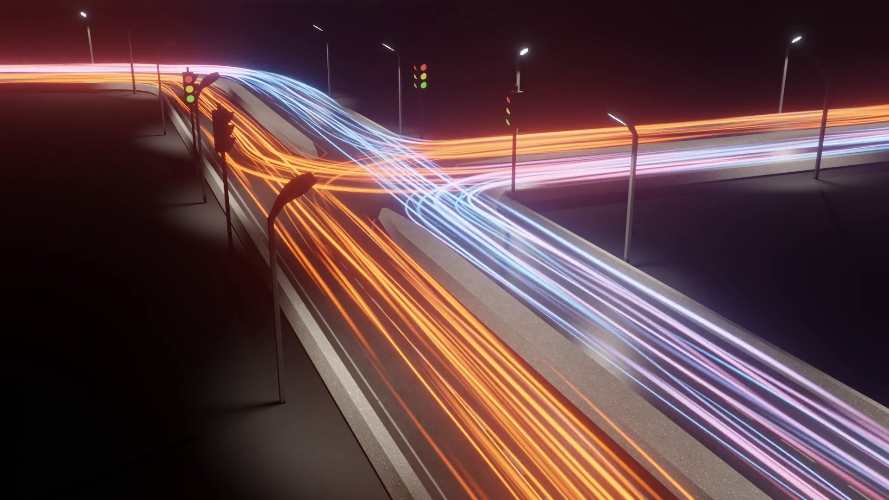
Light Trails Generator 1.1 is a procedural Geometry Nodes setup for Blender that turns curves into animated light-trail effects. It is designed for creating glowing streaks, energy beams, lightning-like trails, motion streaks and other curve-based visual effects without requiring a separate addon installation. The setup works with both Eevee and Cycles and is designed to be highly customisable.
Light Trails Generator on Superhive
What is Light Trails Generator?
The basic concept is straightforward: take a Blender curve and use it as the foundation for a procedural light trail. The Geometry Nodes setup generates the visible trail from that curve, giving you control over its appearance and animation while keeping the underlying workflow inside Blender.
Because it is a Geometry Nodes setup rather than a traditional addon, there is no conventional installation process. You can use the supplied node setup directly in Blender, which makes it convenient for artists who already work with procedural Geometry Nodes systems.
Curve-Based Light Effects
The major advantage is that the trail is driven by a curve. This means you can create or modify the curve using Blender’s normal curve tools and then use that geometry as the path for the effect.
That makes Light Trails Generator useful for motion graphics because changing the curve changes the resulting trail. You can therefore animate the path, reshape it or use different curves to create completely different effects without rebuilding the setup.
Seamless Loops
Version 1.1 adds dedicated seamless loop support. The setup includes a Loop Time parameter, with zero disabling looping. The developer also provides a formula for calculating Loop Time from frame count, frame rate and Time Scale, making it possible to create precisely timed looping effects.
This is particularly useful for motion-design backgrounds, looping social-media animations and visual elements that need to repeat continuously without a visible jump between the final and first frames.
Taper Controls
Version 1.1 also introduces Taper.
Taper lets you vary the thickness of the generated light trail, giving more control over its silhouette and overall appearance. Rather than producing a trail with identical thickness from beginning to end, you can create more dynamic forms.
This is useful for making a trail look more energetic or directional, particularly when working with fast-moving objects.
Multiple Trails From One Curve
Another useful addition in v1.1 is the ability to use another curve as the base curve. This makes it possible to generate multiple different trails from a single underlying curve.
For example, one curve can serve as the primary motion path while several different trail configurations are derived from it. That can make complex energy or motion effects much easier to build.
Different Curve Profiles
Version 1.1 adds additional curve profile types, providing more options for how the generated trail is shaped.
This is important because the profile has a major influence on the final look. A smooth, uniform trail can be useful for simple light streaks, while other profiles can produce more stylised shapes for energy effects and abstract animation.
Eevee and Cycles
Light Trails Generator works with both Eevee and Cycles.
That makes it suitable for both fast interactive previews and higher-quality rendering. Eevee can be particularly useful when experimenting with animated trails because you can iterate quickly, while Cycles can be used when the final scene requires a more physically based rendering workflow.
The ability to remain inside Blender’s existing rendering pipeline is one of the setup’s practical strengths.
Energy and Lightning Effects
Although the product is called Light Trails Generator, the underlying curve-based system can be pushed considerably further than a simple glowing streak.
The Superhive listing shows that users have applied it to effects such as lightning, phaser beams and energy swirls.
This makes the tool particularly interesting for science-fiction motion graphics, game effects and abstract animation.
A single curve can become the foundation for a complex animated energy effect without requiring a full particle simulation.
Motion Graphics Workflow
Light Trails Generator is especially useful when you need a visual effect that follows a specific path.
You can animate the source curve and let the procedural setup produce the corresponding trail. This is considerably easier than manually animating a long sequence of glowing objects or attempting to keyframe every section of the trail independently.
The procedural relationship also means that revisions are much easier. Change the curve and the effect follows.
Light Trails Generator vs Manual Curves
Blender can already turn curves into geometry, so the value here isn’t simply “make a tube from a curve.”
The advantage is the specialised setup around animated trail generation, taper, looping and profile control.
Instead of constructing the entire node network yourself, you get a ready-made foundation that can then be customised for your project.
That is particularly useful for artists who want the result quickly without spending time building the procedural system from scratch.
Who Should Use It?
Light Trails Generator is a good fit for motion designers, VFX artists, game-art creators and Blender artists working on energy-based visuals.
It is especially useful for animation where a light effect needs to follow a controlled path, such as beams, streaks, trails, lightning-like forms and stylised energy.
For basic static lighting, it would obviously be unnecessary. Its value comes from the combination of curve-driven geometry and animation.
Version 1.1
The 1.1 update adds seamless loop support, taper controls, the ability to use another curve as a base curve, additional curve profiles, more example scenes, and various optimisations and fixes.
The current Superhive listing supports Blender 3.3 through 5.2. It currently has more than 2,500 sales and a community rating of 5/5 from 12 ratings.
The listed price is $10, making it a relatively inexpensive procedural effect setup.
Final Thoughts
Light Trails Generator 1.1 is a focused Blender Geometry Nodes tool that does one thing particularly well: turning curves into controllable animated light trails.
Its strongest features are the seamless looping, taper controls, multiple trail generation, additional curve profiles and compatibility with both Eevee and Cycles.
The setup is particularly appealing for artists creating energy beams, lightning effects, phaser-style streaks, glowing paths and abstract motion graphics. The fact that it is a Geometry Nodes setup also means it fits naturally into Blender’s procedural workflow rather than locking the effect into a black-box system.
At $10, it is an inexpensive addition for anyone who regularly needs curve-driven VFX.
Bottom line: Light Trails Generator is a simple but versatile Geometry Nodes solution for creating animated glowing trails and energy effects from curves, with enough controls to make it useful well beyond a basic light-streak effect.
Light Trails Generator Blender, Light Trails Generator 1.1, Blender light trails, Blender light trail generator, Blender Geometry Nodes light trails, Blender energy beams, Blender lightning effects, Blender glowing trails, Blender curve effects, Blender motion trails, Blender VFX trails, Blender energy effects, Blender animated light effects, Blender Eevee light trails, Blender Cycles light trails
Light Trails Generator 1.1 addon plugin for Blender Full Version Free Download
https://zeroupload.com/65a29bbb00adb09a5519ec7a5780d6c2
https://buzzheavier.com/xpqcaw4hbq3y
https://pixeldrain.com/u/KGpcwPjr
https://filekeeper.net/4bl8059cspy5/LightTrailsGenerator1.1_DownloadPirate.com.zip