Lucas Peinador – LP Charcoal Brushes for Procreate, Photoshop and Clip Studio Paint Free Download
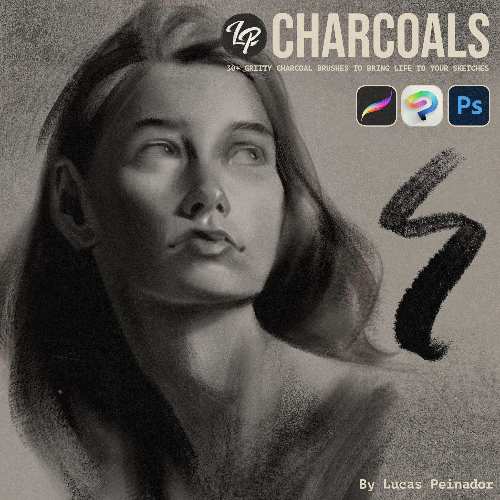
LP Charcoal Brushes is a digital charcoal brush collection by Lucas Peinador, designed to reproduce the texture, drag, softness, smudging and imperfections of traditional charcoal inside digital art applications. The pack is aimed particularly at artists doing gesture drawing, figure studies, portraits, value studies and expressive sketching.
LP Charcoal Brushes official page
What is LP Charcoal Brushes?
The idea behind LP Charcoals is straightforward: take the physical characteristics of charcoal and translate them into a digital brush system.
Instead of getting perfectly clean digital strokes, the brushes are designed to reproduce the grit, drag, softness, smudges, stains and irregular marks associated with real charcoal. Lucas Peinador describes the collection as being made to avoid the flat, lifeless appearance that can sometimes result from generic digital charcoal brushes.
This makes the pack particularly suitable for artists who want their digital drawings to retain the visual character of traditional drawing media.
What You Get
The collection contains 30+ brushes, divided into several categories:
5 Pencil Brushes
5 Fine Brushes
5 Flat Brushes
5 Shader Brushes
5 Cloud Brushes
5 Smudger Brushes
2 Eraser Brushes
2 Erodible Brushes for Photoshop
The different categories cover both mark-making and cleanup, so you aren’t limited to a handful of charcoal strokes.
Pencil Brushes
The pencil brushes are intended for more controlled charcoal drawing.
They’re useful for establishing outlines, constructing figures and adding finer details before moving into broader shading.
For artists doing gesture and figure drawing, this is particularly useful because charcoal traditionally allows you to move between relatively precise marks and much broader strokes.
Fine Brushes
The Fine brushes sit somewhere between the controlled pencil marks and the broader charcoal tools.
They can be used for smaller details, directional strokes and building up texture without producing the heavy coverage of a flat charcoal brush.
This makes them useful when refining an otherwise broad charcoal drawing.
Flat Brushes
The Flat brushes are designed for laying down broader areas of charcoal.
These are useful for blocking in large masses and establishing the overall value structure of a drawing.
That is an important part of a charcoal workflow because traditional charcoal isn’t just about drawing lines. A large part of the medium’s visual character comes from building broad areas of tone and then selectively removing or softening them.
Shader Brushes
The Shader brushes are designed for softer tonal work.
They can be used to gradually build darker areas, create transitions and establish form without relying entirely on hard-edged strokes.
For portraits and figure studies, this makes them particularly useful around areas such as:
Cheeks
Eye sockets
Neck
Torso
Muscles
Hair masses
The result can retain some of the irregularity of physical charcoal instead of looking like a perfectly smooth digital gradient.
Cloud Brushes
The Cloud brushes provide broader, softer marks.
They’re useful for creating atmospheric or diffuse charcoal textures and can also be used for large-scale value blocking.
These brushes are particularly interesting for artists who want to build a drawing through mass and texture rather than constructing everything from individual strokes.
Smudger Brushes
The Smudger brushes are an important part of the pack because charcoal drawing isn’t simply about adding material.
A large part of traditional charcoal technique involves moving existing charcoal around.
Smudging lets you soften edges, blend values, create transitions and push charcoal into the texture of the virtual paper.
The LP Charcoal collection includes five dedicated smudger brushes.
Eraser Brushes
The pack also includes two eraser brushes.
This matters because erasing is an active drawing technique with charcoal.
You can establish a dark mass and then selectively remove material to recover highlights.
That makes the combination of charcoal and eraser particularly useful for portrait and figure studies.
Erodible Brushes
There are also two Erodible brushes specifically for Photoshop.
These are designed around the behaviour of a brush whose mark changes as it is used, giving the digital tool a more physical quality.
Their Photoshop-only availability is worth remembering if you’re choosing the pack primarily for Procreate or Clip Studio Paint.
Soft and Crunchy Looks
One of the more interesting aspects of the collection is that it is designed to cover both soft, creamy blending and harder, crunchy expressive marks.
That gives the pack considerably more range than a collection consisting entirely of rough charcoal stamps.
You can therefore move between:
Soft shading → Broad blocking → Rough marks → Fine lines → Smudging → Erasing
without constantly switching to completely different drawing systems.
Traditional Drawing Workflows
LP Charcoals are particularly suited to academic and classical drawing workflows.
The product is explicitly aimed at artists interested in gesture drawing, figure studies, portraits, value studies and classical atelier-style drawing.
That makes it different from many digital texture packs that are primarily designed to create decorative grunge.
These brushes are intended to actually function as drawing tools.
Gesture Drawing
For gesture drawing, charcoal is useful because it allows you to establish the movement and mass of a figure quickly.
The LP Charcoal set gives you both relatively fine tools and broad brushes, making it possible to construct a figure without becoming overly concerned with clean digital linework.
That is particularly useful for artists who prefer an expressive drawing process.
Figure Studies
Figure studies are probably one of the strongest applications for this pack.
A typical workflow could be:
Gesture → Major masses → Shadow structure → Form shading → Details → Smudging → Highlights
The variety of brushes gives you tools for each stage without forcing you into a purely line-based approach.
Portrait Drawing
The combination of fine brushes, shaders, smudgers and erasers also makes LP Charcoals suitable for portrait work.
Charcoal is particularly effective for portraits because it naturally produces strong value structures.
You can build the darker regions aggressively, soften transitions and then use the eraser to recover highlights.
That workflow translates well to digital drawing.
Value Studies
For artists learning to understand light and form, the brushes are also useful for value studies.
Instead of worrying about colour, you can concentrate on:
Light
Shadow
Edges
Mass
Contrast
The charcoal texture adds a physical quality without interfering with the fundamental value structure.
Procreate, Photoshop and Clip Studio Paint
The official product page specifically lists compatibility with Procreate, Photoshop and Clip Studio Paint.
This is useful because the same general brush collection can fit into different digital-art workflows.
Photoshop users also receive the two Erodible brushes that aren’t available in the other versions.
Digital Charcoal vs Traditional Charcoal
The obvious advantage is convenience.
You get the appearance and behaviour of charcoal without:
Charcoal dust
Dirty hands
Paper preparation
Fixative
Smudged workspace
Cleaning
You can also undo a stroke, duplicate a layer and change the opacity of an entire drawing.
Of course, digital brushes don’t completely reproduce the physical interaction between charcoal, paper tooth and pressure. The point is to get much closer to that behaviour than a generic soft or textured brush.
Who Is It For?
LP Charcoals makes the most sense for:
Digital illustrators
Concept artists
Portrait artists
Figure artists
Character designers
Sketch artists
Students practising traditional drawing
Artists who want a traditional-media appearance
It is less useful if your work is primarily clean vector illustration, hard-surface design or highly polished digital painting with minimal visible brush texture.
LP Charcoals vs Generic Digital Brushes
The advantage isn’t simply the number of brushes.
There are thousands of charcoal-style brushes available for Photoshop and Procreate.
The value of this pack is having a coherent set of tools designed to work together.
You can move from pencil to shader to smudger to eraser without the visual language of the brush suddenly changing.
That makes the collection more suitable for an actual drawing workflow rather than simply being a collection of texture stamps.
Price and License
The current listed price is €19.
The licence is for one user, and that user can install the tools on up to two devices. Commercial and non-commercial use are permitted for individuals, freelancers and creative agencies.
The licence does not allow redistribution or sharing of the brush files.
Lucas Peinador also provides a 30-day money-back guarantee for individual products.
Final Thoughts
LP Charcoal Brushes is a focused brush pack rather than an enormous generic library.
That’s actually its strength.
The collection gives you the major components of a traditional charcoal workflow: pencils, fine marks, broad flats, shaders, softer cloud-like strokes, smudgers and erasers.
The ability to move between soft and crunchy marks makes it useful for both controlled studies and expressive artwork.
For someone doing figure drawing, portraits, gesture studies or semi-realistic illustration, this is considerably more useful than a collection of brushes that merely adds a charcoal-looking texture on top of an otherwise digital painting.
At €19, it’s also relatively inexpensive for a specialised brush system.
Bottom line: LP Charcoals is essentially a digital charcoal drawing kit, designed to make Procreate, Photoshop and Clip Studio Paint feel much closer to working with real charcoal while keeping all the advantages of a digital workflow.
Lucas Peinador LP Charcoal Brushes
LP Charcoal Brushes, Lucas Peinador brushes, LP Charcoals, charcoal brushes Procreate, charcoal brushes Photoshop, charcoal brushes Clip Studio Paint, digital charcoal brushes, realistic charcoal brushes, Procreate charcoal brushes, Photoshop charcoal brushes, digital drawing brushes, charcoal drawing brushes, figure drawing brushes, portrait brushes, gesture drawing brushes, traditional charcoal digital art
Lucas Peinador – LP Charcoal Brushes for Procreate, Photoshop and Clip Studio Paint Free Download
https://zeroupload.com/4c68f97e2b4c72b13ce6a400ce42893a
https://filekeeper.net/crvwmxa1equ4/LP_CharcoalBrushes_DownloadPirate.com.rar
https://buzzheavier.com/irx14vcpbbuh