Lucas Peinador – LP Pencil Brushes for Procreate, Photoshop and Clip Studio Paint Free Download
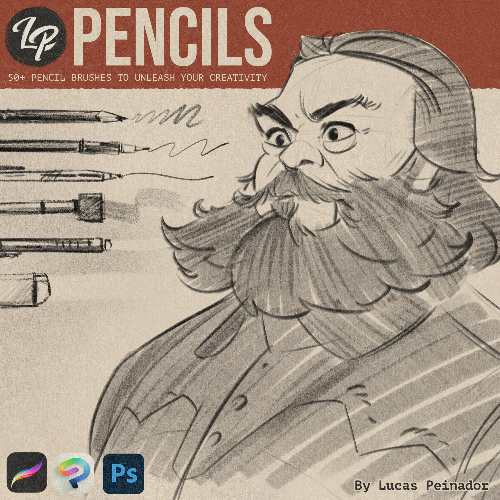
LP Pencil Brushes is a digital pencil brush collection by Lucas Peinador, built to reproduce the texture, pressure response and visual character of traditional graphite and coloured pencils inside digital art applications. The pack contains 50+ brushes covering graphite pencils, mechanical pencils, coloured pencils, shaders, smudgers, erasers, patterns and other specialised tools.
LP Pencil Brushes official page
What is LP Pencil Brushes?
LP Pencils is essentially a complete digital pencil case rather than a small collection of pencil presets.
The brushes are designed to retain the warmth, texture and drag of physical pencils, giving digital drawings a more traditional appearance. Lucas Peinador specifically positions the pack for everything from casual sketching to polished graphite portraits.
The collection is aimed at artists who want digital convenience without losing the physical character of traditional drawing.
50+ Pencil Brushes
The pack contains more than 50 brushes divided into several categories:
5 Pencil Brushes
5 Mechanical Brushes
5 Color Brushes
5 Stick Brushes
5 Shader Brushes
5 Cloud Brushes
5 Pattern Brushes
5 Eraser Brushes
5 Smudger Brushes
5 Bonus Mixed Brushes
There are also 2 Erodible Brushes for Photoshop.
That makes it considerably broader than a conventional graphite brush pack.
Graphite Pencils
The core Pencil brushes are designed for traditional graphite-style drawing.
They’re useful for constructing outlines, gesture drawings, cross-hatching, tonal buildup and detailed rendering.
The important part is that the brushes aren’t intended simply to place a grey line on the canvas. They’re designed to retain visible texture and variation as the stroke is built up.
Mechanical Pencil Brushes
The Mechanical brushes provide a cleaner and more controlled alternative to the broader graphite tools.
They’re useful when you want more precise marks for:
Construction
Details
Line work
Small features
Technical-looking sketches
This gives the collection some useful range between expressive traditional drawing and more controlled digital sketching.
Coloured Pencil Brushes
LP Pencils isn’t limited to monochrome graphite.
The Color Brushes are designed for coloured-pencil artwork, allowing the same traditional pencil workflow to be used for illustrations containing colour.
This makes the pack useful for character illustrations, fan art and coloured studies where you want visible pencil texture rather than smooth digital painting.
Stick Brushes
The Stick brushes provide another type of traditional mark-making tool.
They are useful for broader, more expressive strokes and can help break up the uniformity that often occurs when an artwork is created using a single digital pencil brush.
That variety is important when trying to make a digital drawing feel physically drawn.
Shader Brushes
The Shader brushes are intended for building larger areas of tone.
Instead of constructing every shadow with individual pencil strokes, you can use these brushes to establish broader values and then refine them using the more precise tools.
This is particularly useful for portraits and figure studies.
Cloud Brushes
The Cloud brushes provide softer and more diffuse marks.
They’re useful for building atmospheric shading, broad value masses and softer transitions.
Combined with the harder Pencil and Mechanical brushes, they allow you to move between broad tonal construction and fine detail without leaving the brush system.
Smudger Brushes
The Smudger brushes allow you to manipulate existing graphite rather than simply adding more of it.
This recreates an important part of traditional pencil drawing, where artists can soften, blend and redistribute graphite to create tonal transitions.
The collection contains five dedicated Smudger brushes.
Eraser Brushes
The five Eraser brushes are equally important.
In traditional drawing, an eraser isn’t merely a correction tool. It can be used to actively draw light back into a dark area.
That same approach works digitally with LP Pencils.
You can establish a dark mass, then selectively erase areas to create highlights and refine the form.
Pattern Brushes
The Pattern brushes add another dimension to the collection.
They’re useful for introducing controlled textures and repeating marks, which can help create variation in illustrations or backgrounds without manually drawing every mark.
This is particularly useful when you want the artwork to retain a handmade quality.
Erodible Brushes
Two additional Erodible brushes are included for Photoshop users.
These are designed to reproduce the behaviour of a physical drawing tool whose mark changes as the tip wears down.
The Photoshop-only limitation is worth noting if you’re deciding between the supported applications.
Texture at Any Resolution
One of the advertised characteristics of LP Pencils is that the brushes are designed to remain textured and sharp at different canvas resolutions.
That’s particularly important for digital artists who move between small sketches and large finished illustrations.
A brush that looks convincing at 2K can sometimes become blurry or overly repetitive when used on a much larger canvas. The collection is designed to avoid that problem.
Sketching
LP Pencils is particularly well suited to sketching.
The collection is designed around the experience of filling a physical sketchbook, but without the limitations of paper and graphite.
You can quickly rough out:
Character ideas
Poses
Faces
Creatures
Environments
Composition thumbnails
and then continue developing the same drawing digitally.
Character Design
Character artists can benefit from the combination of expressive pencils, mechanical pencils, shaders and erasers.
A typical workflow could be:
Gesture → Construction → Line refinement → Shading → Details → Erasing highlights
The varied brushes allow each stage to have a slightly different physical character.
Portrait Drawing
Portraits are another strong use case.
Graphite is particularly good at establishing subtle value transitions, and the combination of pencil, shader, smudger and eraser brushes provides the basic tools required for that workflow.
You can build up darker values gradually and then use the eraser to recover highlights.
Fan Art and Illustration
The product page specifically lists fan art, characters, creatures, comics and studies among its intended uses.
This makes the collection particularly appropriate for artists who work in a semi-realistic or traditional-looking illustration style.
The coloured-pencil brushes also make it possible to move beyond simple black-and-white sketches.
Gesture Drawing
For gesture drawing, the combination of fast Pencil and Stick brushes makes it possible to establish movement without getting trapped in detail.
The physical-looking texture can also encourage a more expressive workflow because the drawing doesn’t feel like it’s demanding perfectly clean lines.
LP Pencils vs LP Charcoals
Since you just added LP Charcoal Brushes, the distinction between the two is worth making.
LP Pencils are better for controlled line work, graphite studies, detailed rendering, coloured-pencil artwork and sketching.
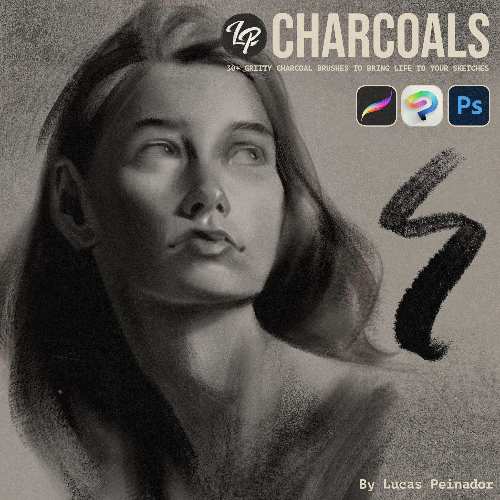
LP Charcoals are better for broader, more aggressive value construction, expressive marks, heavy tonal work and charcoal-style figure drawing.
They overlap in areas such as shaders, smudging and erasing, but the underlying drawing language is different.
If you want something closer to a pencil case, LP Pencils is the better choice.
If you want something closer to a charcoal studio setup, LP Charcoals makes more sense.
Software Support
The product is designed for Procreate, Adobe Photoshop and Clip Studio Paint.
Photoshop users also receive the two Erodible brushes that aren’t available in the other supported applications.
That makes the collection reasonably flexible for artists who work across multiple digital-art platforms.
Tutorials and Bonuses
LP Pencils also includes a full in-depth video tutorial covering the brushes.
That’s useful because a brush collection with 50+ tools can otherwise become overwhelming.
The tutorial is intended to show how the different brushes are meant to be used rather than leaving you to figure out every brush through trial and error.
Who Is It For?
LP Pencils is best suited to:
Digital illustrators
Character artists
Concept artists
Portrait artists
Comic artists
Fan-art artists
Figure-drawing artists
Sketchers
Artists transitioning from traditional to digital
It’s less compelling for artists whose work is primarily hard-edged vector graphics, photorealistic 3D texturing or clean graphic design.
Digital vs Traditional Pencil
The obvious advantage is convenience.
You don’t need to sharpen pencils, replace leads, buy different grades, carry a sketchbook or deal with graphite dust.
You also get:
Undo
Layers
Opacity control
Brush resizing
Digital colour
Unlimited paper
But the goal isn’t to make digital drawing behave exactly like physical graphite in every respect. It’s to reproduce enough of the texture and mark-making behaviour that the artwork retains a traditional character.
Price and License
The current listed price is €29.
A purchase is licensed to one user, who can install and use the tools on up to two devices. Commercial and non-commercial use are permitted for individuals, freelancers and creative agencies.
The licence cannot be transferred or redistributed, and the brush files cannot be shared.
The product also comes with a 30-day money-back guarantee.
Final Thoughts
LP Pencil Brushes is much more than a collection of a few graphite presets.
The 50+ brush system covers the majority of the traditional pencil workflow, from fine graphite and mechanical-pencil marks through broader shaders, clouds, patterns, smudging and erasing.
The inclusion of coloured pencils also gives it considerably more range than a conventional graphite-only pack.
The biggest advantage is the consistency of the collection. You can start with a rough gesture, develop the construction, add shading, refine the details and erase highlights without constantly switching between unrelated brush packs.
At €29, it’s reasonably priced for a specialised brush system, particularly if you’re already working in Procreate, Photoshop or Clip Studio Paint.
Bottom line: LP Pencil Brushes is essentially a complete digital pencil case for traditional-style sketching and illustration, with enough variety to cover everything from quick character sketches to detailed graphite portraits.
Lucas Peinador LP Pencil Brushes
LP Pencil Brushes, Lucas Peinador brushes, LP Pencils, digital pencil brushes, graphite brushes Procreate, pencil brushes Photoshop, pencil brushes Clip Studio Paint, digital graphite brushes, realistic pencil brushes, Procreate pencil brushes, Photoshop pencil brushes, digital drawing brushes, coloured pencil brushes, character sketching brushes, portrait drawing brushes, gesture drawing brushes, traditional pencil digital art
Lucas Peinador – LP Pencil Brushes for Procreate, Photoshop and Clip Studio Paint Free Download
https://zeroupload.com/88cf41f5f98d6c6ee8a3cfab1ce311ef
https://filekeeper.net/4x8u0prokson/LP_PencilBrushes_DownloadPirate.com.rar
https://buzzheavier.com/z34qj6dy4cal