Polydome – The Ultimate Hdri Dome for Blender Free Download
Lighting is one of the most important factors in creating realistic 3D renders. High Dynamic Range Images (HDRIs) provide natural illumination, reflections, and environmental backgrounds, making them a standard tool for product visualization, automotive rendering, architectural visualization, and cinematic scenes. However, achieving convincing HDRI-based renders often requires additional setup, such as matching the ground plane, correcting reflections, adjusting exposure, and blending the HDRI seamlessly into the scene. These manual adjustments can slow down the rendering workflow.
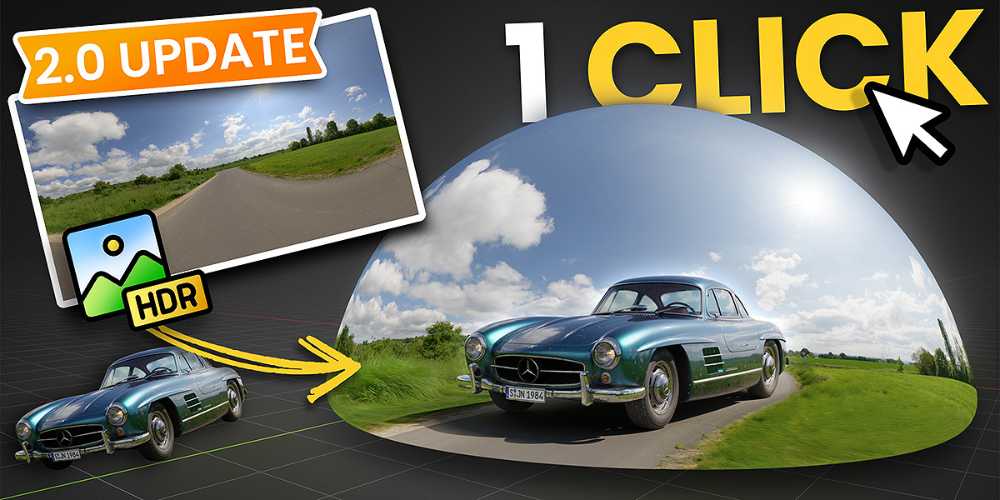
PolyDome – The Ultimate HDRI Dome for Blender is a professional lighting add-on developed by Jonas Noell that simplifies HDRI scene setup inside Blender. The add-on enables artists to load HDRIs with drag-and-drop functionality, automatically create a seamless HDRI dome with realistic floor projection, generate reflections, add procedural puddles, and perform advanced HDRI color adjustments without building complex node setups. PolyDome supports both Cycles and EEVEE, integrates with the Poly Haven Asset Browser, and works with any HDRI stored locally or in Blender’s Asset Browser.
What is PolyDome?
PolyDome is a Blender add-on that automates HDRI environment creation for photorealistic rendering.
Instead of manually creating HDRI domes, shadow-catching floors, and custom world shaders, artists can generate a production-ready lighting setup in seconds.
Typical applications include:
- Product visualization
- Automotive rendering
- Architectural visualization
- Motion graphics
- CGI advertising
- Character rendering
- Portfolio renders
- Visual effects
The add-on focuses on making HDRI lighting both faster and more realistic.
Drag-and-Drop HDRI Workflow
One of PolyDome’s biggest workflow improvements is its drag-and-drop HDRI loading system.
Artists can simply drag an HDRI into the Blender viewport, and PolyDome automatically creates:
- HDRI dome
- Ground projection
- Lighting setup
- Reflection environment
- Floor calibration
This eliminates much of the repetitive setup normally required for HDRI-based rendering.
Automatic Floor Matching
A common issue with HDRI lighting is the visible mismatch between the HDRI background and the rendered ground plane.
PolyDome automatically calibrates the floor to match the HDRI perspective, producing:
- Seamless horizon transitions
- Correct contact shadows
- Natural reflections
- Improved perspective
- More realistic product placement
This feature is particularly useful for automotive, product, and architectural visualization.
Procedural Ground Shading and Water Puddles
Beyond simple HDRI lighting, PolyDome enhances realism through advanced ground shaders.
Artists can customize:
- Ground reflections
- Surface roughness
- Bump details
- Procedural puddles
- Wet surfaces
- Reflection intensity
These controls allow scenes to achieve photorealistic outdoor and studio-quality renders without building custom material networks.
Poly Haven Asset Browser Integration
PolyDome integrates directly with the Poly Haven Asset Browser, allowing users to browse and load more than 1,800 free HDRIs without leaving Blender.
Key capabilities include:
- HDRI preview
- Resolution selection
- Instant loading
- Asset Browser integration
- Local HDRI support
Artists can also use HDRIs stored on their local drive, making the add-on compatible with virtually any HDRI library.
HDRI Color Adjustments
Rather than editing HDRIs externally, PolyDome includes built-in controls for fine-tuning the environment.
Available adjustments include:
- Exposure
- Brightness
- Gamma
- Saturation
- Warmth
- Desaturation
These controls affect both the world lighting and the dome, making it easy to match the HDRI to the artistic direction of a scene.
Invisible Background and Transparent Rendering
For compositing workflows, PolyDome allows the HDRI to contribute lighting and reflections while remaining invisible to the camera.
Additional options include:
- Invisible HDRI mode
- Transparent background rendering (Cycles)
- Custom background colors
- Vignette controls
These features simplify integrating 3D renders with photographs or custom backplates.
Works with Both Cycles and EEVEE
PolyDome is designed to deliver nearly identical lighting results in both Blender render engines.
Artists can:
- Build scenes quickly in EEVEE
- Render final images in Cycles
- Maintain consistent lighting
- Reduce setup time
This workflow combines the speed of EEVEE with the realism of Cycles.
Live Preview and Background Calibration
Version 2.0 introduces several workflow enhancements.
New features include:
- Live HDRI preview
- Automatic background calibration
- Background rendering process
- Brightness and gamma controls
- Transparent mode
- Faster HDRI updates
These improvements make lighting adjustments more interactive while keeping Blender responsive.
Workflow Benefits
PolyDome improves Blender rendering by providing:
- One-click HDRI setup
- Drag-and-drop HDRI loading
- Automatic floor matching
- Procedural puddles
- Ground reflections
- HDRI color correction
- Invisible HDRI mode
- Poly Haven integration
- Cycles and EEVEE compatibility
- Faster lighting workflows
These features significantly reduce the time required to create realistic HDRI environments.
Who Should Use PolyDome?
Product Visualization Artists
Create photorealistic studio renders with seamless ground projection and accurate reflections.
Automotive Artists
Build convincing outdoor and studio lighting setups for vehicle visualization.
Architectural Visualizers
Produce realistic environmental lighting for buildings and interior scenes.
Motion Designers
Use HDRIs to quickly establish professional lighting for animations and promotional videos.
Blender Generalists
Speed up HDRI-based rendering without manually configuring complex world shaders.
Compatibility
According to the official product documentation, PolyDome supports Blender 4.2 and newer, including Blender 5.x, and is compatible with both Cycles and EEVEE. It works with HDRIs from the Poly Haven Asset Browser as well as any HDRI stored locally. The add-on also supports drag-and-drop installation directly from its ZIP package.
For complete product information, documentation, updates, and licensing details, visit the official product page:
https://superhivemarket.com/products/polydome
Final Thoughts
PolyDome – The Ultimate HDRI Dome for Blender streamlines one of the most repetitive aspects of Blender rendering by automating HDRI environment setup, floor matching, reflections, and lighting adjustments. With support for drag-and-drop HDRIs, procedural ground shading, Poly Haven integration, live previews, and both Cycles and EEVEE, the add-on provides a fast and professional workflow for artists creating product renders, automotive visualizations, architectural scenes, and cinematic images. For Blender users seeking a more efficient and realistic HDRI lighting solution, PolyDome offers a comprehensive set of tools that minimize setup time while maximizing visual quality.
- PolyDome Blender
- HDRI Dome Blender
- Blender HDRI Add-on
- Blender Lighting Add-on
- Poly Haven Asset Browser
- HDRI Floor Projection
- Blender Product Rendering
- Blender Studio Lighting
- Blender HDRI Workflow
- Cycles HDRI Lighting
- EEVEE HDRI
- Blender Environment Lighting
- Blender Rendering Add-on
- Photorealistic Blender Lighting
Polydome – The Ultimate Hdri Dome for Blender Free Download
https://zeroupload.com/b24c0c91c464dfb849de7d6f97979806
https://pixeldrain.com/u/hMnDPA4X
https://buzzheavier.com/bihplp3di6zo
https://filekeeper.net/7ewscq2hz2t4/Polydome2_DownloadPirate.com.zip