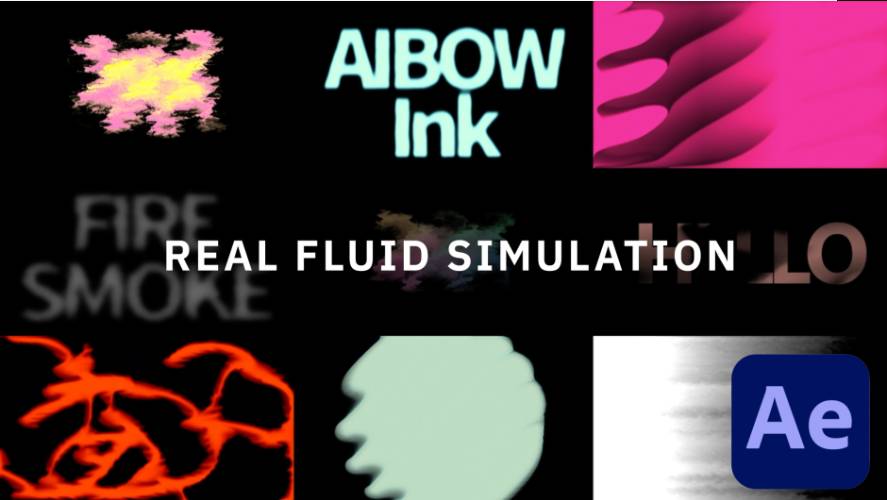
AEScripts AiBow Ink v1.0 Plugin for After Effects Free Download
d compositing setups. AEScripts AiBow Ink v1.0 takes a more direct approach by bringing a real 2D fluid simulation into After Effects, allowing ink-like motion to grow directly from text, logos, shapes, or footage.
Developed by AiBow Tools, AiBow Ink uses GPU-accelerated fluid simulation to generate dynamic results from the actual shape of the source layer. This makes it useful for liquid reveals, ink transitions, smoke-like animation, logo effects, and stylised motion graphics.
What Is AiBow Ink for After Effects?
AiBow Ink is an After Effects effect based on a real-time 2D fluid simulation. Rather than relying on pre-rendered footage, it simulates the fluid behaviour directly, allowing the result to respond to the shape of the source layer.
The simulation uses Stable Fluids with vorticity confinement and can run through CUDA on supported NVIDIA GPUs, with CPU processing available as a fallback. Because the simulation is generated from the layer itself, changing the source text or artwork changes the resulting fluid animation as well.
For the complete feature set, compatibility information, and current release details, visit the official AEScripts AiBow Ink page.
Three Emitter Modes
AiBow Ink provides three different emitter modes for controlling how the fluid begins to appear. Layer Alpha makes the ink emerge from the shape of the source layer, while Direction can be used for effects such as rising smoke or falling drips. Bloom creates radial bursts that expand outward from the source.
These modes give artists a straightforward way to create very different types of fluid motion without rebuilding the simulation from scratch.
For example, a logo can generate ink from its edges, text can produce a rising smoke effect, or a graphic element can trigger a burst of fluid that expands across the frame.
Full Fluid Physics
The simulation includes several physical controls that influence the behaviour of the fluid. Artists can adjust vorticity, viscosity, dissipation, gravity, buoyancy, turbulence, and wind to shape the resulting motion.
The simulation grid can operate at 128, 256, or 512 resolution, providing different balances between speed and detail. Lower settings can be useful during experimentation, while higher resolutions can provide more detailed fluid movement for final work.
This makes AiBow Ink more flexible than a purely decorative ink overlay because the motion itself can be shaped according to the needs of the shot.
Create Ink, Smoke and Liquid Effects
Although the plugin is called AiBow Ink, its applications extend beyond traditional ink animation. The built-in presets demonstrate styles such as Sumi-e Bleed, Neon Glow, Rising Smoke, Ink in Water, Liquid Flame, Falling Drip, and Ink Reveal.
These presets provide quick starting points for different visual directions, while the underlying simulation remains adjustable.
The same system can therefore be used for calligraphic ink effects, fluid transitions, smoke-like motion, glowing liquid, or abstract procedural animation.
Flexible Colour and Appearance Controls
AiBow Ink includes a dedicated colour and appearance system. Artists can use gradient ramps, colours sampled from the source layer, or custom six-colour palettes.
Colour interpolation can be performed in RGB or perceptual OkLab space, giving more flexibility over how gradients transition. Additional appearance controls include contour bands and a draggable Appearance Curve editor.
The plugin also provides glow, bloom, rim lighting, edge darkening, and a texture-layer input, allowing artists to move from clean digital fluid to a more textured or illustrative appearance.
Built-In Transition Modes
One of the most practical features of AiBow Ink is its built-in transition system. Reveal and Erase matte modes allow the fluid simulation to control transitions between shots or visual states.
The effect uses a keyframeable Transition Progress parameter, which can land on an exact frame and run in either direction. This makes it possible to create controlled ink reveals and erasing transitions without assembling a separate matte animation.
For title sequences, logo reveals, wipes, and stylised scene transitions, this can significantly simplify the setup.
Deterministic Simulation
AiBow Ink is designed to be deterministic, meaning the same frame produces the same image when rendered. This is particularly important for After Effects workflows involving scrubbing, rendering, and Multi-Frame Rendering.
A deterministic simulation provides more predictable results than a system whose output can change between evaluations. This helps make the effect more practical for production environments where timing and frame consistency matter.
GPU Acceleration with CPU Fallback
The plugin can automatically select between GPU and CPU processing. CUDA acceleration is available on supported NVIDIA hardware, while CPU processing provides a fallback for systems without a compatible discrete GPU.
The developer recommends an NVIDIA RTX 20-series GPU or newer, but projects created on an RTX system can still render on a laptop without a discrete GPU by switching to CPU processing.
AiBow Ink supports 8-bit and 16-bit-per-channel projects.
AiBow Ink v1.0
AiBow Ink v1.0 is the initial release, launched on September 11, 2026. The first version introduces the complete fluid-simulation workflow, including the three emitter modes, physics controls, colour and appearance system, transition modes, presets, and deterministic rendering.
As an initial release, there is no previous version history to compare against.
Compatibility
AiBow Ink is currently listed for Adobe After Effects 2023, 2024, 2025, and 2026. The plugin is Windows-only and supports 64-bit Windows 10 and Windows 11 systems.
The current AEScripts listing shows a regular price of $24.99, with a special price of $19.99 through September 25, 2026. A free trial is also available.
Who Should Use AiBow Ink?
AiBow Ink is particularly suited to motion designers, VFX artists, title designers, editors, and graphic artists who want fluid-based animation without constructing a full simulation workflow manually.
It is useful for liquid logos, ink reveals, smoke transitions, stylised typography, abstract motion graphics, animated textures, and other effects where fluid movement can become a central visual element.
Final Thoughts
AEScripts AiBow Ink v1.0 brings genuine 2D fluid simulation directly into After Effects, providing a specialised workflow for creating ink, smoke, and liquid animation from existing layers. Its emitter modes, adjustable physics, colour controls, appearance tools, built-in transitions, and deterministic rendering make it considerably more flexible than a conventional animated texture.
The ability to drive the simulation from text, logos, shapes, or footage is particularly useful for motion designers because the fluid remains connected to the source artwork. Combined with GPU acceleration and CPU fallback, AiBow Ink offers an accessible way to introduce procedural fluid behaviour into After Effects projects without relying on pre-rendered stock elements.
AEScripts AiBow Ink, AiBow Ink v1.0, AiBow Ink plugin, After Effects fluid simulation, ink effect After Effects, liquid effect After Effects, smoke effect After Effects, fluid animation plugin, ink reveal After Effects, 2D fluid simulation
AEScripts AiBow Ink v1.0 Plugin for After Effects Free Download
https://zeroupload.com/cc2418c2e68693769099f6c7459dcb52
https://buzzheavier.com/8ynwmieq0whj
https://filekeeper.net/689obmlp99dz/AiBowInk1.0_DownloadPirate.com.rar