AEScripts Brand Manager v1.0 Script for After Effects Photoshop Windows Macintosh Full Version Free Download
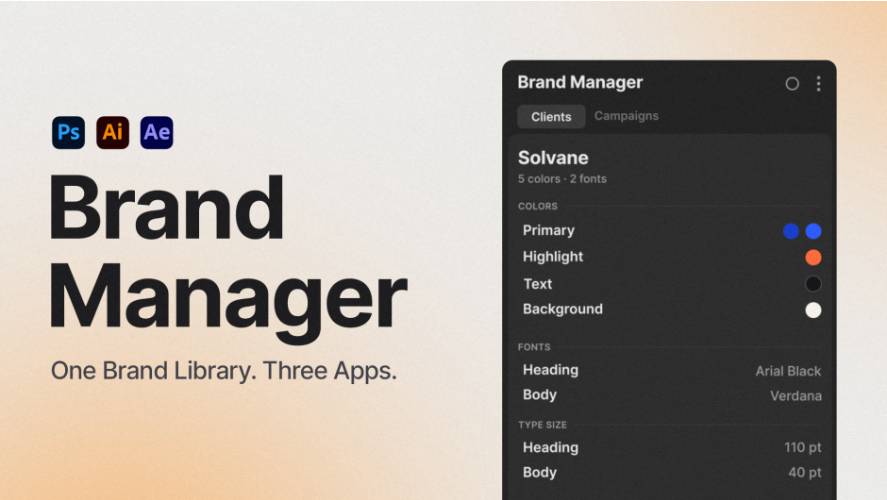
AEScripts Brand Manager v1.0 is a brand identity management extension for Adobe After Effects, Photoshop and Illustrator. It brings brand colours, fonts and typography settings into a shared panel, allowing designers to apply consistent brand styling directly to selected layers and objects.
Instead of repeatedly opening brand guideline PDFs, searching for hexadecimal colour codes or manually entering typography settings, users can create reusable Brand Kits and access them inside their Adobe applications.
Developed by Hexline, Brand Manager is designed for graphic designers, motion designers, freelancers and creative teams working with multiple brands or client identities.
What Is Brand Manager?
Brand Manager turns brand guidelines into organised digital libraries called Brand Kits. Each kit stores the visual specifications of a brand, including colour palettes, font families, type sizes, line height and letter spacing.
The same library is accessible from Photoshop, Illustrator and After Effects. Changes made in one application are reflected in the other supported applications, eliminating the need to maintain separate brand libraries.
Users can dock the extension panel inside their Adobe workspace and apply brand values directly to selected layers or objects.
Key Features of Brand Manager v1.0
1. Centralised Brand Kits
A Brand Kit stores the essential visual elements of a brand in one place.
Each kit can contain:
- Brand colours organised by roles such as Primary, Secondary, Text, Background and CTA.
- Display and body font families.
- Typography sizes.
- Line height settings.
- Letter spacing values.
Users can create separate kits for different clients, campaigns, products or sub-brands. This makes switching between brand identities much easier when working on several projects.
2. One-Click Colour Application
Brand Manager allows users to apply colours directly to selected layers and objects.
Rather than copying HEX values from a brand guideline and manually entering them into a colour picker, users can select a colour role from the panel.
The extension understands different colour targets within each application. Depending on the selected object, it can apply colours to text fills, shape fills, solid layers and supported keyed colour properties.
It also supports applying a colour to multiple selected layers in a single operation.
3. Typography Management
Brand consistency involves more than using the correct colours. Font families, sizes, line height and letter spacing are equally important.
Brand Manager stores these typography specifications as reusable values. Users can apply the required font and type settings directly from the panel instead of repeatedly searching through font menus and entering measurements manually.
This is particularly useful for creating social media graphics, promotional banners, lower thirds, title sequences and other branded content.
4. One Shared Library Across Three Adobe Applications
One of the most useful features is cross-application library sharing.
Brand Manager provides the same Brand Kits in:
- Adobe Photoshop: Apply brand colours and typography to graphic design projects.
- Adobe Illustrator: Maintain consistent brand styling across vector artwork and layouts.
- Adobe After Effects: Apply brand colours and typography to motion graphics and animated compositions.
Users do not need to recreate or separately import their kits in every application. Each installed version of Brand Manager accesses the same shared library.
5. Capture Brand Values from Existing Artwork
Brand Manager includes a Capture from Selection feature that extracts supported values from selected artwork and adds them to a Brand Kit.
Users can capture colours, fonts and typography settings instead of manually rebuilding a brand library from scratch.
Photoshop users also get an Analyze Document feature that reads text and fill colours from an open document to generate a starter kit.
This is useful when a client provides existing artwork but does not have a properly organised brand guideline.
6. Organise Multiple Brands with Collections
When working with multiple clients, keeping every brand kit organised becomes important.
Brand Manager supports Collections, allowing users to group kits by client, project or campaign. A single kit can also belong to multiple collections.
The built-in search function can search kit names, collection names, colour roles, HEX codes, fonts and sizes.
Users can also duplicate an existing kit to create a sub-brand or seasonal variation without starting from scratch.
7. Import and Export Brand Libraries
Brand Kits can be exported as JSON files, making it easier to share brand identities with colleagues or maintain backups.
The extension supports three export options:
- Brand Kit: Export an individual brand identity.
- Collection: Export a complete group of related kits.
- Entire Library: Export the complete library for backup or transfer to another computer.
When importing a kit or collection, the extension adds it to the existing library rather than deleting other kits.
Brand Manager also supports editing the same kit in Photoshop and After Effects simultaneously. Changes are merged, while conflicting changes are preserved in a Recovery folder.
8. Customisable Panel and Interface
The extension offers three panel sizes: Small, Medium and Large. It also follows the light or dark theme of the host Adobe application.
Brand Manager supports eight interface languages:
- English
- French
- Spanish
- German
- Turkish
- Japanese
- Korean
- Simplified Chinese
The panel automatically starts in the language used by the Adobe application.
What’s New in Brand Manager v1.0?
Version 1.0.0 was released on November 2, 2026, marking the initial release of the extension.
The first version introduces:
- Brand Kits for Photoshop, Illustrator and After Effects.
- A shared library containing colours, fonts and typography settings.
- One-click application of brand values to selected layers and objects.
- Capture from Selection for extracting existing design properties.
- HEX palette importing.
- Photoshop document analysis for generating starter kits.
- JSON import and export for sharing Brand Kits and collections.
- Eight interface languages.
System Requirements and Compatibility
| Requirement | Details |
|---|---|
| Adobe Photoshop | 2023 (24.2) or newer |
| Adobe Illustrator | 2022 (26.0) or newer |
| Adobe After Effects | 2024 (24.0) or newer |
| Operating system | Windows 10 (64-bit) or newer |
| macOS | macOS 12.1 or newer |
| Interface | Dockable Adobe extension panel |
| Languages | 8 supported languages |
The extension supports Adobe application versions through 2027. Users do not need to install all three applications. Brand Manager can be installed only in the applications they use.
Who Should Use Brand Manager?
Brand Manager is particularly useful for creative professionals who regularly work with established brand guidelines.
- Motion designers: Apply consistent brand colours and typography to After Effects compositions.
- Graphic designers: Maintain colour and typography consistency across Photoshop and Illustrator projects.
- Freelancers: Switch between different client identities without repeatedly searching through brand guideline documents.
- Design agencies: Maintain organised brand libraries for multiple clients and projects.
- Social media teams: Produce branded posts, banners, advertisements and promotional graphics with consistent styling.
Conclusion
AEScripts Brand Manager v1.0 provides a centralised way to manage brand identities across Adobe Photoshop, Illustrator and After Effects. Its shared library, one-click styling, typography controls, artwork capture and JSON import/export features help reduce repetitive work while maintaining visual consistency.
For designers and agencies handling multiple brands, it can replace the manual process of repeatedly looking up colour codes and typography specifications in separate guideline documents.
The biggest advantage is its cross-application workflow: create a Brand Kit once and access the same brand identity wherever you work.
- AEScripts Brand Manager
- Brand Manager v1.0
- After Effects brand management
- Photoshop brand kit
- Illustrator brand colours
- Adobe brand management extension
- Brand identity workflow
- After Effects typography
AEScripts Brand Manager v1.0 Script for After Effects and Plugin for Photoshop Windows Macintosh Full Version Free Download
https://zeroupload.com/9f2f652d1572bebb3b99e49500cc1343
https://pixeldrain.com/u/iyxqej2t
https://buzzheavier.com/jki5nw7wyo0j
https://filekeeper.net/64whrfot30oy/BrandManager1.0_DownloadPirate.com.zip