AEScripts Putty v1.0 Plugin for After Effects Free Download
Warping text, logos, and graphic elements in Adobe After Effects often means working with Mesh Warp, Puppet tools, or other deformation effects that may not be designed specifically around the artwork itself. AEScripts Putty v1.0 takes a more focused approach, providing a fitted lattice or cage that conforms to the visible artwork so individual points can be manipulated directly.
Created by nebulaf, Putty is designed for smooth and intuitive layer deformation. It can be used to bend text, logos, shapes, and other artwork while providing soft selection, animation, null-driven controls, symmetry, and separate cage-based deformation.
What Is Putty for After Effects?
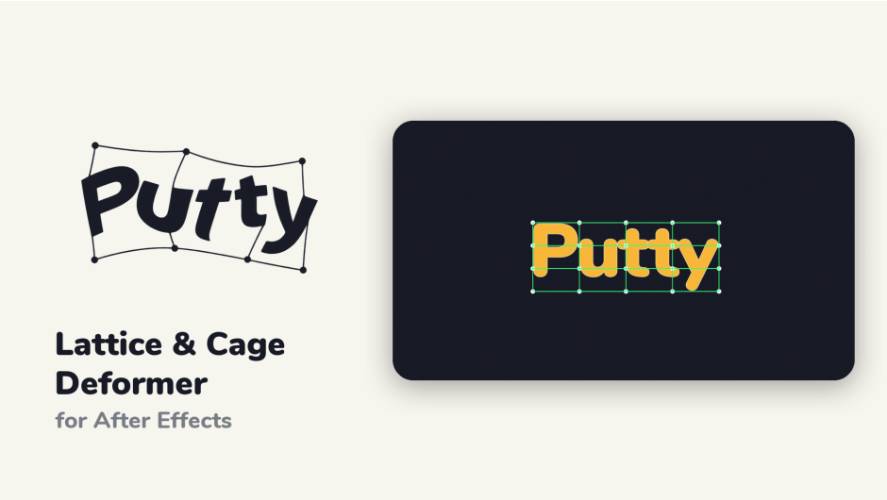
Putty is an After Effects plugin for bending and deforming artwork with a lattice or cage fitted to the visible content. Instead of covering the entire rectangular layer like a conventional mesh warp, Putty places its deformation grid directly around the artwork.
This makes it particularly useful for elements where the exact shape matters. A logo can be bent around a curve, text can follow a wave, or individual letters can be manipulated without requiring a large rectangular deformation field.
A Mesh That Fits the Artwork
One of Putty’s defining features is its fitted deformation grid. Traditional Mesh Warp works across the full layer dimensions, which can leave a large amount of the mesh outside the actual artwork. Putty instead places the lattice around the visible shape.
The Fit Offset control provides additional space around the artwork when required. This gives artists control over how tightly the mesh follows the source element.
The result is a more focused deformation workflow, particularly for text, logos, and graphic shapes.
For the complete product information and current compatibility details, visit the official AEScripts Putty page.
Lattice and Cage Modes
Putty offers two main deformation approaches: Lattice and Cage.
Lattice mode creates a fitted grid around the artwork, allowing artists to manipulate the structure through its points. Cage mode creates an outline around individual pieces of artwork, making it possible to bend or animate elements separately.
Cage mode is particularly useful for typography because individual letters or shapes can be manipulated independently. This can create more sophisticated character animation and logo deformation without requiring every element to be separated into its own layer.
Soft Selection for Smooth Bending
Putty includes Soft Selection, which allows neighbouring points to follow the selected point with a smooth influence. Dragging a point therefore bends a wider portion of the artwork instead of creating a harsh local deformation.
The reach of the influence can be changed while working, and individual points can also be pinned. A single-point editing mode provides another option when precise local movement is required.
This makes Putty suitable for both broad organic bends and smaller corrective adjustments.
Mesh Setup for Precise Control
Putty includes Mesh Setup, allowing artists to position lattice lines exactly where they are needed before beginning the deformation.
This is useful when specific areas of an illustration or piece of typography need to bend along meaningful boundaries. A grid line can be positioned around the edge of a letter, along an elbow-like area, or at another important part of the artwork before deformation begins.
The setup stage does not alter the image, allowing the grid structure to be prepared before any visible distortion is introduced.
Animate Deformations with Keyframes
Putty supports Mesh Animation, where point movements can be keyframed over time. This allows deformation itself to become an animated property rather than a static effect.
Artists can create bending logos, waving text, flexible illustrations, and other shape-based motion effects while keeping the animation editable inside After Effects.
The plugin also includes Wiggle, which can add gentle organic motion to the deformation. This can be useful for creating subtle movement in otherwise static graphic elements.
Drive Points with Null Objects
Selected points can be grouped into Clusters and driven using a Null object. Once a cluster has been created, moving, parenting, or tracking the Null causes its associated points to follow.
This opens up additional rigging possibilities. Instead of manually keyframing every point, artists can use Nulls as higher-level controls for portions of the mesh.
The cluster Null can also follow mesh animation and includes a Soft Selection slider, giving users another layer of control over the deformation.
Symmetry and Image Transform
Putty includes Symmetry, allowing deformation edits to be mirrored across the artwork. This can simplify workflows where both sides of a graphic need to deform in a consistent way.
The Image Transform feature works differently by allowing the source artwork to move, scale, and rotate through the deformation field while the mesh itself remains in place.
Together, these tools provide greater separation between artwork movement and mesh deformation.
Clean Folds and High-Quality Rendering
Putty is designed to maintain clean deformation when points cross, helping prevent undesirable spikes and other artefacts that can appear in heavily manipulated meshes.
The plugin supports 8-bit, 16-bit, and 32-bit-per-channel projects and is compatible with After Effects Multi-Frame Rendering. GPU acceleration is available through CUDA and DirectX 12 on Windows and Metal on Mac, with automatic CPU fallback.
This combination makes Putty suitable for both interactive design work and higher-quality final rendering.
Putty v1.0
Putty v1.0.0 is the initial release, published on September 16, 2026. The original release introduced the fitted lattice and cage workflows, Soft Selection, Mesh Animation, Clusters, Image Transform, Symmetry, and the core deformation system.
Subsequent updates added Mesh Setup and other refinements, but those features belong to later versions rather than the initial 1.0 release.
The current AEScripts listing shows a regular price of $49 with a special price of $36.99 through October 2, 2026. A free trial is available.
Compatibility
Putty currently supports After Effects 2025, 2026, and 2027 on supported Windows and macOS systems. GPU acceleration depends on the available graphics hardware, with CPU fallback providing an alternative when compatible GPU acceleration is unavailable.
Who Should Use Putty?
Putty is particularly useful for motion designers, title designers, logo animators, illustrators, and VFX artists who frequently deform text and graphi,c elements.
It is well suited to organic typography, logo animation, flexible shapes, stylised character elements, perspective-like bends, and situations where conventional layer-warping tools provide too much unnecessary mesh area.
Final Thoughts
AEScripts Putty v1.0 provides a specialised approach to deforming After Effects artwork by fitting the deformation structure directly to the visible design. Its lattice and cage modes, Soft Selection, Mesh Setup, keyframed mesh animation, Cluster Nulls, Symmetry, and Image Transform tools provide a flexible workflow for both precise and organic deformation.
The focus on text, logos, and shapes makes Putty particularly useful for motion designers who need more control than a conventional rectangular mesh warp can provide. Instead of forcing the artwork into a generic deformation field, Putty builds the field around the artwork itself, making complex bends and animated distortions easier to construct and refine.
AEScripts Putty, Putty v1.0, Putty plugin After Effects, After Effects warp plugin, After Effects deformation plugin, text warp After Effects, logo deformation After Effects, lattice warp After Effects, cage deformation After Effects, mesh animation After Effects
AEScripts Putty v1.0 Plugin for After Effects Free Download
https://zeroupload.com/4e828b028b30e0468686398e30489a10
https://buzzheavier.com/fr4em43ucf1i
https://pixeldrain.com/u/BY1RkiN9
https://filekeeper.net/1m7opr0eitv6/Putty1.0_DownloadPirate.com.zip