CGBoost – Master 3D Characters in Blender Free Download
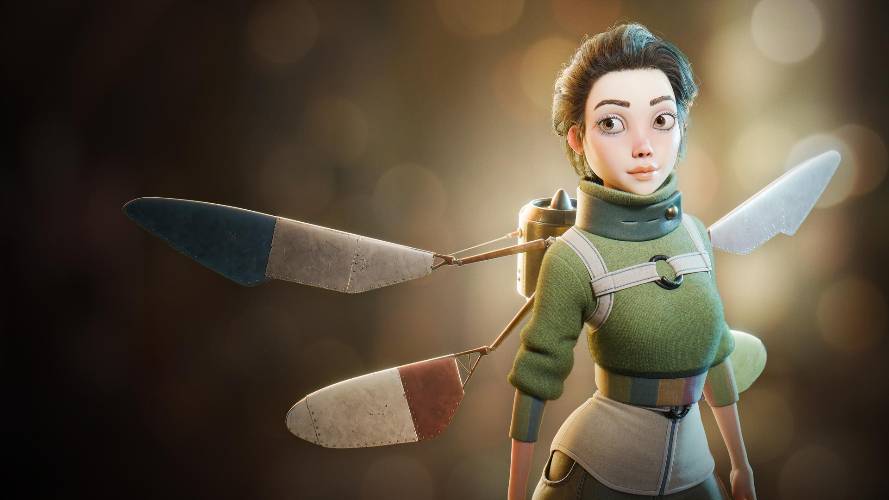
CG Boost’s Master 3D Characters in Blender Part 1 is the first stage of a larger character-creation masterclass taught by Jim Morren. Part 1 focuses entirely on character modelling and sculpting, taking the student from initial concept development through the sculpted character, clothing, boots, sweater and a detailed hard-surface jetpack.
The official course lists Part 1 as 10 chapters, 126 lessons and more than 21 hours of training.
CG Boost – Master 3D Characters in Blender
What Does Part 1 Cover?
Part 1 is essentially the modelling and sculpting stage of the complete character pipeline.
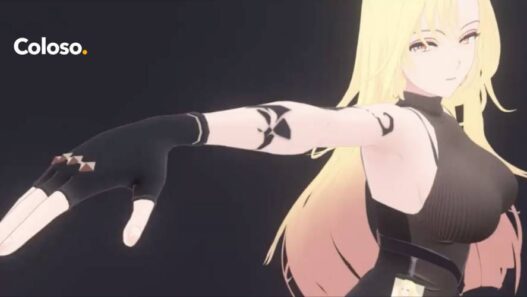
The project revolves around creating a stylized female character, with the course gradually developing the body, clothing and accessories. The emphasis is not just on making a sculpt look good, but on understanding the decisions behind proportions, anatomy, clothing construction and hard-surface details.
The 10 chapters are structured as a progression rather than isolated tutorials, so each stage builds on the previous one.
Chapter 1 & 2: Getting Started and Concept Art
The opening chapters introduce the course and establish the importance of concept art in 3D character creation.
Rather than immediately jumping into sculpting, the course explains how concept art helps determine the character’s design and how to use that reference effectively while building the 3D model.
This is a short section, with 5 videos and approximately 20 minutes of content.
It’s a sensible starting point because character creation becomes much easier when you have a clear design to work toward instead of improvising every major decision during the sculpt.
Chapter 3: Sculpting the Body
Chapter 3 is where the actual character construction begins.
The course starts with rough blockouts and progressively develops the head, facial features, torso and limbs, while introducing the anatomy needed to create a convincing human form. A temporary hair placeholder is also created at this stage.
With 24 videos and around 4 hours 3 minutes, this is the first substantial chapter of Part 1.
The emphasis is on moving from large forms toward smaller anatomical details rather than immediately getting lost in surface detail.
Chapter 4: Blockout of Shirt, Trousers and Boots
Once the body is established, the course moves into clothing.
Chapter 4 creates the initial blockout for the shirt, trousers, knee pads and boots. The character itself is used as the underlying reference so that the clothing maintains appropriate proportions and fits the body correctly.
This chapter contains 6 videos and roughly 59 minutes of material.
The focus here is deliberately on the big shapes. Detailed folds and surface work come later.
Chapter 5: Sculpting the Shirt
Chapter 5 takes the rough shirt blockout and turns it into a more developed piece of clothing.
The course covers the fundamentals of clothing folds, then applies those ideas to sleeves, zippers and other shirt details.
With 11 videos and approximately 2 hours 1 minute, this chapter provides a substantial introduction to sculpting fabric rather than simply modelling a flat garment around the body.
Understanding how folds form around joints, tension points and compressed areas is an important character-art skill, and this chapter applies those principles directly to the project.
Chapter 6: Sculpting the Trousers
The trousers receive a much deeper treatment.
The course begins with the basic garment and progressively adds folds, pockets and knee pads. The focus is on developing believable fabric behaviour while keeping the clothing visually consistent with the character.
At 18 videos and approximately 3 hours 44 minutes, this is one of the larger chapters in Part 1.
It’s particularly useful for artists who struggle with clothing because trousers introduce more complex fold patterns around the hips, knees and legs.
Chapter 7: Sculpting the Boots
Chapter 7 shifts from soft fabric to footwear and layered leather construction.
The boots begin from a relatively simple base and are progressively developed with treads, laces, hooks, folds and stitching.
The chapter contains 19 videos and approximately 3 hours 12 minutes.
This provides a good contrast with the previous clothing chapters because the artist has to think about both sculpted forms and harder manufactured details.
Chapter 8: Blockout of the Sweater and Jetpack
The character’s design then becomes more elaborate.
Chapter 8 introduces the sweater and jetpack, establishing their major forms before detailed modelling begins. The jetpack includes components such as straps, rings, thrusters and wings.
The chapter contains 8 videos and approximately 1 hour 32 minutes.
The important idea here is blockout. Rather than spending hours detailing individual components before knowing whether the overall design works, the course first establishes the major shapes and proportions.
Chapter 9: Sculpting the Sweater
Chapter 9 develops the sweater into a finished sculpted garment.
The course works on folds, the neck belt and surface details, including the use of the Cloth Brush to generate interesting fabric forms. Coloured patches and additional refinement are also introduced.
The chapter contains 8 videos and approximately 1 hour 5 minutes.
This continues the clothing-sculpting techniques introduced earlier, but the sweater introduces a different type of fabric behaviour and surface treatment.
Chapter 10: Modeling the Jetpack
The final chapter of Part 1 moves into hard-surface modelling.
The jetpack blockout is refined into a detailed asset, including its straps and various mechanical components. The course also introduces texture generation and application alongside hard-surface modelling techniques.
This is the largest chapter in Part 1, with 27 videos and approximately 4 hours 37 minutes of content.
The jetpack is a particularly useful addition because it prevents the course from becoming purely an organic sculpting class. You’re learning to combine an organic character with manufactured, mechanical elements.
The Complete Part 1 Workflow
The progression is quite logical:
Concept → Body Sculpt → Clothing Blockout → Clothing Sculpt → Sweater → Hard-Surface Jetpack
By the end of Chapter 10, you’ve built the main sculpted character and its major clothing and accessory components.
Importantly, Part 1 stops before the retopology, UV and texturing stages. Those belong to the subsequent sections of the full course.
That makes Part 1 useful as a standalone learning block for artists specifically interested in character modelling and sculpting.
What You Learn
The course teaches a mixture of artistic and technical skills rather than simply demonstrating Blender buttons.
The major areas include concept interpretation, anatomy, character sculpting, clothing construction, fabric folds, leather detailing, hard-surface modelling and character design.
The project also introduces practical details such as zippers, stitching, pockets, knee pads, boot components, straps, thrusters and mechanical elements.
That variety is important because real character assets are rarely just a human body.
Who Is Part 1 For?
CG Boost recommends having good fundamental Blender knowledge before starting the course. The instructors specifically suggest completing their Blender Beginner and Blender Sculpting for Beginners courses first.
You don’t need to already be an experienced character artist. The lessons are taught step by step, but the course deliberately doesn’t spend time explaining basic Blender operations.
A graphics tablet is also useful for the sculpting sections, particularly once the lessons move into anatomy and clothing detail.
Part 1 vs the Full Course
Part 1 is only the beginning of the complete character pipeline.
The later parts move into retopology, UVs, texturing, shading and hair grooming, eventually taking the character toward a finished presentation.
So if your specific goal is learning how to sculpt and model a character, Part 1 contains the material you need.
If your goal is creating a finished production-quality character, you’ll want the subsequent parts as well.
Final Thoughts
CG Boost – Master 3D Characters in Blender Part 1 is a substantial character-modelling course rather than a quick sculpting tutorial.
Its biggest strength is the variety of the project. You’re not spending 20 hours sculpting only a human body. You move through anatomy, clothing, fabric folds, leather boots, a sweater and a detailed jetpack, giving you experience with both organic and hard-surface character elements.
The 21+ hours and 126 lessons also give the material enough room to explain the process properly rather than rushing through the difficult parts.
If you’re learning Blender character creation and want to get serious about sculpting, clothing and character modelling, Part 1 is a strong foundation. Just remember that it isn’t the complete character pipeline. Retopology, UVs, texturing, shading and grooming come later.
CG Boost – Master 3D Characters in Blender
CG Boost Master 3D Characters, Master 3D Characters in Blender, Blender character creation course, Blender character modelling course, Blender character sculpting, Blender anatomy course, Blender retopology, Blender UV unwrapping, Blender character texturing, Blender hair grooming, Blender clothing sculpting, Blender Geometry Nodes hair, Blender hard surface character modelling, Blender 3D character course, Jim Morren Blender course
CGBoost – Master 3D Characters in Blender Free Download
Those who sell pirated content are losers.
If you're paying for pirated content, you're the biggest loser.
Please read the FAQ if you need basic help.
Use VPN &
FDM if you have download problems.