AEScripts Foldspace v1.3 plugin for After Effects Full Version Free Download
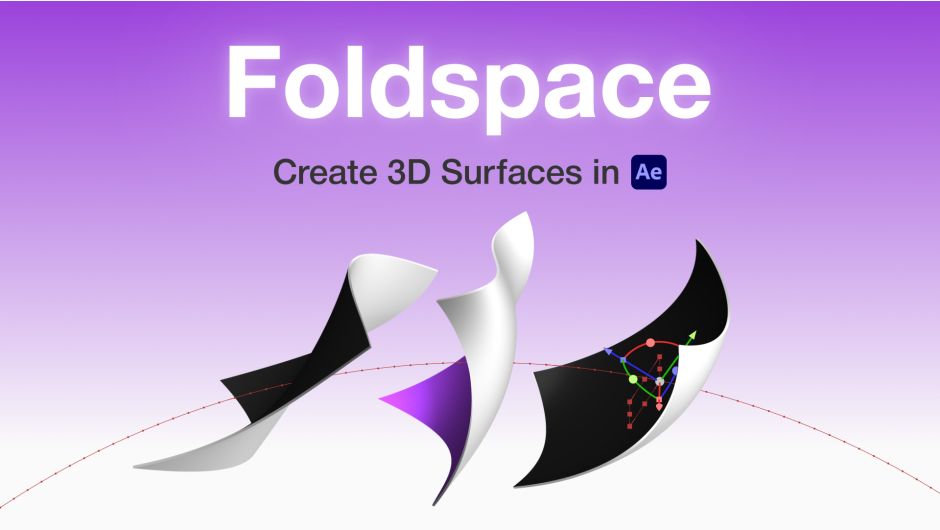
AEScripts Foldspace v1.3 is a GPU-accelerated 3D surface and deformation plugin for Adobe After Effects, created by Denis Mozgovoy. It lets you create, manipulate and animate curved 3D surfaces directly inside After Effects, going well beyond what AE’s native 3D layers can comfortably do.
AEScripts Foldspace official page
What is Foldspace?
Foldspace essentially brings a lightweight 3D surface system into After Effects.
Instead of treating an AE layer as a flat rectangular plane, Foldspace allows you to create surfaces that can bend, curve, fold, roll and deform in 3D space. Each surface is controlled through 16 freely positionable control points, giving you direct control over its shape.
This makes it useful for motion graphics where a flat layer needs to behave more like physical geometry.
For example, a graphic can bend around a curve, fold like paper, wrap into a tube or become part of a larger 3D construction.
Creating Curved 3D Surfaces
The core of Foldspace is its surface system.
Each surface contains 16 control points that can be positioned freely in 3D space. You can create multiple surfaces inside a single Foldspace instance, and those surfaces can overlap or intersect while remaining independently editable.
This makes it possible to construct more complicated forms from multiple surfaces instead of relying on a single deformation effect.
A simple setup could be:
Flat layer → Foldspace surface → Bend → Animate control points → 3D composition
Direct Viewport Controls
Foldspace includes a dedicated on-screen interface that appears when the effect is selected.
Instead of manipulating everything through numerical parameters, you can interact directly with the surfaces and control points in the After Effects viewport. Position, rotation and scale gizmos are available, with local and global transformation modes.
That makes the plugin feel more like a small modelling tool inside After Effects than a conventional 2D effect.
Animation
Foldspace isn’t limited to creating static curved surfaces.
Its control points can be animated individually, and those points can be attached to other After Effects layers. Attached surfaces inherit the transformations of their associated layers, including animation.
This opens up considerably more interesting motion-graphics possibilities.
You could construct a surface and then drive different portions of it with separate layers, effectively creating a custom animation rig directly inside AE.
Layer Attachments
The ability to attach surfaces and control points to After Effects layers is one of Foldspace’s strongest features.
Instead of manually keyframing every point, you can use AE’s normal layer transformations to control the Foldspace geometry.
That means Foldspace can work alongside existing AE animation systems rather than forcing you into an entirely separate animation workflow.
Roll Modifier
Foldspace includes a Roll modifier specifically designed for rolling and wrapping surfaces.
With controls such as Angle, Tilt and Radius, a flat surface can be transformed into tube-like or spiral forms.
This is particularly useful for effects such as:
Flat graphic → curling sheet → tube → spiral
It can also be used for stylized transitions and abstract motion graphics.
Materials and Textures
Foldspace includes its own material system.
Each surface can have independent materials assigned to its front and back, and surfaces with thickness can also have separate materials for their side planes. Material properties include things such as diffuse, specular, shininess and opacity.
More importantly, any layer in the After Effects composition can be used as a texture source.
That means your existing graphics can become textures for Foldspace geometry without first exporting them to another 3D application.
Front, Back and Side Materials
The material system gives you control over different parts of a surface.
For a thickened surface, you can treat the front, back and sides independently. This becomes useful for creating objects that resemble physical cards, panels, sheets or blocks rather than infinitely thin planes.
For example, you could have one graphic on the front, another on the back and a separate material on the edges.
Lighting
Foldspace works with After Effects’ native cameras and lights, and it can also use a custom camera and lighting system controlled by the effect.
This allows Foldspace objects to participate more naturally in an existing AE 3D composition.
The material system also includes an Accepts Lights option, added in v1.1.0, allowing individual materials to ignore composition lights when required.
Render Passes
Version 1.2 introduced several useful render passes.
You can display:
- Final Render
- Depth
- World-space Normals
- View-space Normals
- UV
These passes can be extremely useful for compositing and debugging because they expose information about the generated surface beyond the final beauty render.
For example, a depth pass can be used to build additional depth-based effects in After Effects, while normal passes can provide useful information for stylized or technical compositing.
World Transform
Foldspace v1.3 introduces a World transform group.
This allows you to move, rotate and scale the entire Foldspace scene rather than manipulating individual surfaces separately.
That’s particularly useful once a scene becomes complicated and contains many independent surfaces.
Instead of selecting everything and transforming it manually, you can treat the Foldspace scene as a larger 3D object.
Surface Duplication
Another v1.3 addition is the ability to duplicate surfaces together with their attachment and roll-control layers.
That’s a significant workflow improvement when building repeated structures.
You can create one properly configured surface, duplicate it, and retain the relationships needed for its animation and controls.
Improved Surface Selection
Version 1.3 also changes how surface selection works with transparency.
When clicking on a fully transparent portion of a surface, Foldspace can now select the surface behind it instead of automatically selecting the transparent surface. A Caps Lock fallback allows the previous selection behaviour when needed.
This is a small feature, but it becomes useful when several surfaces overlap.
Two-Axis Gizmo Controls
Foldspace v1.3 adds square handles to the YZ, XZ and XY planes for the Move and Scale gizmos.
These allow transformations to be constrained across two axes simultaneously instead of being limited to a single axis.
It’s another example of the plugin becoming more like an actual 3D manipulation environment.
GPU Acceleration
Foldspace is GPU accelerated and uses Vulkan on Windows and Metal on macOS.
The developer specifically designed it to remain responsive even with complex surface setups. The minimum GPU requirements are relatively low, although actual performance will obviously depend on the complexity of the scene.
For Windows, the listed minimum GPU is an NVIDIA GeForce GTX 745 or AMD Radeon RX 470, while macOS requires hardware such as Apple M1, Intel HD Graphics 5000 or AMD Radeon Pro 450 and above.
Multi-Frame Rendering and 32-bit
Foldspace supports up to 32-bits per channel and integrates with After Effects’ Multi-Frame Rendering system.
That makes it more appropriate for serious production work than a simple viewport-only distortion effect.
You can therefore use it in higher-quality compositing workflows where colour precision and rendering performance matter.
Where Foldspace Fits
Foldspace occupies an interesting space between After Effects and a conventional 3D application.
It isn’t trying to replace Blender, Cinema 4D or 3ds Max. Instead, it gives After Effects users enough 3D surface manipulation capability to create certain effects without leaving AE.
That is particularly useful when the rest of the project is already built in After Effects.
For motion graphics, the workflow could be:
Illustrator/Photoshop artwork → After Effects → Foldspace → 3D deformation → Compositing → Final output
Use Cases
Foldspace is particularly well suited to motion graphics, where flat artwork frequently needs to become dynamic 3D geometry.
It can be used for things such as animated cards, folded graphics, curved panels, abstract surfaces, product-style graphics, geometric transitions and 3D infographic elements.
It can also be useful for creating stylized 3D scenes without having to send the project into a separate modelling package.
Who Should Use Foldspace?
Motion designers are probably the primary audience. If you regularly make graphics that need to fold, bend, curl or wrap in 3D, Foldspace gives you a much more direct workflow.
Compositors can also benefit from the depth, normal and UV passes, especially when a 3D-looking element needs to remain inside an AE compositing workflow.
3D generalists working heavily in After Effects may find it useful for smaller 3D tasks where opening Blender or Cinema 4D would be unnecessary overhead.
Foldspace vs Native After Effects 3D
The difference is quite significant.
After Effects’ standard 3D layers are essentially flat planes with transformations applied to them. Foldspace turns the surface itself into editable 3D geometry.
So instead of:
Plane + Rotation
you can have:
Curved Surface + Control Points + Materials + Lighting + Animation
That’s the reason to use Foldspace.
Foldspace vs Blender or Cinema 4D
Blender and Cinema 4D remain vastly more capable for full 3D production.
They provide proper modelling, sculpting, UV workflows, advanced simulation, sophisticated materials and much deeper 3D pipelines.
Foldspace wins in a different way: speed inside After Effects.
If you’re already halfway through an AE composition and suddenly need a graphic to fold around itself, moving the entire project into Blender just to create that one effect would be overkill.
Foldspace handles that kind of situation directly.
Compatibility
The official AEScripts listing currently lists compatibility with After Effects 2019 through 2026.
Windows support starts at Windows 10, while macOS support starts at macOS 11 Big Sur. GPU acceleration requires Vulkan on Windows or Metal on macOS.
The current official listing shows Foldspace at $149.99 and provides a free trial so users can test GPU compatibility before purchasing.
Final Thoughts
Foldspace v1.3 is one of the more interesting 3D-oriented After Effects plugins because it isn’t simply applying a distortion to a flat layer. It actually gives you editable curved surfaces inside AE.
The combination of 16-point surface control, layer attachments, independent materials, lighting, render passes, the Roll modifier and GPU acceleration makes it capable of considerably more than a conventional warp effect.
The v1.3 update is also a meaningful improvement rather than just a compatibility bump. Surface duplication, World transforms, better transparent-surface selection and improved two-axis gizmos make the tool easier to use when scenes become more complicated.
For your After Effects toolkit, I’d classify Foldspace as a high-end 3D motion-design plugin. If you already have Blender, Cinema 4D or 3ds Max, you don’t need Foldspace for serious 3D modelling. But if you want to create folding, bending and curved 3D graphics without leaving After Effects, that’s exactly where this plugin earns its place.
AEScripts Foldspace, Foldspace After Effects, Foldspace v1.3, After Effects 3D Plugin, After Effects Curved Surfaces, After Effects 3D Surface, After Effects Bend Plugin, After Effects Warp Plugin, After Effects 3D Motion Graphics, After Effects GPU Plugin, After Effects 3D Modeling, After Effects Roll Animation, After Effects Surface Animation, After Effects 3D Deformation, After Effects Motion Graphics Plugin
AEScripts Foldspace v1.3 plugin for After Effects Full Version Free Download
https://zeroupload.com/7756dabcf7ecfcd38362cd869f7e3b6a
https://filekeeper.net/s66narpqatxf/Foldspace1.3_DownloadPirate.com.zip
https://pixeldrain.com/u/x6sFFgLR
https://buzzheavier.com/zvir65rk839r
Those who sell pirated content are losers.
If you're paying for pirated content, you're the biggest loser.
Please read the FAQ if you need basic help.
Use VPN &
FDM if you have download problems.