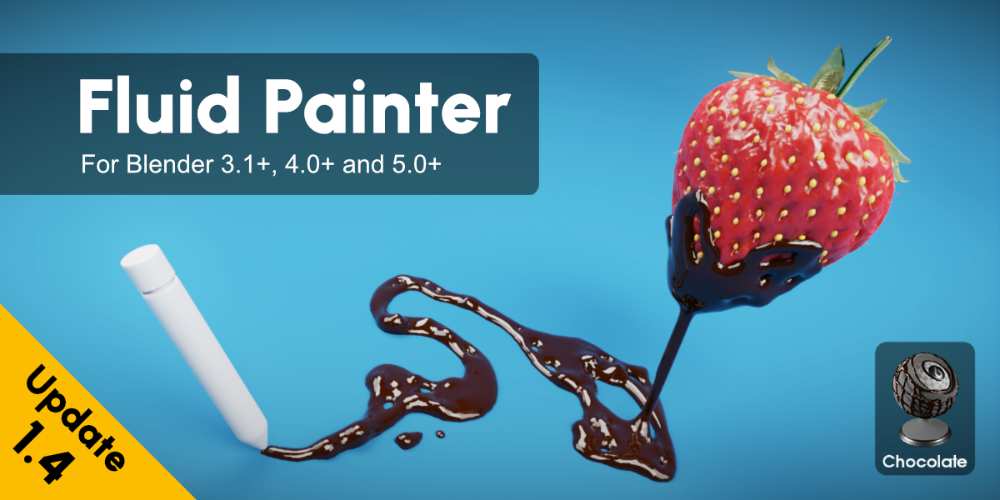
Fluid Painter 1.4.2 for Blender Full Version Free Download
Fluid Painter 1.4.2 is a Blender add-on by Mk3dLab that lets you create stylized and viscous-looking fluids by simply drawing curves directly onto 3D surfaces. It uses Geometry Nodes rather than traditional fluid simulation, making it much faster and more art-directable for things such as honey, chocolate, syrup, glaze, slime, oil, mud, soap, and dripping liquids.
The big advantage is straightforward: you draw where you want the fluid, instead of simulating where the fluid happens to go.
What is Fluid Painter?
Fluid Painter is essentially a 3D fluid painting system.
You select a fluid preset, draw a curve over your model, and the add-on generates the fluid geometry along that path.
It is useful for:
- Food visualization
- Product visualization
- Advertisement renders
- Material studies
- Stylized VFX
- Motion graphics
- Liquid effects
- Character/environment detailing
The current marketplace listing describes it as a Geometry Nodes-based tool that can paint fluids over 3D surfaces using curves.
Geometry Nodes Instead of Traditional Fluid Simulation
This distinction is important.
Fluid Painter is not trying to replace Blender’s Mantaflow simulation system.
It generates fluid-like geometry procedurally from curves. That makes it much easier to art-direct and generally much faster for static or controlled effects than running a full fluid simulation.
So if you want:
“Put honey exactly here and make it drip down this pancake.”
Fluid Painter is excellent.
If you want:
“Pour 20 litres of water into a container and simulate the splash.”
Use an actual fluid simulator instead.
Paint Fluids Directly on 3D Objects
The core workflow is extremely simple.
Select surface → Draw curve → Fluid appears
The curve acts as your painting path, allowing you to manually determine exactly where the fluid should appear.
This makes the tool particularly useful for art-directed product shots where physically accurate simulation isn’t necessary.
30+ Fluid Presets
Fluid Painter includes more than 30 presets, covering a surprisingly broad range of materials.
The current preset library includes:
- Biscuit
- Blood+
- Chocolate Brown
- Chocolate White
- Donut
- Foam
- Glaze
- Glaze+
- Glitter
- Gummy
- Honey
- Honey+
- Ketchup
- Lube
- Maple Syrup
- Maple Syrup+
- Mayo
- Metal Gold
- Metal Silver
- Milk
- Milk+
- Mud+
- Mustard
- Crude Oil+
- Oil
- Slime
- Glowing Slime
- Soap
- Soap+
- Water Drops
- Animated Water Drops
- Water+
- Wax
That makes it much more than a “water” tool.
Fluid vs Fluid+ Presets
Fluid Painter has two major preset types.
Fluid
Regular Fluid presets are designed for general-purpose fluid painting.
They can:
- Draw over 3D surfaces
- Create fluid leaks
- Follow drawn curves
- Generate dripping effects
They don’t require you to assign a specific drawing surface.
Fluid+
Fluid+ presets are designed for fluids that should conform closely to a particular surface.
They:
- Flatten onto the drawing surface
- Adapt to the assigned surface
- Require a drawing object
- Provide additional surface-oriented controls
This is particularly useful for things like icing, glaze, sauce, mud, paint, or liquid coating a product.
Drop System
Fluid Painter includes a dedicated Drop System for creating droplets along the fluid path.
You can control:
- Drop size
- Drop length
- Drop curvature
- Drop position
- Drop movement
This lets you create the appearance of fluid slowly running or dripping down a surface.
Animated Drops
The drop system isn’t purely static.
It includes:
- Drop Loop
- Streaming start/stop
- Movement randomization
- Speed randomization
This allows you to create looping or continuously moving drops without setting up a full fluid simulation.
Non-Repetitive Drop Animation
The newer drop controls include randomization for movement and speed.
That’s important because perfectly synchronized drops look fake as hell.
Randomized timing and movement make the result feel more organic while still being procedural.
Scattering Objects Inside the Fluid
Fluid Painter can also add layers of spheres or cylinders inside or over the fluid.
These can be used to simulate things such as:
- Air bubbles
- Sugar particles
- Embedded particles
- Small surface details
This is a nice additional realism layer, particularly for food and material visualization.
Stick Fluids to Animated Objects
One particularly useful feature is the ability to stick fluids to animated objects.
This means the generated fluid can remain attached to objects that are:
- Rigged
- Animated
- Simulated
- Deforming
That opens up more interesting applications than simply putting static honey on a pancake.
For example:
Animated character/object → Fluid attached to surface → Surface moves → Fluid follows
Create Your Own Fluids
You aren’t restricted to the included presets.
Fluid Painter provides default presets that can be modified to create custom fluid materials and appearances.
So the included honey, chocolate, oil, slime, etc. are starting points rather than hard-coded effects.
Viewport and Render Resolution
Version 1.4.1 introduced separate Viewport Resolution and Render Resolution controls.
That’s useful because you can keep the viewport relatively lightweight while generating a higher-resolution result for the final render.
This is particularly useful when working with:
- Dense fluid geometry
- 4K renders
- Complex surfaces
- Multiple fluid layers
String Slack
The Fluid String feature also gained a String Slack control in version 1.4.1.
This provides additional control over the behavior and appearance of string-like fluid formations.
Blender 5.2 Support
The 1.4.2 update specifically adds full compatibility with Blender 5.2.
The current marketplace listing indicates compatibility from Blender 3.1 through 5.2, with both Cycles and Eevee supported.
Export to Other 3D Software
Fluid Painter isn’t locked to Blender.
Once you’re satisfied with the fluid, you can convert it to mesh and export it to another 3D application.
That makes it useful in pipelines involving:
- Cinema 4D
- Houdini
- 3ds Max
- Maya
- Unreal Engine
- Other mesh-compatible applications
The procedural part happens in Blender, but the resulting geometry can leave Blender.
Cycles and Eevee
Fluid Painter supports both:
- Cycles
- Eevee
This is important because you can use it for both high-quality final rendering and faster interactive workflows.
Best Use Cases
Food Visualization
This is probably one of the strongest use cases.
Imagine:
- Honey dripping over pancakes
- Chocolate coating a dessert
- Maple syrup running down waffles
- Ketchup over food
- Mayo spread over a product
- Glaze covering a donut
These are exactly the kinds of shots where physically simulating the liquid would be overkill.
Product Advertising
Fluid Painter is excellent for creating controlled liquid effects around products.
For example:
Bottle + honey → art-directed honey flow
Cosmetic product + cream → controlled cream coating
Food product + sauce → precisely placed sauce
Stylized VFX
The procedural approach is also useful for:
- Slime
- Goo
- Mud
- Wax
- Oil
- Magical liquids
- Abstract fluid effects
Motion Graphics
Because you control the path directly, it works nicely for art-directed motion graphics where the fluid needs to follow a very specific design.
What Fluid Painter Is NOT
This is the most important caveat.
Fluid Painter is not a physically accurate fluid simulator.
It is not the tool I’d choose for:
- Large water splashes
- Ocean simulations
- Complex liquid interactions
- Breaking waves
- Fluid collisions
- Multi-layer fluid dynamics
- Realistic pouring simulations
For those situations, Blender’s native fluid tools or dedicated fluid simulation software are more appropriate. A third-party comparison of the tool also specifically notes that it excels with viscous fluids and isn’t intended for thin, splashy liquids or complex fluid animation.
Workflow Benefits
Fluid Painter provides:
- Curve-based fluid painting
- Geometry Nodes workflow
- 30+ presets
- Fluid and Fluid+ systems
- Dripping system
- Animated drops
- Drop loops
- Drop randomization
- Streaming controls
- Scattered bubbles/particles
- Surface-conforming fluids
- Animated-object attachment
- Custom fluid creation
- Viewport/render resolution controls
- Mesh conversion
- Export workflow
- Cycles support
- Eevee support
Who Should Use Fluid Painter?
Blender Generalists
Very useful when you need attractive fluid effects without becoming a fluid-simulation specialist.
Product Visualization Artists
Probably one of the best audiences for this add-on.
Food Artists
The honey, chocolate, glaze, syrup, ketchup, milk, and similar presets make it particularly useful.
Motion Designers
Good for controlled, stylized liquid animation.
VFX Artists
Useful for art-directed viscous effects, but not as a replacement for serious fluid simulation.
Compatibility
Fluid Painter 1.4.2 adds full Blender 5.2 compatibility. The current Superhive listing shows support for Blender 3.1 through 5.2 and both Cycles and Eevee. The add-on is GPL licensed.
The marketplace currently lists the product at $10 and shows more than 6,000 sales.
Fluid Painter official Superhive page
Final Thoughts
Fluid Painter 1.4.2 is a very practical Blender add-on because it doesn’t try to solve the wrong problem.
It’s not about physically simulating every molecule of liquid. It’s about letting you say:
“I want the fluid exactly here, flowing exactly this way.”
And then drawing it.
For honey, chocolate, syrup, glaze, slime, mud, oil, wax, soap, and other viscous fluids, that’s often a much better production workflow than setting up a full simulation. You get direct artistic control, quick iteration, reusable presets, and animation capabilities without the usual simulation headache.
For serious splashy water simulation, though, don’t confuse this with Mantaflow or a dedicated fluid solver. Fluid Painter is an art-direction tool, not a physics simulator.
- Fluid Painter Blender
- Fluid Painter 1.4.2
- Blender Fluid Addon
- Blender Liquid Addon
- Blender Fluid Painting
- Blender Honey Effect
- Blender Chocolate Effect
- Blender Syrup Effect
- Blender Liquid Surface
- Blender Geometry Nodes Fluid
- Blender Dripping Liquid
- Blender Viscous Fluid
- Blender Product Visualization
- Blender Food Visualization
- Blender Fluid Animation
- Blender Liquid Effects
- Blender Fluid Presets
- Mk3dLab Fluid Painter
Fluid Painter 1.4.2 for Blender Full Version Free Download
https://zeroupload.com/a8cba8ffc0bb37477fbe1ecdd46ac8bd
https://buzzheavier.com/isj5y3qcnv7i
https://pixeldrain.com/u/NcC43BXM
https://filekeeper.net/h7vud70exbni/FluidPainter1.4.2_DownloadPirate.com.rar
Those who sell pirated content are losers.
If you're paying for pirated content, you're the biggest loser.
Please read the FAQ if you need basic help.
Use VPN &
FDM if you have download problems.