Palettegrid 1.3 for Blender Full Version Free Download
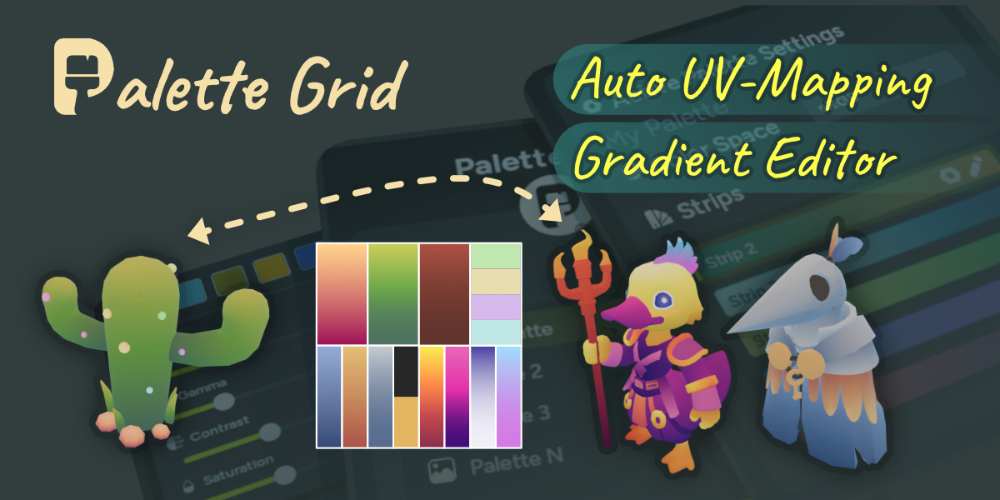
PaletteGrid 1.3 is a Blender addon designed around palette-based and gradient texturing, with the goal of making stylized 3D texturing faster and far less dependent on tedious manual UV editing. It lets you create palette textures, edit colours and gradients directly inside Blender, and map those palettes onto selected faces using several different projection methods.
The main idea is simple: instead of giving every asset its own large texture, you can use a compact palette containing flat colours and gradients, then control how different parts of the model use those palette strips.
What is PaletteGrid?
PaletteGrid is built around gradient texturing, a technique that uses small palette textures containing organized colour strips.
The addon handles the annoying parts of that workflow. You can create the palette directly inside Blender, edit its colours, select strips visually and automatically position UVs onto them.
So instead of:
Create palette in Photoshop → Export PNG → Import into Blender → UV unwrap → Move UVs → Scale UVs → Align UVs
you can do most of the process directly inside Blender.
That is the real selling point.
Creating Palette Textures
PaletteGrid lets you create a palette from scratch inside Blender.
When creating a palette, you can choose the texture resolution, number of rows and columns, strip orientation and whether the strips contain flat colours or gradients. The available texture presets range from small textures through 4K, with custom resolutions also supported.
You can therefore build something as simple as a small colour palette or create a much more elaborate collection of gradient strips for an entire stylized asset library.
Live Gradient Editing
Once the palette exists, you can edit its colours directly in Blender.
Gradient stops can be moved visually on the palette texture, while controls for hue, gamma, contrast and saturation allow you to adjust the overall appearance. The changes are applied non-destructively at render time.
This makes look development considerably faster.
You can experiment with the character’s colour scheme, for example, without opening an external image editor, repainting the palette and importing another texture.
One-Click UV Snap
The most useful feature is probably UV Snap.
Select faces on your model, choose a palette strip and tell PaletteGrid to snap the UVs to that strip. The addon automatically creates and positions the UVs, even if the mesh doesn’t already have a UV map.
This is especially useful when many faces need to use the same colour or gradient.
Instead of manually moving UV islands onto a specific row of a palette texture, you simply select the faces and choose the strip.
Project From View
PaletteGrid also includes Project From View, which projects the selected gradient from the current viewport angle.
This is useful when you want a gradient to follow the visible orientation of an object. The addon provides options for projection mode, direction, margins and merging multiple objects.
It can work particularly well for stylized lighting effects, rim-like gradients and directional colour transitions.
You essentially frame the object from the desired angle, select the gradient strip and project it.
Gradient Path
For curved and organic objects, PaletteGrid provides a Gradient Path system.
You can draw a path across the model and have the gradient follow that path. This is particularly useful for things such as tentacles, vines, tree trunks, spirals and other geometry where a simple planar projection would be awkward.
The addon can also detect rough geometric gestures. A rough line or circle can be interpreted as a cleaner shape that you can then adjust before applying it.
That makes the system feel more like a visual design tool than conventional UV editing.
Radial Snap
Radial Snap handles another type of gradient that is annoying to create manually.
You position the 3D cursor where you want the gradient’s centre to be, then PaletteGrid maps the gradient outward based on surface distance.
This works particularly well for:
- Spheres
- Domes
- Shields
- Energy effects
- Orbs
- Stylized lighting
Moving the 3D cursor changes the centre of the gradient, giving you a quick way to experiment with different looks.
Multiple Palettes
PaletteGrid supports multiple palettes within a single .blend file.
Different objects can reference different palette textures, allowing you to maintain separate colour systems inside the same scene.
This is useful for larger projects where characters, environments and props may each require different palettes.
It also makes palette-driven asset libraries easier to manage.
Copy and Paste Strips
Individual strips can be copied and pasted between palette slots or even between different palettes.
The addon supports keyboard shortcuts, hover-based copying and context menus.
This is a small feature, but it becomes useful when you’ve already built a good palette and want to reuse parts of it elsewhere.
Palette Import and Export
PaletteGrid has its own palette data format that can be imported and exported as JSON.
The .pgridpalette data stores information such as strip metadata and gradient-stop positions, allowing the palette to be reconstructed and edited inside PaletteGrid rather than being treated as nothing more than a flat PNG.
At the same time, the actual palette texture is a standard PNG, so the resulting texture isn’t locked to the addon.
That distinction is important for game-art workflows.
Game Development
PaletteGrid is particularly well suited to stylized game art.
The technique behind it is based on using very small palette textures instead of giving every asset a large unique texture. The developer specifically positions PaletteGrid toward stylized, low-poly and mobile-optimized workflows where texture memory and draw calls matter.
The resulting PNG palette can be exported alongside the model and used in Unity, Unreal Engine, Godot or another engine.
That makes the addon useful beyond Blender itself.
Texture Efficiency
One of the main benefits of palette texturing is that you can achieve a surprisingly broad visual range from a very small texture.
The developer claims that replacing unique high-resolution textures with a shared 128px palette can reduce texture memory usage by more than 95% per asset in suitable workflows.
Obviously, the exact savings depend on the assets and pipeline, but the underlying concept is sound: a tiny shared palette can be dramatically cheaper than maintaining large unique textures for every asset.
Stylized Art
PaletteGrid is especially interesting for low-poly and stylized rendering.
Instead of relying entirely on physically based textures, you can deliberately construct a limited colour language and use gradients to create controlled transitions across the model.
That works well for:
Low-poly characters → Stylized props → Game environments → Mobile assets → Hand-painted-looking 3D
The result can have a very deliberate visual identity while keeping the texture pipeline lightweight.
Existing UV Maps
PaletteGrid doesn’t require you to throw away an existing UV workflow.
It can work with existing UV maps, while also being able to generate UVs for meshes that don’t have them.
This makes it more flexible for artists who already have assets and want to introduce palette texturing without completely rebuilding them.
One Palette Across an Asset Library
One particularly interesting use is creating a shared palette for an entire collection of assets.
Imagine a stylized game where dozens of props need to share the same colour language.
Instead of creating separate textures for every object, you can build a common palette and map different parts of each model to the appropriate strips.
Change the palette and the appearance of the entire asset set can shift together.
That can be extremely useful for rapid art-direction changes.
Workflow
A typical PaletteGrid workflow is straightforward:
Create Palette → Design Colours → Select Faces → Choose Strip → Snap or Project UVs → Adjust Palette → Export
The important part is that you don’t have to constantly jump between Blender and Photoshop or manually manipulate UV islands.
Everything happens within the Blender workflow.
Who Should Use PaletteGrid?
Stylized game artists are probably the strongest target audience. The combination of tiny palette textures, fast UV placement and reusable colour systems fits very well with optimized game-art pipelines.
Low-poly artists can also benefit because the palette approach complements intentionally simple geometry and controlled colour schemes.
Character artists may find Gradient Path and Radial Snap particularly useful for adding controlled colour transitions without painting large texture maps.
Environment and prop artists can use shared palettes to keep an entire collection visually consistent.
For purely photorealistic PBR work, however, PaletteGrid is much less compelling. It is clearly designed around a different philosophy.
PaletteGrid vs Manual UV Workflow
The difference is mainly speed.
A traditional workflow might involve creating a palette externally, importing it, unwrapping the model, moving UV islands to individual palette strips and repeatedly adjusting their scale and position.
PaletteGrid turns much of that into a visual selection process.
Select faces → select strip → snap.
For gradient mapping, you can instead use the viewport projection, path or radial tools depending on the geometry.
That’s where the addon earns its money.
Compatibility
The current Superhive listing specifies support for Blender 4.2 through Blender 5.1. PaletteGrid is Blender Extension compatible and is distributed under the GPL licence.
The current Individual licence is listed at $25, although Superhive currently shows a discounted price of $21. Studio and larger team licences are also available. The listing states that the Individual licence includes lifetime updates.
The addon currently has more than 1,000 sales on Superhive.
One thing worth mentioning is that the current community rating is 4/5 from six ratings, and at least one reviewer reported crashes during normal use. That’s a small sample, but if you’re considering buying it, I’d keep autosaves enabled and test the addon against your Blender version before committing it to an important production.
Final Thoughts
PaletteGrid 1.3 is a very focused Blender addon, but the workflow it targets is genuinely useful.
Its biggest strength isn’t simply creating colour palettes. Blender can already do that. The useful part is connecting the palette to UV placement and gradient mapping so that the entire process becomes visual and fast.
The combination of one-click UV snapping, viewport projection, Gradient Path, Radial Snap, live palette editing and reusable palette data makes gradient texturing considerably less tedious.
It’s particularly compelling for stylized game art and low-poly workflows, where small shared textures and consistent colour palettes can provide both visual control and technical efficiency.
For a photorealistic character artist using 4K PBR textures everywhere, this probably isn’t something you’ll urgently need.
For someone building a stylized game-art pipeline, though, PaletteGrid is a smart little tool. It turns what is normally a fiddly combination of palette creation + UV editing + gradient mapping into one coherent Blender workflow.
Bottom line: PaletteGrid isn’t trying to replace Substance Painter or Blender’s entire texturing system. It is doing something much more specific, and for palette-driven stylized 3D, it does that very well.
PaletteGrid Blender, PaletteGrid 1.3, Blender palette texturing, Blender gradient texturing, Blender stylized texturing, Blender palette texture addon, Blender UV mapping addon, Blender gradient UV mapping, Blender low poly texturing, Blender game art texturing, Blender stylized game assets, Blender gradient editor, Blender palette workflow, Blender UV snapping, Blender texture optimization, Blender game development
Palettegrid 1.3 for Blender Full Version Free Download
https://zeroupload.com/d846d06086363157dcd0fb8b6081d7d4
https://buzzheavier.com/olfb2d8segw5
https://pixeldrain.com/u/uocUXhEV
https://filekeeper.net/fryw174eyv1f/PaletteGrid1.3_DownloadPirate.com.zip