RadialZ v1.6 Plugin for ZBrush Full Version Free Download
Working with a large collection of brushes in ZBrush can involve repeatedly opening menus, searching through folders, and remembering where individual brushes are stored. RadialZ v1.6 is a workflow utility designed to provide quick access to ZBrush brushes through customizable radial menus. It runs alongside ZBrush and connects its brush library with configurable shortcut-driven menus.
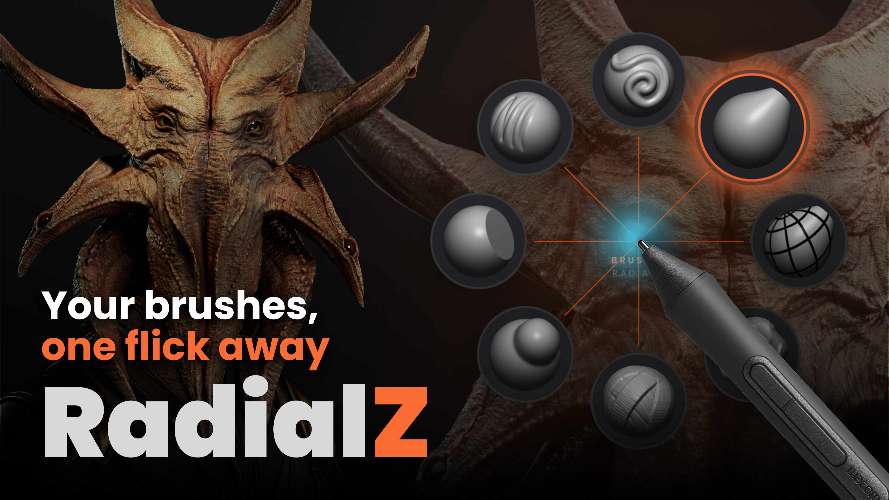
RadialZ is designed around a simple concept: organize frequently used ZBrush brushes into radial menus and access them through keyboard shortcuts. The software can scan a brush library, display brush thumbnails, and assign brushes to menu positions. This provides an alternative to repeatedly navigating ZBrush’s standard brush selection interface.
What Is RadialZ for ZBrush?
RadialZ is a companion application for ZBrush that creates customizable radial menus for accessing brushes. Users can create menus, assign brushes to individual positions, and trigger those menus with their own hotkeys.
The application includes a brush library that can be synchronized with ZBrush brush folders. Once the library has been synchronized, brushes can be organized into radial menus according to the user’s preferred workflow. Custom brush folders are also supported, allowing the library to be built from a selected folder on any drive.
Customizable Radial Brush Menus
The central feature of RadialZ is its radial menu system. Instead of browsing through a long list of brushes, users can organize commonly used tools around a circular menu and access them through a dedicated shortcut.
Each radial menu can have its own trigger hotkey. This makes it possible to create separate menus for different categories of brushes or different stages of a sculpting workflow.
For example, a user can organize sculpting brushes into one menu and create another menu for detailing or surface work. The actual organization is determined by the user’s own brush collection and preferred workflow.
Sync Your ZBrush Brush Library
RadialZ includes a library synchronization function that scans the configured brush location and brings the available brushes into its interface. The application can also work with custom brush folders.
The official documentation explains that choosing a custom folder establishes the location, while Sync Library rebuilds the RadialZ library from that location. This means brushes can be managed outside the default ZBrush brush folder structure as well.
Brush files accessed during synchronization are used for thumbnail display within the RadialZ interface. The developer also states that RadialZ is an independent tool and is not affiliated with or endorsed by Maxon.
Keyboard Shortcut Workflow
RadialZ is designed around quick keyboard access. A radial menu can be assigned its own trigger key, allowing users to open a specific brush menu without navigating through multiple interface panels.
The application also uses a bridge hotkey to communicate brush selections back to ZBrush. The official setup guide recommends using an F-key such as F8 and assigning the same key to the RadialZ Load Brush function in ZBrush. The hotkey then needs to be stored through ZBrush’s Preferences > Hotkeys > Store system.
This setup allows the selected brush from RadialZ to be loaded directly into ZBrush.
Support for Multiple ZBrush Versions
RadialZ supports ZBrush 2022 through ZBrush 2026 according to its current documentation. ZBrush 2026 and newer versions use automatic setup, while ZBrush 2022 through 2025 provide a one-click bridge installation through RadialZ’s ZBrush Setup section.
This version-aware setup is intended to simplify installation across different ZBrush installations.
Organize Brushes Around Your Workflow
A large brush library can contain hundreds of brushes, but only a smaller group may be used regularly during a particular project. RadialZ allows users to build custom menus around the brushes they actually use.
Because users can create their own radial menu configurations and brush assignments, the organization can be adapted to different sculpting workflows. The software’s licence terms also specify that users retain ownership of the radial menu configurations, brush assignments, and presets they create.
Automatic Updates
RadialZ includes a built-in update system. Individual licences include updates within the v1.x major version, with updates delivered automatically through the application. Future major versions may require a separate purchase or upgrade.
The licensing system also allows an individual licence to be installed on up to two machines, while a separate studio licence supports up to 15 authorized users. Personal and commercial use, including client work, is permitted under the individual licence terms.
Key Features of RadialZ
- Customizable radial menus for ZBrush brushes
- Dedicated hotkeys for individual radial menus
- Brush library synchronization
- Support for custom brush folders
- Brush thumbnail display
- Bridge between RadialZ and ZBrush
- ZBrush 2022 through 2026 support
- Automatic setup for ZBrush 2026 and newer
- One-click bridge installation for supported older ZBrush versions
- Custom brush assignments and menu configurations
- Built-in automatic updates for v1.x
- Individual licence support for up to two machines
- Personal and commercial use
Conclusion
RadialZ v1.6 is a ZBrush workflow utility built around customizable radial brush menus. By combining a synchronized brush library, keyboard-triggered menus, brush thumbnails, and a bridge to ZBrush, it provides a dedicated way to organize and access brushes.
Its support for custom brush folders allows users to structure their libraries according to their own setup, while configurable radial menus can separate brushes according to different workflows. Support for ZBrush 2022 through 2026 and automatic v1.x updates further defines its current software ecosystem.
RadialZ ZBrush, RadialZ plugin, ZBrush radial menu, ZBrush brush manager, ZBrush brush library, ZBrush brush shortcuts, ZBrush workflow plugin
RadialZ v1.6 Plugin for ZBrush Full Version Free Download
https://zeroupload.com/5b5d41443dd746fde1259686f7b0565a
https://buzzheavier.com/p09qenza73cl
https://pixeldrain.com/u/ohFUimy7
https://filekeeper.net/n108ppwtqdbn/ZbrushRadialZ1.6_DownloadPirate.com.rar