AEScripts MagicMorphing v1.0 Script for After Effects WIN/MAC Full Version Free Download
Shape morphing in Adobe After Effects can produce unwanted twisting when the path vertices of different keyframes do not follow the same order, direction, or starting point. AEScripts MagicMorphing v1.0 is a script designed to correct these path-matching problems automatically, helping create smoother and more accurate shape morphing animations.
Developed by Aref Nashawi, MagicMorphing provides a compact panel inside After Effects where users can select path keyframes and automatically align their vertices. The tool is designed to preserve existing keyframe timing and easing while correcting the underlying point order used during the morph.
What Is AEScripts MagicMorphing?
AEScripts MagicMorphing v1.0 is an After Effects script for correcting shape morphing transitions. Its main function is to automatically align path vertices between selected keyframes.
When two shapes have different vertex arrangements, After Effects can sometimes interpolate between corresponding points in an undesirable way. This can cause a shape to twist, rotate unexpectedly, or travel along an unnatural path during the transition.
MagicMorphing addresses this by aligning the point order, path direction, and first vertex between the selected keyframes.
Fix Twisted Shape Morphing
The primary purpose of MagicMorphing is to resolve unwanted twisting during shape transitions.
The script does not simply create a new animation from scratch. Instead, it works with existing path keyframes and corrects how their vertices correspond to one another. This allows the shapes to retain their existing animation structure while improving the transition between them.
The official product page demonstrates this with a shape transition in which the original point matching causes a twisted movement. After running MagicMorphing, the point order, direction, and starting point are aligned so that the transition follows a more appropriate route.
Preserve Existing Timing and Easing
One important aspect of MagicMorphing is that it is designed to preserve the animation work already created.
After selecting the relevant path keyframes, the script aligns the path points without changing the keyframe timing or easing. This means users can correct the path relationship without having to rebuild the timing of the animation.
This workflow is useful when the timing and motion curve are already established but the shape itself is taking an undesirable route during interpolation.
How MagicMorphing Works
The workflow is straightforward. Users first select at least two keyframes on a Path property. Selecting only the layer is not sufficient.
After selecting the keyframes, the user clicks the MAGIC button. MagicMorphing then aligns the point order, path direction, and starting point between the selected keyframes.
The resulting transition can then be previewed directly in After Effects to evaluate how the shapes move between the keyframes.
This makes the process a three-step workflow:
- Select the path keyframes.
- Click MAGIC.
- Preview the resulting transition.
Complex Path Mode
MagicMorphing includes a Complex Path option for shapes with more detailed contours.
The standard mode prioritizes keeping the number of points relatively low and adds missing points when necessary to match the selected shapes. Complex Path mode uses denser contour matching and can increase the number of vertices in the path.
This provides two approaches depending on the complexity of the shapes being morphed. Standard mode can be used for simpler paths, while Complex Path can be enabled when more detailed contours require additional matching points.
The Complex Path option adds vertices to the existing path rather than creating additional Path properties or layers.
Undo Previous Magic Operations
MagicMorphing also includes an Undo function within its panel.
After a successful MAGIC operation, the script saves the relevant path values and point counts. The Undo control can then restore the original path values and point counts from that operation.
The available undo history remains accessible during the current panel session, although later edits to the affected keyframes can prevent the previous state from being restored.
Supported Paths
MagicMorphing supports animated Bezier shape paths and supported mask paths. Users must select keyframes directly on the Path property.
The selected keyframes also need to be consistently open or consistently closed. Feathered masks are not supported.
Because the script works with the actual path structure, checking the selected path and its keyframes before running MAGIC is an important part of the workflow.
Compact After Effects Panel
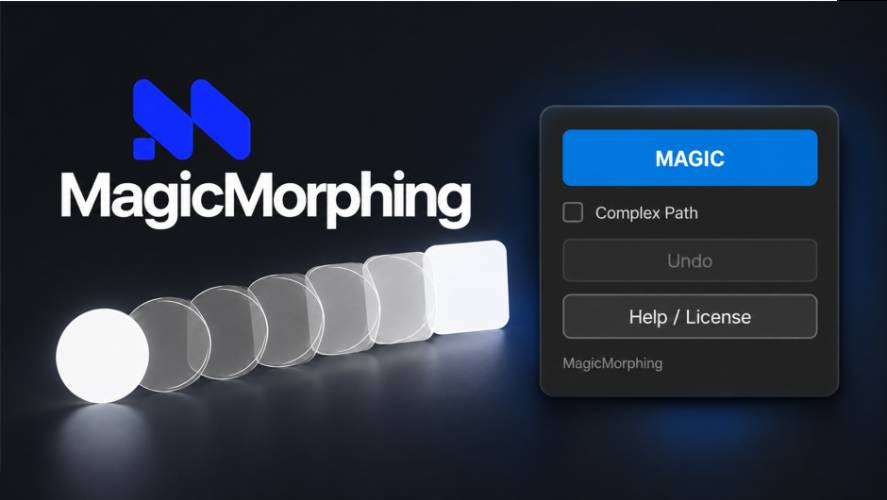
MagicMorphing runs directly inside Adobe After Effects through a compact floating extension panel. After installing the ZXP, users can access it through Window > Extensions > MagicMorphing.
The panel contains the primary MAGIC function alongside the Complex Path option, Undo, and Help / License controls. This keeps the main morphing workflow accessible without requiring a separate application.
Compatibility With Adobe After Effects
AEScripts MagicMorphing v1.0 supports a wide range of Adobe After Effects versions. The official product page lists compatibility with After Effects CC 2019, 2020, 2021, 2022, 2023, 2024, 2025, 2026, and 2027.
Version 1.0 is the initial release, dated October 1, 2026. The release includes one-click shape morphing correction, automatic path vertex alignment, complex path support, the aescripts licensing framework, trial limitations, and Help / License controls.
For complete product information and the latest version, visit the official AEScripts MagicMorphing product page.
Key Features of AEScripts MagicMorphing
- One-click shape morphing correction
- Automatic alignment of path vertices
- Corrects point order between keyframes
- Aligns path direction and first vertex
- Helps eliminate unwanted twisting during morphing
- Preserves existing keyframe timing
- Preserves existing easing
- Complex Path mode for detailed contours
- Automatic addition of missing vertices when required
- Undo function for previous successful MAGIC operations
- Supports animated Bezier shape paths
- Supports supported mask paths
- Compact floating After Effects panel
- Compatible with After Effects CC 2019 through 2027
- Trial mode available
Conclusion
AEScripts MagicMorphing v1.0 is a specialized After Effects script for correcting problematic shape morphing transitions. Its primary function is to align path vertices, point order, path direction, and starting points between keyframes so that shapes can transition without the unwanted twisting that can occur with mismatched path structures.
The script is designed to preserve existing timing and easing, allowing users to correct the underlying path relationship without rebuilding the animation. Its Complex Path mode provides additional control for detailed contours, while the built-in Undo function allows previous successful operations to be restored during the current panel session.
MagicMorphing After Effects, AEScripts MagicMorphing, After Effects shape morphing, After Effects morphing script, After Effects path alignment, After Effects vertex matching, shape morphing animation
AEScripts MagicMorphing v1.0 Script for After Effects WIN/MAC Full Version Free Download
https://zeroupload.com/de652044644cfd7f7a9c10e12b246af1
https://pixeldrain.com/u/eofK8Bm9
https://filekeeper.net/sy2nrb18iq17/MagicMorphing1.0_DownloadPirate.com.zip