AEScripts Fractal Noise Browser v1.2.1 Script for After Effects Full Version Free Download
AD
Fractal Noise and Turbulent Noise are among the most versatile procedural effects in Adobe After Effects, but discovering useful combinations of their many settings can take considerable experimentation. AEScripts Fractal Noise Browser v1.2.1 is designed to make that process more visual and efficient by providing a searchable library of curated presets with thumbnails and animated previews.
Instead of starting with a blank Fractal Noise effect and adjusting parameters one by one, artists can browse a collection of ready-made looks, preview their behaviour, and apply a selected preset directly to the active layer. The tool is particularly useful for creating procedural textures, backgrounds, atmospheric effects, grunge, glitch visuals, and other animated design elements.
What Is Fractal Noise Browser for After Effects?
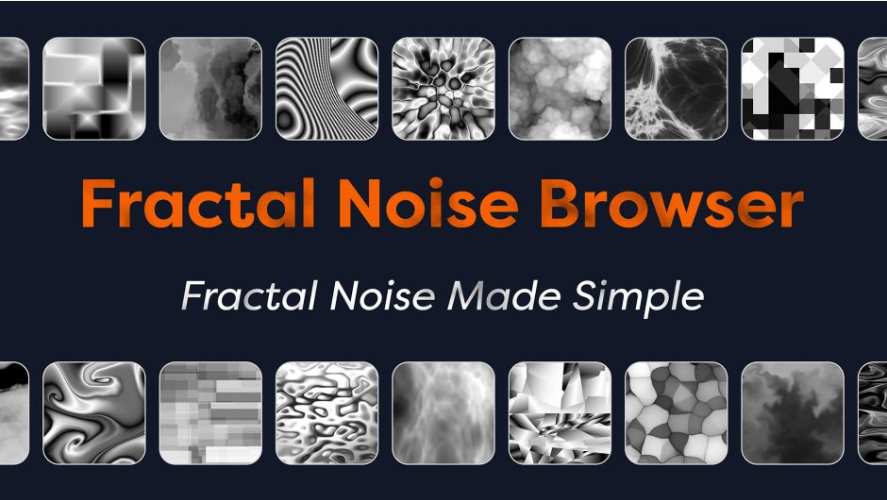
Fractal Noise Browser is a ScriptUI panel for Adobe After Effects that provides a visual browser for Fractal Noise and Turbulent Noise presets. The current official product information describes a library of more than 250 curated presets arranged into nine categories.
The categories include Atmospheric, Fluid, Glitch, Granular, Grunge, Organic, Striped, Terrain, and Stylistic looks. This gives artists a way to approach procedural textures visually instead of relying on technical parameter names.
For the complete product details and latest official release information, visit the official AEScripts Fractal Noise Browser page.
Browse Presets with Visual Previews
The browser is built around visual discovery. Each preset can be represented by a thumbnail, while animated previews show how the procedural pattern behaves over time.
This is useful because a noise texture that looks appropriate in a static thumbnail may behave very differently when its Evolution or other properties are animated. Previewing the motion makes it easier to choose a starting point for an animation.
Presets can be applied by double-clicking them or by selecting a preset and pressing the Apply button.
Fractal Noise and Turbulent Noise Support
Fractal Noise Browser works with both Fractal Noise and Turbulent Noise, allowing artists to choose which underlying After Effects effect should be used when a preset supports both.
The browser identifies compatible presets with badges, making it easier to understand which noise type can be used. This flexibility also means the same general visual idea can be explored through different procedural implementations.
Fractal Noise has the additional advantage of supporting seamless looping and GPU acceleration, making it particularly useful for animated textures and repeating backgrounds.
Randomize Seeds for Variations
The browser includes a Randomize Seed option that can create fresh variations from the same preset.
This is useful when a preset has the right overall structure but needs to look slightly different from one project or layer to another. Instead of manually changing parameters, artists can regenerate the underlying random pattern while retaining the preset’s general characteristics.
For repeated elements, this can help prevent identical textures from appearing throughout a composition.
Animate and Loop Procedural Textures
Fractal Noise Browser provides built-in options for Evolution animation. Artists can add an expression to animate the Evolution parameter at a selected speed or generate a seamless loop using keyframes.
The looping workflow is particularly useful for backgrounds, moving textures, atmospheric layers, screens, and other assets that need to repeat continuously without an obvious jump.
Because the browser handles the initial animation setup, artists do not need to construct the same expression or keyframe arrangement manually for every preset.
Create Your Own User Presets
The User Presets section allows artists to save their own Fractal Noise and Turbulent Noise configurations and browse them using the same visual workflow as the built-in library.
Custom presets can be organised into folders and subfolders, while thumbnails and video previews can be added to make the collection easier to navigate. This turns Fractal Noise Browser into a personal procedural-texture library rather than a fixed collection of presets.
Custom presets can also be reused across projects, making them valuable for studios and designers who develop a consistent visual language.
Useful for Grunge, Glitch and Organic Effects
The preset categories cover a broad range of production needs. Grunge textures can be used for distressed surfaces, while glitch presets can provide digital patterns and displacement sources. Organic and Fluid collections are suited to smoke-like textures, liquid forms, clouds, and abstract movement.
Terrain presets can also serve as foundations for stylised landscapes or height-like patterns, while Striped and Stylistic categories can provide more graphic results.
The browser therefore works as a starting-point system for many different types of procedural design.
Combine Noise with Other After Effects Effects
Fractal Noise Browser does not need to create the final effect on its own. Its presets can be combined with native After Effects tools such as Colorama, Displacement Map, Compound Blur, and blending modes.
This makes the browser particularly useful as a texture-generation stage. A procedural noise preset can become the source for a colour treatment, displacement, mask, or animated surface rather than simply remaining visible as grayscale noise.
The official product examples demonstrate these combinations across fire, water, grunge, terrain, text, and abstract background effects.
Fast Preset Application
The panel is resizable, dockable, and scrollable, allowing it to remain inside the After Effects workspace while the artist works.
Application settings also provide control over how the browser behaves when a layer already contains a Fractal Noise or Turbulent Noise effect. Artists can replace an existing noise effect or add a new one depending on the workflow.
This makes it easier to experiment rapidly without repeatedly creating and organising noise effects manually.
Fractal Noise Browser v1.2.1
The requested version is v1.2.1. The official AEScripts page currently publicly documents releases through v1.1, including the User Presets section and 52 additional presets. A separate v1.2.1 changelog is not currently exposed in the publicly accessible version history, so specific changes unique to v1.2.1 should not be assumed.
The current product listing shows the browser at $35 and provides a free trial.
Compatibility
AEScripts currently lists Fractal Noise Browser for After Effects 2022, 2023, 2024, 2025, and 2026.
The product is designed specifically for Adobe After Effects and works as a dockable ScriptUI panel within the application.
Who Should Use Fractal Noise Browser?
Fractal Noise Browser is particularly useful for motion designers, VFX artists, title designers, compositors, and After Effects users who frequently rely on procedural textures.
It is especially valuable for artists who want to discover useful noise patterns quickly, create looping backgrounds, build grunge and glitch effects, or maintain a reusable personal library of procedural presets.
Final Thoughts
AEScripts Fractal Noise Browser v1.2.1 provides a visual shortcut for one of After Effects’ most flexible procedural systems. Instead of repeatedly adjusting Fractal Noise or Turbulent Noise parameters from scratch, artists can browse ready-made textures, preview their motion, randomise variations, add animation, and save their own custom presets.
Its usefulness extends beyond simple texture generation. The presets can become sources for colour treatments, displacement, blur, masking, and other effects, making the browser a practical starting point for much larger motion-graphics setups. With a visual library and reusable preset system, it turns procedural noise from a parameter-heavy effect into a much more discoverable creative resource.
AEScripts Fractal Noise Browser, Fractal Noise Browser v1.2.1, After Effects Fractal Noise presets, Fractal Noise presets, Turbulent Noise After Effects, procedural textures After Effects, animated noise After Effects, grunge textures After Effects, glitch textures After Effects, seamless noise loops
AEScripts Fractal Noise Browser v1.2.1 Script for After Effects Full Version Free Download
https://zeroupload.com/1780e34f670bc48dca8f59326fc5fee2
https://buzzheavier.com/nr57mlb1lyr9
https://filekeeper.net/iuovt8498uda/FractalNoiseBrowser1.2.1_DownloadPirate.com.zip
https://pixeldrain.com/u/C9Qwgpmt
Those who sell pirated content are losers.
If you're paying for pirated content, you're the biggest loser.
Please read the FAQ if you need basic help.
Use VPN &
FDM if you have download problems.
AD