AEScripts AiBow Manga Koma v1.0 Script for After Effects Windows Macintosh Full Version Free Download
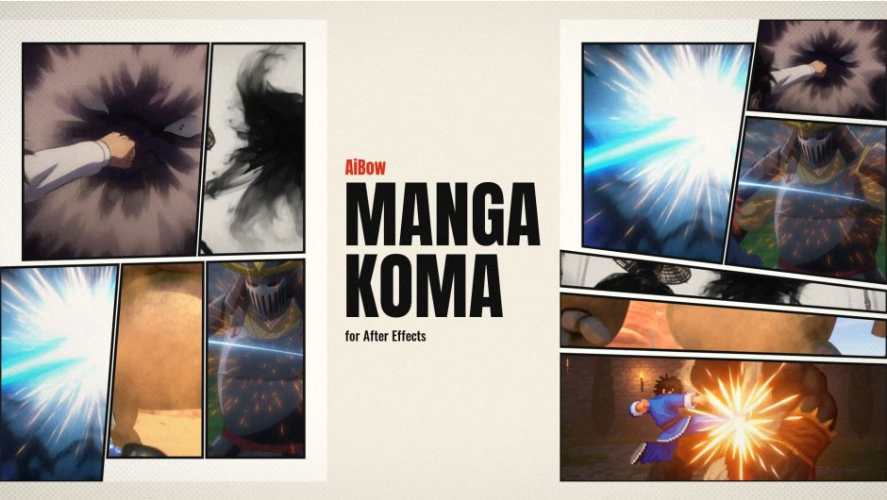
AEScripts AiBow Manga Koma v1.0 is an After Effects script designed to automate the creation of manga-style comic page layouts using existing footage, animations and visual assets. It generates complete comic pages as editable After Effects compositions, automatically arranging selected clips into individual panels according to manga reading order.
Developed by AiBow Tools, the script combines comic panel generation, layout variations, animated panel reveals and camera movements in one workflow. It is particularly useful for motion designers, anime editors, manga creators and artists producing motion comics or manga-inspired social media content.
Instead of manually creating panel masks, positioning footage and drawing frame borders, AiBow Manga Koma generates the entire page structure with a single operation.
What Is AiBow Manga Koma?
AiBow Manga Koma brings the Japanese manga layout technique known as koma-wari into Adobe After Effects.
The script creates comic pages using individual masked precompositions, with each panel containing its own footage. It automatically arranges selected clips in reading order and generates the frame lines above the panels.
The resulting page is not a flattened image. Every panel remains an editable After Effects composition, allowing users to modify the footage, adjust the layout and animate individual elements.
One of its most useful features is the ability to change the layout of an existing page without rebuilding the entire composition. The footage remains in place while the panel masks and frame lines are rearranged.
Key Features of AiBow Manga Koma v1.0
1. Six Manga Layouts in One Click
AiBow Manga Koma generates six different comic page layouts with each click.
Users can experiment with different panel arrangements without manually drawing masks or repositioning individual clips.
The script also includes two layout-generation functions:
- New Batch: Generates six new readable layouts.
- Mutate: Creates six variations of a selected layout.
A Seed control allows users to reproduce a previously generated batch, making it easier to return to a preferred arrangement.
2. Four Different Manga Layout Styles
The script provides four layout styles designed for different storytelling requirements.
- Calm / Dialogue: Uses straight, regular panel arrangements suitable for conversations and slower scenes.
- Standard: Introduces slight panel tilts for a more dynamic composition.
- Action: Uses stronger angles, split panels and panels extending beyond page boundaries.
- Splash / Title: Creates larger panels for dramatic illustrations, important scenes and title presentations.
Additional sliders allow users to adjust row slant, column slant, page bleed, split panels and large panels.
This makes it possible to move beyond fixed templates and create more customised manga layouts.
3. Automatic Manga Reading Order
One of the defining features of AiBow Manga Koma is its support for different reading directions.
Users can choose between:
- Right to Left: The traditional Japanese manga reading direction.
- Left to Right: A layout suitable for Western comics and other reading formats.
When switching between directions, the layout is mirrored automatically.
The script also creates reading-order numbers as guide layers. These numbers help users understand the panel sequence but do not appear in the final render.
4. Editable After Effects Compositions
AiBow Manga Koma creates actual After Effects compositions rather than flattening the generated comic page into a single image.
Each panel consists of a masked precomposition containing its own footage. Frame lines are created using a shape layer, while a separate control null provides adjustments for frame-line width and paper colour.
This structure gives artists control over individual panels and their visual appearance.
Users can also open the panel compositions and modify the underlying footage without rebuilding the page.
5. Change Manga Layouts Without Replacing Footage
The Re-layout feature allows users to apply a different layout to an existing comic page.
When a new layout with the same number of panels is selected, the script updates the panel masks and frame lines while refitting the footage into the new arrangement.
Existing panel reveals and camera tours also follow the new layout.
An important detail is that footage manually moved or scaled by the user is left unchanged during this process.
This feature is particularly useful when experimenting with different storytelling arrangements after the initial page has already been created.
6. Animated Panel Reveals
AiBow Manga Koma includes an Add Panel Reveal function that animates the appearance of individual panels in reading order.
Each panel appears sequentially, while the corresponding frame lines fade into view.
This is useful for creating animated manga presentations, promotional videos, character introductions and storytelling sequences.
Instead of presenting the entire comic page at once, artists can reveal the story panel by panel.
7. Automatic Camera Tour for Motion Comics
The Create Camera Tour feature converts a static manga page into a motion-comic sequence.
With a single click, the script generates a 16:9 composition in which the camera:
- Starts by showing the complete manga page.
- Moves towards the first panel.
- Visits each subsequent panel in reading order.
- Holds on individual panels.
- Returns to the complete page.
The generated camera keyframes remain editable, allowing users to adjust movement, timing and pauses according to their storytelling requirements.
This provides a convenient starting point for creating motion comics without manually animating every camera movement.
8. Multiple Page and Video Formats
The script supports several page dimensions and aspect ratios for different publishing platforms.
Available formats include:
- B5 manga pages.
- A5 manga pages.
- Social media portrait format (4:5).
- Square format.
- Vertical video format (9:16).
- Widescreen video format (16:9).
Users can also adjust frame width and gutter spacing using pixel-based and percentage-based controls.
The generated layout can be saved as an SVG file, providing an additional option for using the panel arrangement outside After Effects.
How to Use AiBow Manga Koma
The basic workflow is straightforward:
- Open the script from Window and select AiBow Manga Koma.
- Choose a layout style, page size and reading direction.
- Generate a batch of six layouts and select the preferred arrangement.
- Select the footage in the After Effects Project panel.
- Click Create Page Comp to generate the comic page.
- Add a Panel Reveal or create a Camera Tour.
- Change the layout later if necessary without rebuilding the footage arrangement.
The generated compositions remain editable throughout the process.
What’s New in AiBow Manga Koma v1.0?
Version 1.0.0 was released on November 12, 2026, marking the initial release of the script.
The first version introduces:
- Automatic manga page generation.
- Six layout variations per batch.
- Four layout styles: Calm, Standard, Action and Splash.
- Right-to-left and left-to-right reading directions.
- Editable panel precompositions and frame lines.
- Automatic footage placement in reading order.
- Re-layout functionality.
- Animated panel reveals.
- Automatic 16:9 camera tours.
- B5, A5, 4:5, square, 9:16 and 16:9 formats.
- SVG layout export.
System Requirements and Compatibility
| Requirement | Details |
|---|---|
| Host application | Adobe After Effects |
| Compatible versions | After Effects 2026 and 2027 |
| Operating system | Windows 10/11 |
| macOS | Not supported in the initial release |
| Script format | ScriptUI panel (ExtendScript) |
| Licensing | Online licence verification |
| Trial | Available |
Important: The initial release is Windows-only. The developer stated on November 13, 2026, that a macOS version was scheduled for release later in November. However, it was not yet listed as supported in the official compatibility information.
The script also requires users to enable Allow Scripts to Write Files and Access Network under After Effects Preferences, in Scripting & Expressions, for online licence verification.
Who Should Use AiBow Manga Koma?
AiBow Manga Koma is designed for artists who want to combine manga-style storytelling with animation and video production.
It can be particularly useful for:
- Anime editors: Create manga-inspired layouts using anime clips and animated footage.
- Motion designers: Produce dynamic comic layouts and animated panel transitions.
- Manga creators: Turn illustrated panels into motion-comic presentations.
- Content creators: Produce vertical manga videos and comic-style social media content.
- Video editors: Create cinematic comic sequences using existing footage.
- Japanese culture enthusiasts: Experiment with traditional manga reading directions and panel arrangements.
Conclusion
AEScripts AiBow Manga Koma v1.0 simplifies manga page creation inside Adobe After Effects. Its automatic panel generation, six-layout batches, four visual styles and support for Japanese reading direction make it a specialised tool for creating comic-inspired compositions.
The ability to animate panel reveals and generate automatic camera tours is particularly interesting for motion-comic production. Since every panel remains an editable composition, users retain control over their footage and page structure rather than working with a flattened result.
For anime editors, manga creators and motion designers interested in Japanese comic aesthetics, AiBow Manga Koma offers a convenient way to transform existing footage into animated manga-style storytelling.
- AEScripts AiBow Manga Koma
- AiBow Manga Koma v1.0
- After Effects manga script
- Manga page generator
- Comic panel layout After Effects
- Motion comic creator
- Anime editing tools
- Japanese manga layout
- Koma-wari After Effects
- Animated comic panels
AEScripts AiBow Manga Koma v1.0 Script for After Effects Windows Macintosh Full Version Free Download
https://zeroupload.com/e499d94c7f656d5afe509efe850164df
https://buzzheavier.com/enk5u5y3x2ck
https://filekeeper.net/4e8z2ytadcwp/AiBowMangaKoma1.0_DownloadPirate.com.zip