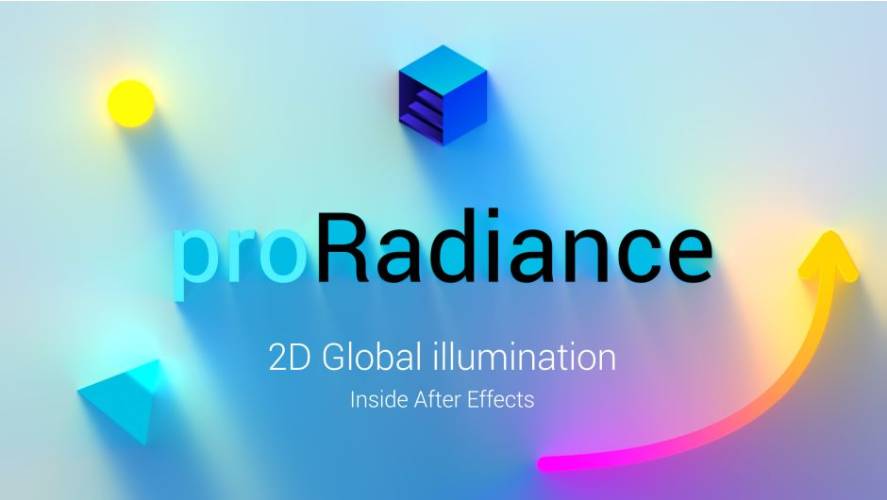
AEScripts proRadiance v1.0 Plugin for After Effects Full Version Free Download
AEScripts proRadiance v1.0 is a global illumination plugin for Adobe After Effects that brings advanced lighting calculations directly into 2D compositions. Powered by Radiance Cascades technology, it simulates how light spreads, reflects and interacts with objects, creating more realistic lighting, colour bleeding and soft shadows.
Developed by irrealix and Ilya Sinitsyn, proRadiance is designed for motion designers, compositors and visual effects artists who want to introduce realistic lighting into their After Effects projects without relying on external 3D rendering applications.
Unlike conventional glow and shadow effects, proRadiance calculates indirect illumination across the composition. This allows objects to influence the lighting of their surroundings, creating a more convincing relationship between light sources, surfaces and shadows.
What Is proRadiance for After Effects?
proRadiance brings Radiance Cascades, a hierarchical lighting technique, into Adobe After Effects.
Traditional 2D compositions often rely on manually created glows, gradients, shadows and light effects to simulate environmental lighting. While these techniques can produce attractive results, they do not automatically reproduce how light interacts with surrounding objects.
proRadiance addresses this limitation by calculating global illumination directly inside After Effects.
The plugin can recognise emissive elements, calculate indirect lighting and produce soft shadows. It updates the lighting every frame, so animated objects and moving lights can influence the environment without requiring precomputed lighting maps or baking.
Key Features of proRadiance v1.0
1. Radiance Cascades Technology
The core technology behind proRadiance is Radiance Cascades, a hierarchical probe-based approach to calculating global illumination.
Instead of relying on conventional ray tracing or path tracing with noisy samples and denoising, it uses radiance intervals to calculate how light travels through the composition.
This approach provides clean, stable lighting without the grain and temporal flickering commonly associated with stochastic rendering techniques.
Radiance Cascades was developed by Alexander Sannikov of Grinding Gear Games.
2. Dynamic Global Illumination
proRadiance recalculates lighting every frame, allowing the illumination to respond to changes in the composition.
When objects move, lights change position or emissive elements animate, the lighting updates automatically.
There is no need to bake lighting or perform a separate precomputation process. This makes the plugin particularly useful for animated scenes where lighting must remain consistent throughout the sequence.
3. Indirect Lighting and Colour Bleeding
One of the most important aspects of global illumination is the interaction between light and surrounding surfaces.
proRadiance allows illuminated objects to influence nearby areas, producing indirect lighting and colour interactions.
For example, a brightly coloured emissive object can influence the appearance of nearby surfaces, helping create a more connected lighting environment.
This is useful for stylised 2D scenes, animated illustrations, atmospheric backgrounds and motion graphics.
4. Realistic Soft Shadows and Penumbra
The plugin calculates soft shadows based on the relationship between objects and light.
Rather than producing a simple hard-edged shadow, proRadiance can generate gradual shadow transitions and realistic penumbra effects.
These soft shadow gradients help create a greater sense of depth and spatial separation in otherwise flat compositions.
5. Multiple Light Sources Without Proportional Rendering Costs
proRadiance uses the Radiance Cascades architecture to reduce the dependence of global illumination performance on the number of light sources.
According to the developer, the computational cost remains largely constant regardless of scene complexity or the number of lights.
This allows artists to experiment with multiple light sources without the traditional performance penalty associated with adding more individual lights to a ray-based lighting system.
6. Emission Threshold Control
Not every bright object in a composition should necessarily emit light.
The Emission Threshold control determines which pixels contribute illumination and which objects simply receive lighting and cast shadows.
This gives artists more control over the lighting behaviour of individual elements.
By adjusting the threshold, users can distinguish between actual light-emitting objects and ordinary surfaces.
7. Sky and Sun Controls
proRadiance includes dedicated controls for creating environmental illumination.
Users can adjust:
- Sky colour
- Sky intensity
- Sun colour
- Sun intensity
- Sun angle
- Sun size
These settings make it possible to establish different lighting atmospheres, from soft ambient illumination to stronger directional sunlight.
The plugin also allows users to work with sky-only lighting or disable both the sky and sun when building a custom lighting setup.
8. Adjustable Render Quality
The plugin includes several quality controls that allow users to balance performance and visual fidelity.
Available settings include:
- Working Resolution: Adjusts the resolution used during lighting calculations.
- Angular Quality: Controls the angular detail of the lighting solution.
- Anti-Aliasing: Helps improve the smoothness of rendered results.
- Cascade Levels: Controls the hierarchical levels used in the lighting calculation.
- Probe Scaling: Adjusts probe distribution and quality.
These controls are useful when switching between faster previews and higher-quality final renders.
9. Adjustment Layer Workflow
proRadiance can be applied to an After Effects adjustment layer, allowing users to introduce global illumination into their compositions without rebuilding the original artwork.
Its main controls include Intensity, Emission Threshold, Sky and Sun settings, and Render Settings.
This provides a straightforward workflow for experimenting with different lighting environments while keeping the original layers editable.
What’s New in proRadiance v1.0?
Version 1.0.0 was released on November 10, 2026, marking the initial release of the plugin.
The first release introduces:
- Radiance Cascades-powered 2D global illumination.
- Dynamic lighting calculations without baking.
- Noise-free lighting without requiring denoising.
- Indirect illumination and colour interaction.
- Physically plausible soft shadows and penumbra.
- Emission Threshold controls.
- Adjustable sky and sun lighting.
- Adaptive quality settings.
- Integration directly into Adobe After Effects.
System Requirements and Compatibility
| Requirement | Details |
|---|---|
| Host application | Adobe After Effects |
| Compatible versions | After Effects 2020, 2021, 2022, 2023, 2024, 2025, 2026 and 2027 |
| Platform | Adobe After Effects plugin |
| Technology | Radiance Cascades |
| Workflow | 2D global illumination |
The official product listing does not specify a detailed minimum GPU or VRAM requirement. Check the developer’s installation documentation for hardware-specific requirements before purchasing.
Who Should Use proRadiance?
proRadiance is intended for artists who want more convincing lighting in 2D compositions without manually creating every shadow, glow and lighting interaction.
It can be particularly useful for:
- Motion designers: Add dynamic global illumination to animated graphics and typography.
- 2D animators: Create more atmospheric scenes with indirect lighting and soft shadows.
- Compositors: Improve the integration of multiple visual elements through consistent lighting.
- Illustrators: Introduce depth and realistic light interaction into layered artwork.
- Visual effects artists: Create lighting effects that respond automatically to moving objects and light sources.
Conclusion
AEScripts proRadiance v1.0 introduces Radiance Cascades-powered global illumination directly into Adobe After Effects. Its ability to calculate dynamic indirect lighting, colour interaction and soft shadows makes it a useful addition to workflows that traditionally depend on manually constructed lighting effects.
The most interesting aspect is its dynamic approach. Lighting updates every frame without baking, while the hierarchical Radiance Cascades architecture aims to maintain consistent performance as the number of light sources increases.
For motion designers and compositors working with layered 2D artwork, proRadiance offers a different approach to lighting inside After Effects, bringing global illumination concepts into a familiar compositing environment.
- AEScripts proRadiance
- proRadiance v1.0
- After Effects global illumination
- Radiance Cascades After Effects
- 2D global illumination plugin
- After Effects lighting effects
- Dynamic indirect lighting
- After Effects soft shadows
AEScripts proRadiance v1.0 Plugin for After Effects Full Version Free Download
https://zeroupload.com/4fb70e774cdbeef75795cef68f3b87d0
https://filekeeper.net/9oto2t8kiqtb/proRadiance1.0_DownoadPirate.com.zip
https://buzzheavier.com/dwqexhaiiqht