AEScripts AiBow Impact Burst v1.0 Plugin for After Effects Full Version Free Download
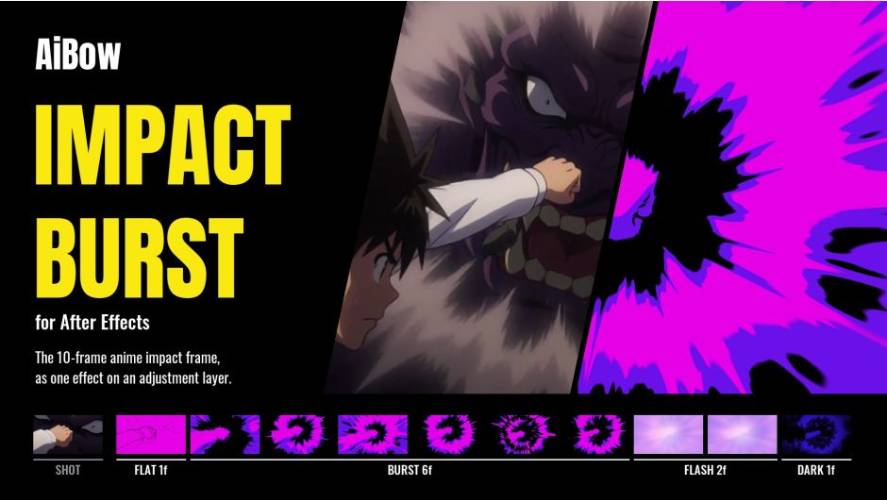
AEScripts AiBow Impact Burst v1.0 is an After Effects plugin designed to recreate the dramatic impact frames commonly seen in Japanese anime, manga-inspired animations and action sequences. It generates a complete 10-frame anime impact effect using radial spikes, contrasting colours, flashes and dark frames, all through a single effect.
Developed by AiBow Tools, the plugin allows motion designers and anime editors to create stylised impact sequences without manually drawing individual frames or constructing complicated shape-layer animations.
It can be applied to an adjustment layer to affect the entire composition or directly to text and shape layers to generate impact spikes from their silhouettes.
What Is AiBow Impact Burst?
Anime productions frequently use stylised impact frames to emphasise punches, collisions, explosions and other moments of intense action.
These sequences often combine high-contrast colours, radial speed lines, geometric spikes and brief flashes to make an impact feel more powerful.
AiBow Impact Burst automates this visual technique inside After Effects. It generates a timed sequence consisting of:
- One flat frame containing only line details.
- Six frames of three-tone radial spikes.
- Two frames of a pastel-coloured flash.
- One dark frame.
The complete sequence lasts 10 frames at 30 FPS. Users can customise the duration of individual stages or disable them entirely.
Key Features of AiBow Impact Burst v1.0
1. Complete 10-Frame Anime Impact Sequence
The plugin generates the traditional anime-style impact sequence using a single effect.
Instead of manually animating multiple shapes, masks and colour transitions, users can generate the entire sequence automatically.
The individual stages can be adjusted through frame-count controls. Setting a stage to zero skips it completely, allowing users to create shorter or more customised impact sequences.
A Burst Hold setting can also hold each spike shape for two or more frames, producing a heavier and more deliberate impact.
2. Random Look Generation with Gacha!
One of the most distinctive features is the Gacha! button.
Every click generates a new combination of colours and radial spike shapes. Users can repeatedly generate variations until they find an appearance that matches their footage.
This is useful when creating multiple impact sequences that should not all look identical.
The Seed control also allows users to change the spike pattern while preserving the other effect settings.
3. Eleven Built-In Colour Presets
AiBow Impact Burst includes 11 colour presets designed for different anime-inspired visual styles.
Available presets include:
- Magenta Neon
- Blood Red
- Electric Blue
- Toxic Green
- Solar Gold
- Inferno
- Ice White
- Cyber Pink
- Sepia Print
- Mono Ink
- Abyss Teal
Users can also create their own colour combinations by adjusting Shadow, Mid and Highlight colours, along with the two flash colours and dark-frame tint.
This makes it possible to match the impact effect to the colour palette of an existing animation or composition.
4. Four Timing Presets
The plugin includes four ready-to-use timing presets:
- Magenta Hit: 10-frame sequence.
- Short Hit: 6-frame sequence.
- Mono Ink: 10-frame sequence.
- Burst Only: 6-frame sequence.
These presets provide different starting points for creating quick impacts, monochromatic effects and more complete anime-style sequences.
Users can further customise the timing of individual stages.
5. Adjustable Radial Burst Shapes
The Burst section provides detailed controls for shaping the radial spikes.
Available parameters include:
- Center: Changes the position of the burst origin.
- Streak Length: Controls the length of the radial spikes.
- Spikiness: Adjusts the sharpness and appearance of the burst.
- Spike Count: Determines the number of radial spikes.
- Tone Thresholds: Controls the separation between the three colour tones.
- Background: Adjusts the background appearance.
- Ring Frame: Adds a circular frame around the burst.
- Center Jitter: Introduces variation around the burst centre.
- Zoom Punch: Adds a zoom-based impact effect.
These controls provide enough flexibility to create different impact styles, from clean geometric bursts to more aggressive action-oriented visuals.
6. Automatic Triggering and Timing Controls
AiBow Impact Burst offers several ways to determine when an impact sequence should begin.
The available triggering modes include:
- Layer Markers: Starts the effect at markers placed on the adjustment layer.
- Layer Start: Triggers the sequence from the beginning of the layer.
- Trigger: Uses a trigger control to initiate the effect.
- Every N Frames: Repeats the impact at a specified frame interval.
- BPM: Synchronises impact timing to a musical tempo.
- Composition Markers: Uses markers placed on the composition timeline.
Layer Markers are particularly useful for action sequences. Users can place markers at the exact frames where punches, collisions or other impacts occur.
Moving a marker automatically moves the corresponding impact sequence.
7. Works with Adjustment Layers, Text and Shape Layers
The plugin supports different layer-based workflows.
Adjustment Layer Workflow
Applying AiBow Impact Burst to an adjustment layer affects the footage and visual elements underneath it. This is useful for creating full-frame anime impact transitions.
Text and Shape Layer Workflow
When applied directly to a text or shape layer, the transparent areas remain transparent. The radial spikes grow out of the letter or shape silhouettes, allowing artists to create customised impact graphics using existing artwork.
This makes the plugin useful for animated titles, logos and typography-based effects.
8. GPU and CPU Rendering
AiBow Impact Burst supports GPU rendering on Windows through DirectX 11, with CPU rendering also available.
On macOS, the effect renders using the CPU.
The plugin supports 8-bit, 16-bit and 32-bit per-channel colour processing, providing flexibility for different compositing and finishing workflows.
How to Use AiBow Impact Burst
The basic workflow is straightforward:
- Create an adjustment layer above the footage in After Effects.
- Apply AiBow Impact Burst from the Effect menu.
- Open the Timing controls and select Layer Markers.
- Add markers at the frames where impacts should occur.
- Choose a timing preset and colour preset.
- Press Gacha! to generate alternative colour and spike combinations.
- Adjust the burst parameters and render the composition.
Every marker triggers its own impact sequence, making it possible to create multiple effects within the same shot.
What’s New in AiBow Impact Burst v1.0?
Version 1.0.0 was released on November 12, 2026, marking the initial release of the plugin.
The first version introduces:
- Automated 10-frame anime impact sequences.
- Three-tone radial spike generation.
- Pastel flash and dark-frame stages.
- Gacha! random colour and shape generation.
- 11 colour presets.
- Four timing presets.
- Customisable radial burst parameters.
- Layer marker and composition marker triggering.
- BPM-based timing.
- Text and shape layer support.
- GPU and CPU rendering.
- 8-bit, 16-bit and 32-bit colour depth support.
System Requirements and Compatibility
| Requirement | Details |
|---|---|
| Host application | Adobe After Effects |
| Compatible versions | After Effects 2025, 2026 and 2027 |
| Windows | Windows 10/11, 64-bit |
| macOS | macOS 11 or later |
| Apple Silicon | Supported |
| Intel Mac | Supported |
| Windows rendering | GPU (DirectX 11) or CPU |
| macOS rendering | CPU |
| Colour depth | 8-bit, 16-bit and 32-bit |
| Trial | Available |
The initial release was Windows-focused. Version 1.1, released November 15, 2026, added macOS support for both Apple Silicon and Intel processors. The macOS version uses CPU rendering, while the Windows plugin remains unchanged.
Who Should Use AiBow Impact Burst?
AiBow Impact Burst is particularly useful for creators working with anime-inspired animation and high-energy motion graphics.
- Anime editors: Add dramatic impact frames to anime edits and action sequences.
- Motion designers: Create stylised bursts for promotional graphics and animated titles.
- 2D animators: Emphasise punches, collisions and dramatic movements.
- Typography designers: Generate radial effects from text and shape silhouettes.
- Content creators: Produce manga-inspired transitions and short-form video effects.
Conclusion
AEScripts AiBow Impact Burst simplifies the creation of anime-style impact frames inside Adobe After Effects. Its automated frame sequence, radial spike controls, colour presets and Gacha! randomisation make it a specialised tool for creating high-energy visual effects.
The ability to trigger effects using layer markers, composition markers and BPM settings is particularly useful for synchronising impacts with animation and music.
For anime editors and motion designers who frequently create action sequences, manga-inspired graphics or dramatic typography, AiBow Impact Burst offers a quick alternative to manually constructing every impact frame.
- AEScripts AiBow Impact Burst
- AiBow Impact Burst v1.0
- After Effects anime effects
- Anime impact frames
- Manga impact effect
- Radial burst After Effects
- Anime editing plugin
- After Effects action effects
- Motion graphics impact effects
AEScripts AiBow Impact Burst v1.0 Plugin for After Effects Full Version Free Download
https://zeroupload.com/eb9501f55a823ad0fed6bf2429c97670
https://pixeldrain.com/u/8zFrR3zY
https://buzzheavier.com/tvwazgam1w8h
https://filekeeper.net/2my2pqpeyy7k/AiBowImpactBurst1.0_DownloadPirate.com.zip