AEScripts MotionBaker v1.0.1 Script for After Effects Full Version Free Download
AD
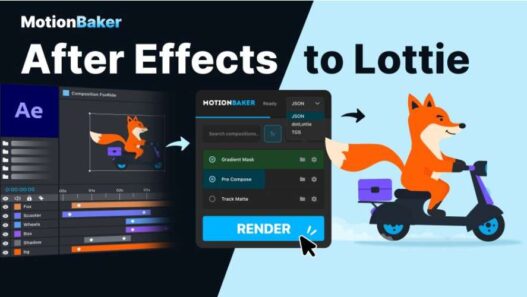
Exporting motion graphics from Adobe After Effects into lightweight web and application formats can be more complicated than creating the animation itself. Lottie-based formats have their own limitations, raster assets may need optimisation, and exporting multiple compositions manually can quickly become repetitive. AEScripts MotionBaker v1.0.1 is designed to streamline this delivery process by bringing JSON, dotLottie, and TGS export into a single After Effects workflow.
Developed by Yurii Zakhidnyi, MotionBaker combines batch exporting, output management, raster-image optimisation, text conversion, and browser previews inside one panel. It is aimed at artists who create animations in After Effects but need to deliver them as portable assets for websites, apps, interfaces, and other digital products.
What Is MotionBaker for After Effects?
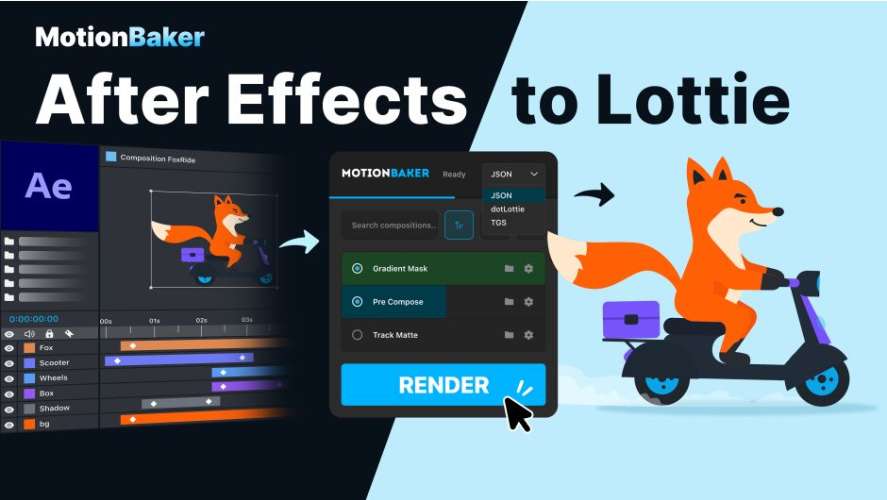
MotionBaker is an After Effects script for exporting compositions to JSON, dotLottie, and TGS formats. Instead of setting up separate export workflows for each animation, users can select their compositions, choose the required format, configure the destination, and render directly from the MotionBaker interface.
The script is focused on the delivery stage of motion design. It does not create animation effects itself. Instead, it helps convert existing After Effects work into formats that can be used outside the traditional video-rendering workflow.
For the complete product information, current compatibility, and release details, visit the official AEScripts MotionBaker page.
Export to JSON, dotLottie and TGS
MotionBaker supports three output formats used in different lightweight animation workflows. JSON provides a common Lottie-style format, while dotLottie packages Lottie animations into a modern container format. TGS export is useful for animation workflows that require Telegram’s sticker format.
Having all three options available from one panel makes it easier to prepare the same animation for different destinations without rebuilding the export workflow for every platform.
As with other Lottie and TGS workflows, not every After Effects feature can necessarily be reproduced in the exported format. The official documentation recommends checking the finished animation in its intended player or application.
Batch Export Multiple Compositions
One of MotionBaker’s biggest productivity features is batch export. Multiple compositions can be selected and processed together instead of being rendered individually.
This is especially useful for projects containing collections of animated icons, buttons, interface elements, illustrations, loading indicators, or other reusable motion assets. Once the output settings are configured, MotionBaker can process the selected compositions as a group.
For large motion-design libraries, batch processing can reduce a repetitive export task to a much simpler operation.
Flexible Output Paths
MotionBaker allows users to assign individual output paths to compositions or select a shared destination folder.
This is useful when different animations need to be delivered to separate directories or when a project already follows a structured asset-management system. Keeping output paths inside the export workflow also reduces the need to manually move and rename files after rendering.
For teams working with large numbers of animation assets, consistent output organisation can be just as important as the export itself.
Compress and Resize Raster Assets
Lottie-style animations can include raster images, and those assets may significantly increase the final file size. MotionBaker includes options to compress and resize raster image assets during export.
This gives artists a straightforward optimisation step without requiring them to prepare every bitmap manually before exporting. The feature is particularly relevant for web and app delivery, where smaller assets can help reduce storage and download requirements.
The amount of optimisation should still be balanced against the visual quality required by the destination platform.
Convert Text into Shapes
Fonts can become a compatibility problem when an animation is moved from After Effects to another environment. MotionBaker includes a Glyphs option that converts supported text into shapes during export.
This helps preserve the appearance of typography without requiring the target system to have the original font installed.
For animated logos, interface labels, kinetic typography, and other text-heavy designs, converting glyphs into vector shapes can make the exported animation more portable.
Generate HTML Previews
MotionBaker can create HTML previews of exported animations, providing a convenient way to check the result in a browser before delivering the final asset.
This is useful for identifying export problems early, particularly when an animation contains features that may behave differently outside After Effects. The preview provides a quick intermediate step between rendering and final deployment.
The HTML preview player may require an internet connection to load.
Simple Export Workflow
The overall workflow is intentionally straightforward. Artists select their compositions, define output paths and image settings, choose JSON, dotLottie, or TGS, and start the export.
A dedicated panel keeps these controls together, making MotionBaker particularly useful during the final delivery stage of a motion project. Instead of switching between different scripts, exporters, and file-management steps, users can handle much of the process from one location.
MotionBaker v1.0.1
MotionBaker v1.0.1 was released on September 22, 2026. The update fixes dashed-stroke artefacts that could appear in certain Trim Paths animations and reduces unnecessary export data by excluding unused layers outside the composition’s Work Area.
The release also improves saving and overwriting reliability for JSON, dotLottie, TGS, and HTML exports, provides clearer error messages when files cannot be saved, and improves keyboard navigation and dropdown behaviour in narrower panels.
Compatibility
AEScripts currently lists MotionBaker for After Effects 2025 and 2026 on Windows and macOS.
The current listing shows a regular price of $30, with a promotional price of $26 through September 25, 2026. A free trial is also available.
Who Should Use MotionBaker?
MotionBaker is aimed at motion designers, UI designers, illustrators, web designers, and After Effects artists who regularly convert animations into lightweight digital formats.
It is particularly useful for people creating animated icons, interface components, web graphics, app animations, Telegram stickers, and Lottie-based assets where batch processing and file optimisation can save considerable production time.
Final Thoughts
AEScripts MotionBaker v1.0.1 focuses on one of the less glamorous but highly repetitive parts of motion design: preparing finished After Effects animations for delivery. Its JSON, dotLottie, and TGS export options, batch processing, flexible output paths, raster optimisation, glyph conversion, and HTML previews create a practical workflow for digital animation delivery.
The v1.0.1 update further improves reliability by addressing Trim Paths artefacts, reducing unnecessary exported data, strengthening file-saving behaviour, and refining the interface. For artists who regularly move animations from After Effects into web, app, or platform-specific formats, MotionBaker provides a compact export workflow designed to make that final stage faster and more organised.
AEScripts MotionBaker, MotionBaker v1.0.1, MotionBaker script, After Effects Lottie export, After Effects JSON export, dotLottie After Effects, TGS export After Effects, Lottie animation workflow, batch export After Effects, After Effects animation export
AEScripts MotionBaker v1.0.1 Script for After Effects Full Version Free Download
https://zeroupload.com/dd005bae549a5be9df3e9991e70a7900
https://filekeeper.net/zrwnbc4mtua7/MotionBaker1.0.1_DownloadPirate.com.zip
https://buzzheavier.com/a4xwqqkrz38v
https://pixeldrain.com/u/NAJ9XJPy
Those who sell pirated content are losers.
If you're paying for pirated content, you're the biggest loser.
Please read the FAQ if you need basic help.
Use VPN &
FDM if you have download problems.
AD