AEScripts Popcorn! v1.0 for After Effects Script WIN/MAC Full Version Free Download
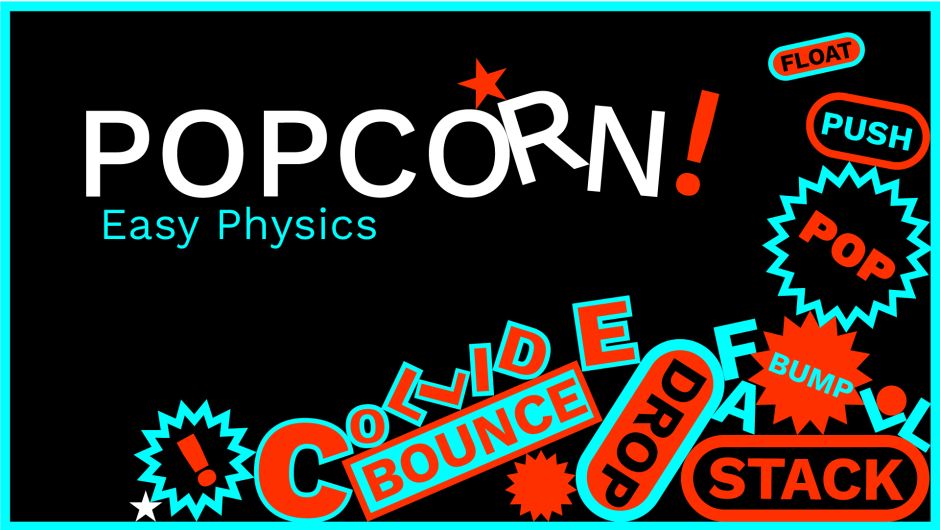
AEScripts Popcorn! v1.0 is a 2D physics-based animation script for Adobe After Effects that turns ordinary text, shapes, logos, images and other layers into physical objects that can collide, bounce, stack, float, push, pop and react to animated boundaries. Instead of manually creating hundreds of keyframes to fake physical interaction, Popcorn! calculates the relationships between elements and lets you bake the result back into editable After Effects animation.
AEScripts Popcorn! official page
What is Popcorn!?
After Effects is excellent for keyframe animation, but it doesn’t have a native general-purpose collision system for ordinary layers. If you want letters to fall into a pile, shapes to push each other, or objects to bounce off a moving wall, you normally have to build the illusion manually or rely on expressions and complicated setups.
Popcorn! is designed specifically to solve that problem.
The workflow is built around three simple stages:
Select → Simulate → Bake
You load the layers you want to work with, apply a preset or adjust the physics, preview the result and then bake the simulation into editable Position, Rotation, Scale and Opacity keyframes.
Physical Layer Animation
Popcorn! treats standard After Effects layers as objects within a 2D physics system.
Text, shape layers, logos, images, footage and compositions can interact with one another, allowing you to create motion based on physical relationships instead of manually animating every object independently.
This is particularly useful when the desired motion depends on collisions.
For example, instead of manually animating ten letters falling onto the ground, you can let them fall, collide and settle naturally.
Text as Collision Objects
One of the most useful aspects of Popcorn! is its text workflow.
Text can be used directly as a collision object, in which case Popcorn! uses its bounding box, or you can generate editable collision shapes around the text. Supported generated shapes include rectangles, circles, stars and polygons.
The generated text shapes can include adjustable padding, fill and stroke settings. After baking, the resulting shapes remain editable as After Effects shape layers, while the original text can also remain editable.
For kinetic typography, this is particularly powerful because the letters themselves can behave like physical objects.
Animated Containers
Popcorn! can use an animated mask as a physical boundary.
You can draw a mask and use it to contain, redirect, compress, guide or release elements. When the mask moves, the boundary moves with it and interacts with the simulated objects.
This opens up considerably more interesting animation possibilities than a static floor or wall.
A mask can become a moving container, allowing text or graphic elements to react dynamically as the available space changes.
Entrance Controls
Popcorn! provides considerable control over how objects enter the simulation.
Elements can spawn from a chosen compass direction, appear from a custom position, arrive sequentially, appear randomly or enter all at once. You can also control spread, interval, entry velocity, push and pop behaviour.
This means you aren’t simply turning on gravity and hoping for an interesting result.
You can design the entrance itself.
For instance, words can drop from above one at a time, arrive from different directions, or burst into the scene simultaneously before colliding and settling.
Physics Controls
The physical behaviour is controlled through a set of familiar parameters.
Popcorn! includes Gravity, Surface Friction, Bounce, Repel, Air Resistance, Wind and Turbulence.
These controls determine how the objects behave after they enter the system.
Gravity can make elements fall and settle. Friction determines how much they slide. Bounce controls how energetic the collisions are, while air resistance can slow objects down. Wind can push the entire system in a particular direction, and turbulence introduces more irregular movement.
Together, these controls allow the same composition to feel heavy, soft, unstable, energetic or almost weightless.
Kinetic Typography
Kinetic typography is one of Popcorn!’s strongest applications.
Words and individual text elements can drop, collide, stack, scatter, bounce, pop, fill spaces and settle.
This makes it possible to create typography that feels physically motivated rather than simply moving according to conventional position keyframes.
For example, a group of words can fall from the top of the frame and gradually build into a pile at the bottom. Because the elements actually interact, each word affects the others rather than following a predetermined path.
Logos and Brand Graphics
Popcorn! can also be used for logo animation.
A logo can collide with shapes, push other elements out of the way or settle into a graphic composition. This gives branding animations a more playful and physical character.
The same approach works for title cards, broadcast graphics and animated promotional layouts.
Photo and Video Arrays
Because Popcorn! accepts images, footage and compositions, the physics system isn’t limited to typography and vector graphics.
You can create arrangements of photos or videos that stack, collide and redistribute themselves.
This can be useful for portfolio montages, editorial graphics, social-media layouts and presentation-style animations.
Pattern and Packing
Another interesting application is procedural packing.
Popcorn! can fill areas with objects that collide, distribute themselves and settle naturally.
That means you can construct compositions that would be extremely annoying to build manually.
Instead of positioning every element individually, you establish the physical environment and let the objects find their own arrangement.
Sound Cue Markers
Popcorn! can also generate a guide layer containing markers at every pop and collision.
The markers use different colours to distinguish pops from impacts, giving you a timeline reference for the moments when objects interact.
This is particularly useful for sound design.
Rather than trying to visually estimate where every impact occurs, you can hand the timeline information to an editor or sound designer and build audio cues around the actual simulated events.
Seed and Randomization
Popcorn! includes a Seed control for generating different random arrangements without changing the other simulation parameters.
This is excellent for experimentation.
You can keep the same gravity, friction, bounce and timing while cycling through different starting arrangements until you find one that looks right.
That can be much faster than manually rebuilding the animation every time you want a different variation.
Baking to After Effects
The simulation doesn’t have to remain locked inside Popcorn!.
Once you’re satisfied with the result, you can bake it into standard After Effects animation. The product specifically exports Position, Rotation, Scale and Opacity keyframes.
This is important for production because baked keyframes can then be adjusted using normal After Effects tools.
You can therefore use Popcorn! to generate the difficult physical movement, then continue refining the result manually.
Presets
For users who don’t want to begin by adjusting physics parameters from scratch, Popcorn! includes one-click presets.
These provide ready-made starting points for common styles and can be previewed quickly using the current composition layers.
This gives the tool two workflows: fast preset-driven animation for immediate results, and detailed physical controls when you need more precise behaviour.
Who Should Use Popcorn!?
Popcorn! is particularly useful for motion designers, kinetic-typography artists, title designers and graphic animators.
It’s also useful for broadcast work, social-media graphics and explainer videos where lots of elements need to interact naturally.
If your work rarely involves collisions or physical interactions, however, the script won’t offer much value. It’s a specialist animation system rather than a general-purpose replacement for After Effects’ native animation tools.
Version and Compatibility
Popcorn! v1.0.0 was initially released on August 27, 2026. The official listing currently supports After Effects 2024, 2025 and 2026.
The current listed regular price is $59, with a promotional price of $44 through September 11, 2026. A free trial is available.
Final Thoughts
AEScripts Popcorn! v1.0 is an interesting addition to the After Effects animation ecosystem because it addresses something AE has traditionally made unnecessarily difficult: physical interaction between ordinary 2D layers.
Its combination of collision handling, animated masks, spawning controls, gravity, friction, bounce, wind, turbulence and baking gives you a practical physics-based workflow without requiring expressions or hundreds of manually created keyframes.
The text workflow makes it particularly appealing for kinetic typography, while the support for logos, images, footage, shapes and compositions gives it broader motion-design applications.
The ability to bake the result into editable After Effects keyframes is also important. You’re not forced to accept the simulation exactly as generated. You can use it as a starting point and continue refining the motion normally.
Bottom line: Popcorn! is essentially a 2D physics playground for After Effects, and for collision-heavy typography and motion graphics, it can turn a painful manual animation task into a surprisingly fast workflow.
AEScripts Popcorn, Popcorn After Effects, Popcorn v1.0, After Effects physics animation, After Effects collision plugin, After Effects collision script, After Effects kinetic typography, After Effects physics engine, After Effects text physics, After Effects layer collision, After Effects bouncing text, After Effects stacking animation, After Effects procedural animation, After Effects motion graphics physics, After Effects animated masks
AEScripts Popcorn! v1.0 for After Effects Script WIN/MAC Full Version Free Download
https://zeroupload.com/7abc15202989e5ab992d45fced158048
https://buzzheavier.com/2by9ozf20pef
https://pixeldrain.com/u/uQHS8ksm
https://filekeeper.net/hk6s5858ggjy/Popcorn1.0_DownloadPirate.com.zip