AEScripts Script Sync v1.0 Script for After Effects WIN/MAC Full Version Free Download
Managing scripts, expressions, animation presets, and extensions across an After Effects team can become difficult when files are stored across different computers, shared drives, email threads, or messaging applications. AEScripts Script Sync v1.0 is a panel for Adobe After Effects designed to centralize these resources in a shared library and keep team members working with the latest versions.
Script Sync allows teams to store After Effects scripts, expressions, animation presets, and CEP panels in either a GitHub repository or a local/shared folder. Team members can access and run the available resources directly from the panel, while updated items are identified when changes are published.
What Is Script Sync?
Script Sync is an After Effects panel designed specifically for teams that need to distribute and maintain shared scripting resources. Instead of manually copying scripts between workstations, users can connect the panel to a shared library and access the available tools from within After Effects.
The library supports .jsx and .jsxbin scripts, expressions, .ffx animation presets, and complete CEP extensions. Each resource is handled according to its type when selected. Scripts can be run, expressions can be applied to selected properties, animation presets can be applied to selected layers, and CEP extensions can be installed through the panel.
Shared Library for After Effects Teams
The main purpose of Script Sync is to give an After Effects team one central location for its internal tools. The library can be hosted in a GitHub repository or maintained in a folder on a computer or shared drive. A dedicated server is not required.
With a GitHub-based library, GitHub controls repository access. Users can connect using a fine-grained personal access token, with read access required for using the library and write access required for publishing content.
A folder-based library provides another workflow for teams that prefer to keep everything on local storage or an existing shared drive. Nothing needs to be uploaded when using this option.
For more information about the product and its workflow, visit the official AEScripts Script Sync page.
Run Scripts, Expressions, and Presets
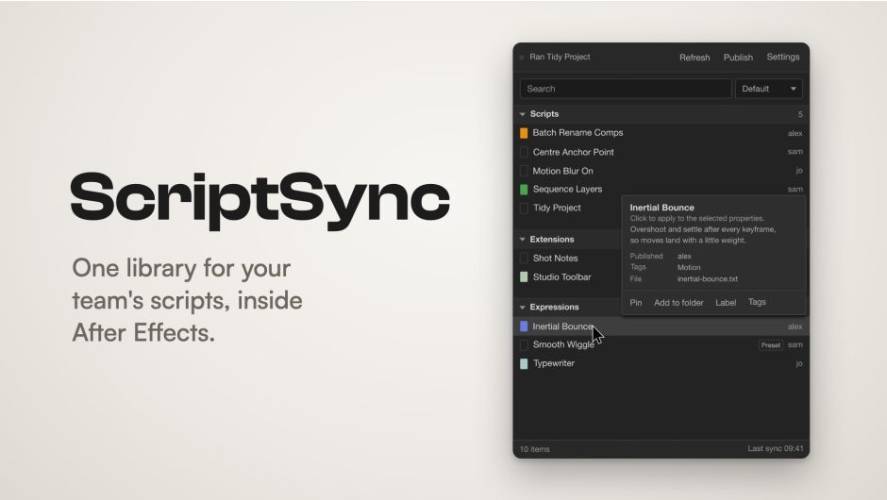
Script Sync provides direct interaction with the contents of the shared library. Users can click a script to run it, select an expression to apply it to selected properties, or choose an animation preset to apply it to selected layers.
The panel also provides information when hovering over an item, including what it does, who published it, and its associated tags. This can make a shared collection easier to navigate as the number of internal tools increases.
CEP extensions receive their own installation workflow. When a new CEP panel is published, Script Sync can install it for users, with an After Effects restart required before the newly installed panel becomes available.
Publish Tools Directly From After Effects
Script Sync also includes publishing functionality, allowing users with the necessary write permissions to add resources without leaving After Effects.
The Publish function supports a script file, pasted script code, expression, animation preset, folder, or ZIP archive. Users can provide a name, short description, and tags before publishing the resource to the shared library. Existing published items can also be edited or removed through the panel.
This workflow allows an animator or technical artist to distribute a new version of an internal tool without manually sending the updated file to every team member.
Automatic Updates and Version Awareness
When a published resource is changed, Script Sync identifies the item as Updated. Team members can then refresh their library to receive the latest version. Scripts can be used immediately after updating, while newly installed CEP panels require an After Effects restart.
This provides a straightforward mechanism for distributing bug fixes, improvements, and new versions of internal After Effects tools across a production team.
Personal Organization and Search
Although the underlying library can be shared, each user can organize their own local view independently. Script Sync supports pins, personal folders, After Effects label colors, custom tags, searching, tag filtering, and sorting by name or newest first.
Personal organization settings remain on the individual computer. Pins, labels, and personal tags are not shared with other team members, while publisher-provided tags remain part of the shared resource information.
The panel also supports different interface configurations, including a twirl-down list or tabbed groups, dark or light themes, customizable background and highlight colors, and three text sizes.
Included Demo Library
Script Sync v1.0 includes a demonstration library containing 14 scripts and 9 expressions. The demo scripts cover common After Effects operations such as batch-renaming compositions, centering anchor points, generating marker reports, enabling motion blur, creating nulls from selections, sequencing layers, staggering layers, and organizing project items.
The included expressions cover functions such as automatic fading, countdowns, flickering, layer following, inertial bounce, looping after the final keyframe, keyframe overshoot, smooth wiggle, and typewriter animation.
Requirements and Compatibility
Script Sync v1.0 requires Adobe After Effects 2025 or later, with the official compatibility listing currently covering After Effects 2025 and 2026. It is available for Windows and macOS through a single installer.
The panel can be installed using the aescripts + aeplugins Manager or the ZXP/UXP Installer. A free trial is also available through the aescripts + aeplugins Manager.
Conclusion
AEScripts Script Sync v1.0 provides a centralized system for managing and distributing scripts, expressions, animation presets, and CEP panels across After Effects teams. Its support for GitHub repositories and local or shared folders gives teams different options for hosting their internal library, while built-in publishing, updating, tagging, searching, and personal organization tools help maintain the collection directly from After Effects.
With support for After Effects 2025 and later on Windows and macOS, Script Sync provides a dedicated workflow for teams that need to keep shared After Effects resources organized and synchronized.
AEScripts Script Sync, Script Sync After Effects, Script Sync v1.0, After Effects team scripts, After Effects script library, shared After Effects scripts, After Effects expressions, After Effects animation presets, After Effects CEP panels
AEScripts Script Sync v1.0 Script for After Effects WIN/MAC Full Version Free Download
https://zeroupload.com/c8f0afb86ac36871ca001f00d9ba7c6b
https://buzzheavier.com/2u3n4c8xhpe9
https://pixeldrain.com/u/XTf6cvU7
https://filekeeper.net/8jshjrbpkk3e/ScriptSync1.0_DownloadPirate.com.rar