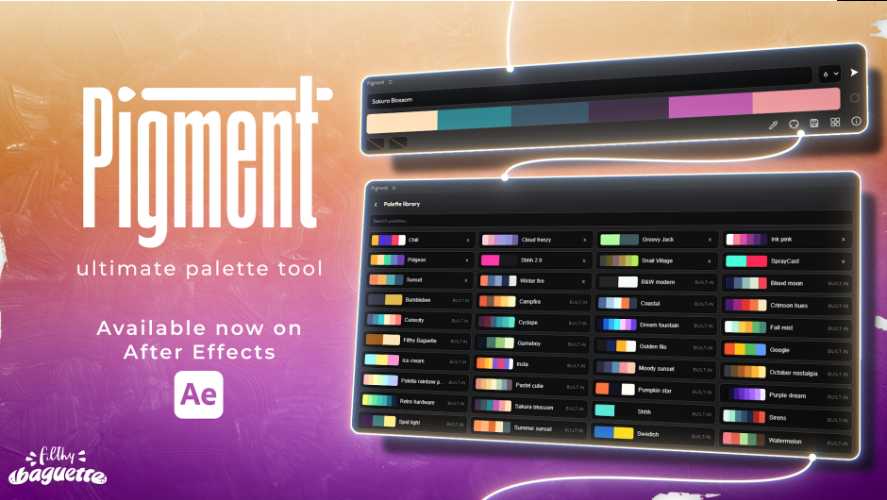
AEScripts Pigment v1.3 for After Effects Script WIN/MAC Full Version Free Download
AEScripts Pigment v1.3 is a color-palette and color-management utility for Adobe After Effects, created by Filthy Baguette. It is designed for motion designers who want to create harmonious palettes, extract colors from compositions, apply colors quickly to layers, build gradients and keep an entire project visually consistent. The tool is focused on making color decisions faster without forcing artists to constantly switch between After Effects and an external color application.
AEScripts Pigment official page
What is Pigment?
Pigment is essentially a dedicated palette workspace inside After Effects. Instead of manually picking colors from the Color panel or keeping a separate palette in Photoshop, you can generate and organize colors directly alongside your motion-design project.
The panel lets you generate palettes, fine-tune individual colors, preview different combinations and save palettes for later use. It comes with 30 built-in palettes, while the palette library lets you keep your own collections available for reuse.
This is especially useful for motion designers because color decisions are often repeated across multiple compositions. Once a visual identity is established, Pigment makes it easier to maintain that identity.
Generate Harmonious Color Palettes
Pigment provides eight color-harmony modes that can turn a starting color into a complete palette using harmony algorithms.
This means you don’t have to manually guess complementary, analogous or other related colors. Start with one color, choose a harmony approach and use the generated palette as a starting point.
You can then modify the colors rather than accepting the generated result as final.
This makes Pigment useful during the exploratory stage of a project, when you’re trying to discover a visual direction quickly.
Extract Colors From Your Composition
One of the most practical features is the smart eyedropper.
Pigment can extract colors from the current composition and turn them into a palette.
This is useful when you’re working from an existing reference frame or animation and want to build a reusable palette from it.
For example, you can sample an existing scene, collect its dominant colors and then use those colors across typography, shape layers and other graphic elements. Instead of repeatedly sampling the same colors manually, they remain available as a palette.
Apply Colors With Shortcuts
Pigment is designed for quick application of colors.
You can separately change fill and stroke colors, and the plugin also provides a shortcut for applying a fill effect with a single action.
This becomes useful when working on compositions containing lots of shape layers. Rather than selecting layers one at a time and repeatedly opening color controls, Pigment gives you a more direct palette-driven workflow.
The objective is speed rather than adding another complicated color-grading system.
Project Sync
Version 1.1 introduced Project Sync, one of the more important features in Pigment’s workflow. It allows you to link the assets in a composition to a palette so that changes to the palette can automatically update those linked assets.
This is particularly powerful for branded motion graphics.
Imagine a title sequence containing dozens of shape layers and graphic elements. If you later decide that the primary accent should change from orange to blue, a synchronized palette can update the linked elements instead of requiring you to manually hunt through the entire composition.
It essentially turns the palette into a lightweight color-control system.
Gradient Tool
Version 1.2 added a dedicated gradient tool that can turn the current palette into a customizable gradient directly on the selected layer. Pigment supports both Linear and Radial gradients, along with nine built-in gradient presets.
This makes the palette useful for more than flat colors.
A palette can become the foundation for:
Background gradients
Shape fills
Graphic overlays
Stylized lighting
UI elements
The gradient settings can then be refined rather than rebuilding the effect manually.
Pigment Ramp
The underlying Pigment Ramp effect supports gradients containing up to nine colors and provides customization options for the resulting effect.
This is particularly useful when the visual language of a project depends on carefully controlled multi-color transitions.
Instead of managing separate color stops from scratch for every layer, you can derive those gradients from a saved palette.
That helps keep a project visually consistent.
Colorblindness Preview
Pigment also includes colorblindness simulation, allowing you to preview how a palette may appear to users with different forms of color-vision deficiency.
This is a useful design feature rather than just a gimmick.
Motion graphics increasingly appear in interfaces, presentations, advertisements and digital products where accessibility matters. Being able to check a palette before final delivery can help identify combinations that may become difficult to distinguish.
Import and Export Palettes
Palettes can be exported and imported as .pigment files.
This makes it possible to share a color system between projects, create backups or move a palette library between systems.
For teams, it also provides a straightforward way of distributing a standardized palette.
A studio could maintain a project palette and give it to different artists working on the same visual identity.
Web Color Export
Version 1.2 expanded Pigment beyond After Effects with a web export menu. Palettes can be copied in RGB, HSL, HSV, HEX and CMYK formats for use in websites and applications.
That makes Pigment useful for projects that cross the boundary between motion design and digital product design.
For example, a color palette established for an animation can also be handed to a developer for use in a website or application.
Random Apply
The biggest addition in v1.3.0, released on August 27, 2026, is the new Random Apply tool. It assigns random colors from the current palette to the selected layers.
This is particularly useful for exploratory motion design.
Rather than deciding manually which color each graphic element should receive, you can generate a quick randomized arrangement and use it as a starting point.
The v1.3 update also improves menu ergonomics and gradient preview performance.
Modern Interface and Performance
Pigment has a clean, minimal interface designed specifically for creators and motion designers. The developer emphasizes that the tool is built to be fast and lightweight, and the recent releases have continued to improve panel performance.
The v1.3 update additionally adds interface language support for English, French, German, Spanish, Russian, Japanese and Chinese.
Working With Keyframes
Pigment’s color workflow also supports keyframing colors, which means color changes can become part of an animation rather than remaining static design decisions.
This is useful for transitions where a composition needs to gradually move from one color system into another.
It also makes the palette workflow more relevant to animation rather than simply functioning as a static color picker.
Who Should Use Pigment?
Pigment is primarily aimed at motion designers, graphic animators and After Effects artists who care about consistent color systems.
It is particularly useful for branded content, title design, social-media graphics, UI animation and other projects where a palette needs to be reused across many layers and compositions.
For someone who only occasionally chooses colors in After Effects, it may be unnecessary. Its value increases substantially when color management and visual consistency become a regular part of the workflow.
Compatibility
The official listing currently supports After Effects 2022, 2023, 2024, 2025 and 2026.
Pigment v1.3.0 was released on August 27, 2026. The current listed price is $29, with a promotional price of $19 through August 31, 2026, and a free trial is available.
Final Thoughts
AEScripts Pigment v1.3 is a compact but genuinely useful color-management utility for After Effects.
Its strength comes from connecting several small tasks into one workflow: generate palettes, extract colors, apply them quickly, synchronize them across a project, convert them into gradients, preview color accessibility and export them for other applications.
The new Random Apply feature in v1.3 also makes experimentation faster, while the improved gradient preview and multilingual interface continue to polish the tool.
Pigment isn’t a replacement for a professional color-grading application, nor is it trying to be one. It is a motion-design palette system that makes color selection and consistency considerably less tedious.
Bottom line: Pigment is most valuable when you want your After Effects project to have a coherent color language and you want changing that language to be easy. For motion designers who regularly build palette-driven graphics, it’s a very practical little tool.
AEScripts Pigment, Pigment v1.3, Pigment After Effects, After Effects color palette, After Effects palette tool, After Effects color management, After Effects color harmony, After Effects gradient tool, After Effects project color sync, After Effects random colors, After Effects color picker, After Effects color workflow, After Effects motion design colors, After Effects color palette generator, After Effects colorblind preview
AEScripts Pigment v1.3 for After Effects Script WIN/MAC Full Version Free Download
https://zeroupload.com/95d0b69a914116bd8a32ebaf3e4a6117
https://pixeldrain.com/u/gtktWnXY
https://filekeeper.net/b02vm0h7ds2a/Pigment1.3_DownloadPirate.com.zip